Structured Text Language Reference
Cloud-Native DCS implements a subset of IEC 61131-3 Structured Text (ST). The same parser, lexer, and most of the language surface is shared across all places ST is authored, but ST runs against two different runtimes with different built-in functions:
- SFC engine — interprets step actions and transition conditions in
a Sequential Function Chart, one statement at a time, against the
gateway tag layer. Builtins read and write named tags
(
READ('TT-101')). - Unit-runtime function-block scan loop — executes a control
module's logic on every scan cycle on the controller node. Builtins
read and write raw I/O addresses (
AI('addr')).
The data types, operators, control-flow statements, and comment syntax in this reference apply to both runtimes. The built-in function tables, program-wrapping shape, and validation paths are runtime-specific and are split below.
Where you write ST
There are four authoring surfaces, two per runtime:
| Surface | Runtime | Field | Wrapping |
|---|---|---|---|
| SFC step action | SFC engine | actionST |
Bare statement list |
| SFC transition condition | SFC engine | conditionST |
Single boolean expression |
| Control-module template | Unit-runtime FB scan loop | blocks + dataConnections (ST is a projection, compiled via control-logic/to-network) |
PROGRAM ... END_PROGRAM with VAR block |
| Control-module block config | Unit-runtime FB scan loop | block params | Bare expression bound to one input |
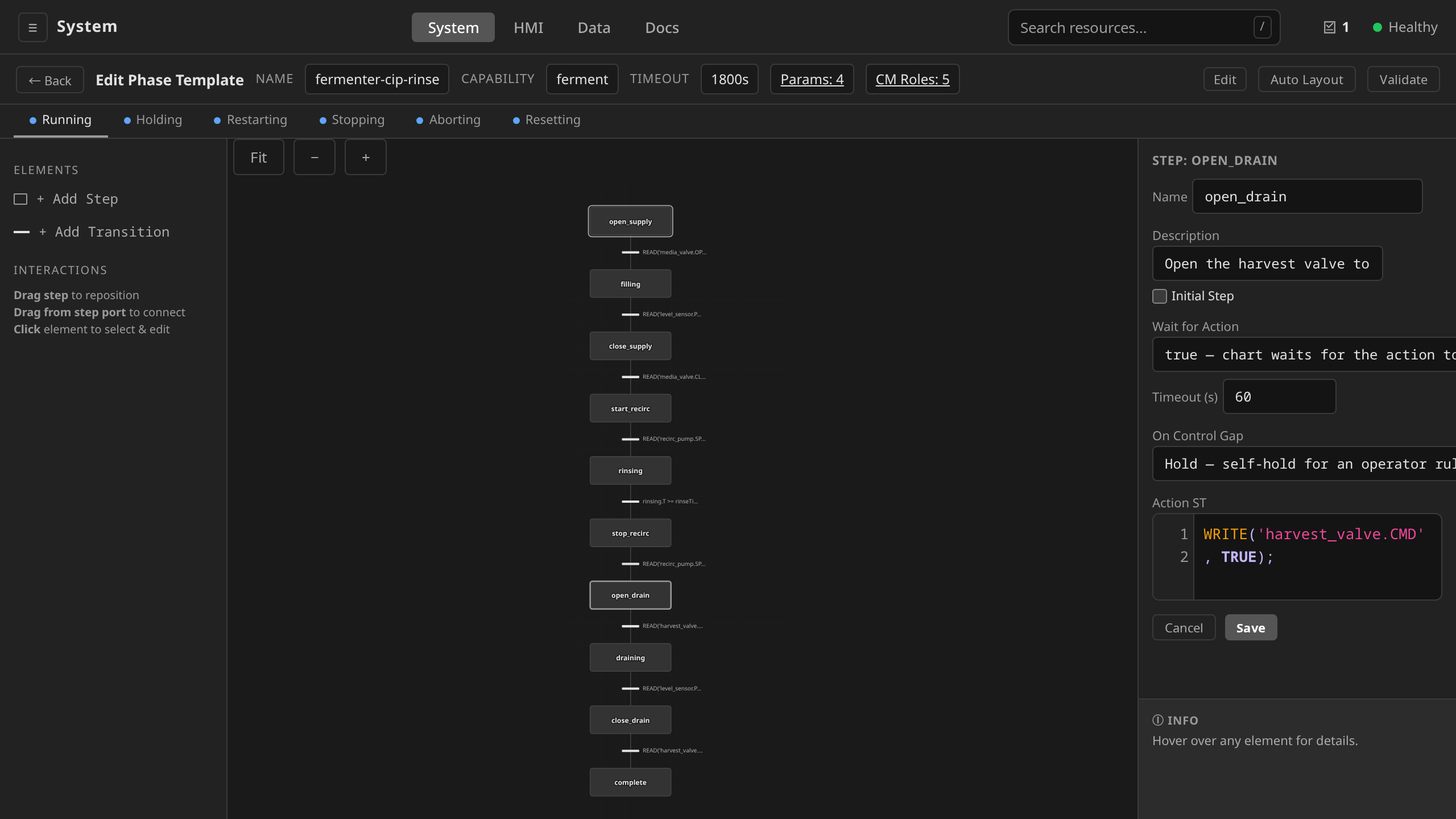
Open any SFC chart or FB network → click the element whose ST you want to change → Edit → type into the code textarea. The editor syntax-highlights IEC 61131-3 keywords, built-in functions, and literals. Save runs the validator, and errors appear inline before the value is persisted.
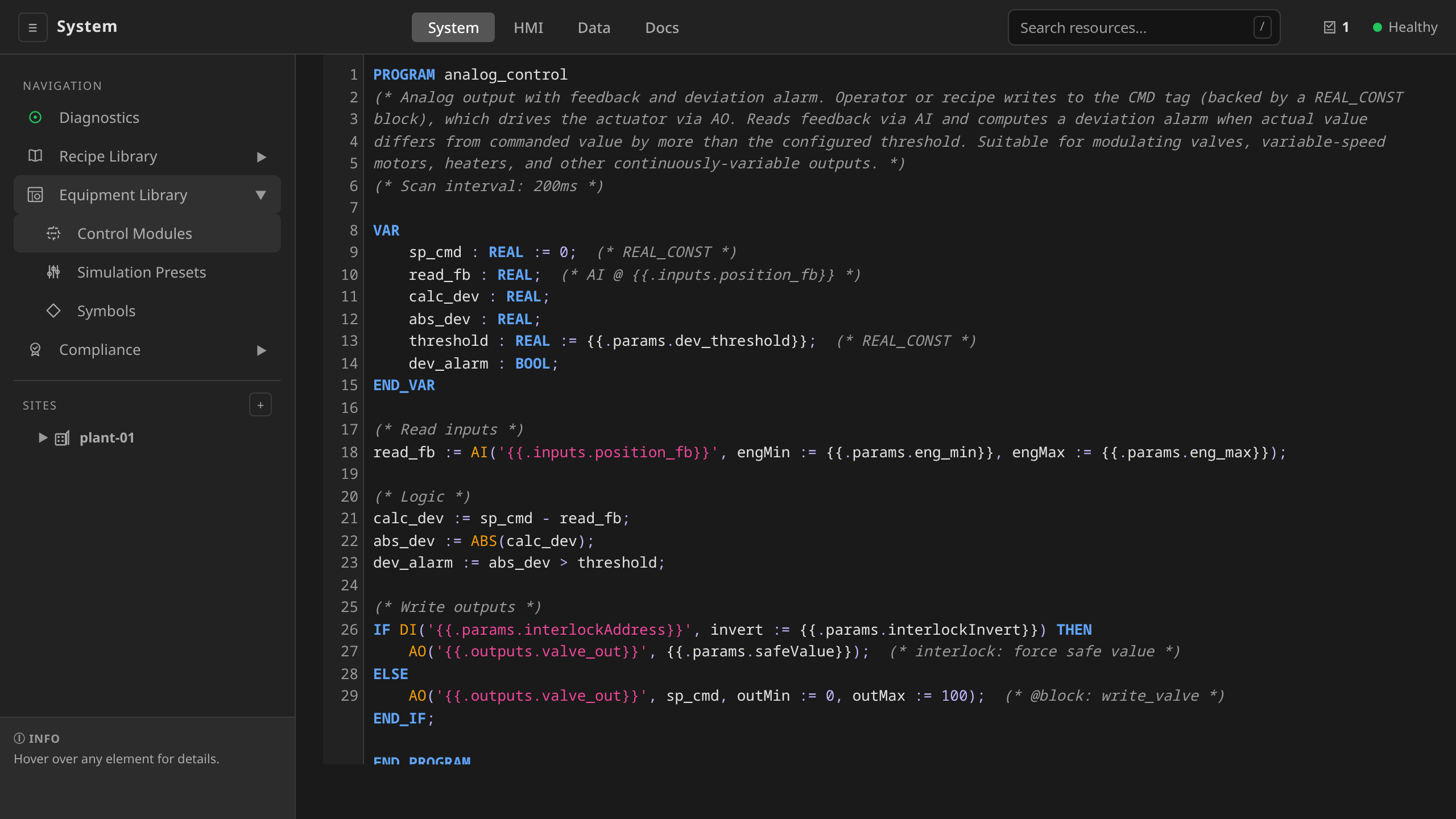
To edit a whole control module's ST program, open its template in the editor (EDIT) and flip the Diagram / ST toggle. ST and FBD are co-equal, editable projections of one stored network: editing the ST recompiles the diagram and vice-versa. The control-module detail page shows both projections read-only. Authoring lives in the template editor.
Edit the relevant ST field in YAML, then dcs apply -f file.yaml.
Validation failures appear as the Validated=False condition on
the resource.
Send the field as part of the resource body to the matching
PUT endpoint (e.g. PUT /api/v1/sites/{site}/phasetemplates/{name}
for SFC ST). A control module's ST is compiled to the network through
POST /api/v1/control-logic/to-network (and stored as the network by
PUT /api/v1/controlmoduletemplates/{name}). ST outside the dataflow
subset returns 422 with the offending line / column, while SFC ST
parse errors return 400.
Data Types
| Type | Description | Literal Examples |
|---|---|---|
BOOL |
Boolean | TRUE, FALSE |
INT |
64-bit signed integer | 42, -7, 0 |
REAL |
64-bit floating point | 3.14, -0.5, 1.0e3 |
STRING |
Text | 'hello', 'valve-01' |
TIME |
Duration | T#5s, T#100ms, T#1m30s |
Type coercion: INT is automatically promoted to REAL in mixed-type arithmetic. BOOL, INT, and REAL are interconvertible where semantically meaningful (0/non-zero for bool).
Operators
Listed in order of precedence (highest to lowest):
| Operator | Description | Types |
|---|---|---|
NOT, - (unary) |
Logical NOT, negation | BOOL; INT, REAL |
*, /, MOD |
Multiply, divide, modulo | INT, REAL; TIME * INT/REAL, TIME / INT/REAL |
+, - |
Add, subtract | INT, REAL, TIME; STRING (+ = concatenate) |
<, >, <=, >= |
Comparison | INT, REAL, TIME, STRING |
=, <> |
Equality, inequality | All types |
AND |
Logical AND | BOOL |
XOR |
Logical exclusive OR | BOOL |
OR |
Logical OR | BOOL |
Assignment uses := (not =).
Control Flow
IF / ELSIF / ELSE
IF temperature > 80.0 THEN
  WRITE('valve-cooling', TRUE);
ELSIF temperature > 60.0 THEN
  WRITE('valve-cooling', FALSE);
  alarm := TRUE;
ELSE
  WRITE('valve-cooling', FALSE);
END_IF;
WHILE / DO
count := 0;
WHILE count < 10 DO
  count := count + 1;
END_WHILE;
A configurable iteration limit (default 10,000) prevents infinite loops.
FOR / TO / BY
FOR i := 1 TO 10 BY 2 DO
  total := total + i;
END_FOR;
The BY clause is optional (default step is 1).
REPEAT / UNTIL
count := 0;
REPEAT
  count := count + 1;
UNTIL count >= 10 END_REPEAT;
REPEAT is a post-test loop: the body always executes at least once, then
the UNTIL condition is evaluated. The same iteration limit that protects
WHILE applies to REPEAT (default 10,000).
EXIT
EXIT terminates the innermost enclosing WHILE, FOR, or REPEAT loop
and continues at the statement after it. Using EXIT outside of a loop is
a runtime error.
FOR i := 1 TO 100 DO
  IF READ('pressure') > 90.0 THEN
    EXIT;
  END_IF;
  total := total + i;
END_FOR;
RETURN
RETURN ends ST program execution immediately. Statements after the
RETURN do not run. Legal at any nesting depth, including inside loops.
IF emergency_stop THEN
  WRITE('valve-inlet', FALSE);
  RETURN;
END_IF;
// rest of the action runs only if the guard above did not fire
CASE / OF
CASE step_number OF
  1: WRITE('valve-inlet', TRUE);
  2: WRITE('agitator', TRUE);
  3: WRITE('valve-outlet', TRUE);
END_CASE;
Comments
// Single-line comment

(* Multi-line
   block comment *)
SFC engine — step actions and transition conditions
Step actions and transition conditions are interpreted by the SFC
engine in pkg/structuredtext. They run inside a phase's batch
execution context with access to recipe parameters (pre-set as ST
variables), operator messaging, and the gateway tag layer.
Built-in functions
| Function | Signature | Description |
|---|---|---|
READ |
READ(tagPath) |
Read a process value from the gateway tag layer |
WRITE |
WRITE(tagPath, value) |
Write a value to the gateway tag layer |
MESSAGE |
MESSAGE(text) |
Log a message to the batch execution record |
PROMPT |
PROMPT(text) |
Pause execution until the operator acknowledges; returns the fixed non-empty sentinel 'Acknowledged' (ISA-88 Part 4 Table 7) |
PROMPT_CHOICE |
PROMPT_CHOICE(text, opt1, opt2) |
Pause execution until the operator selects one of two or more authored options; returns the selected option string |
PROMPT_VALUE |
PROMPT_VALUE(text, min, max, unit) |
Pause execution until the operator enters a number within [min, max] (bounds required, unit optional); returns REAL |
AWAIT_RESULT |
AWAIT_RESULT(resultKey, min, max, unit) |
Pause execution until a system outside the control system delivers the named measurement within [min, max] (bounds required, unit optional); returns REAL. Records provenance in place of a signature (ADR 0055) |
COMMAND |
COMMAND(cmd) |
Issue an ISA-88 state command (Hold, Stop, Abort) |
MODE |
MODE(name, mode) |
Set the ISA-88 equipment mode on a CM role or unit ('Automatic', 'Manual') |
CALL_SERVICE |
CALL_SERVICE(unit, service, input := value, ...) |
Invoke an OPC UA Method declared on a smart Unit's serviceBinding; positional unit + service name, named inputs, returns the first declared output as a typed value. One AuditRecord emitted per invocation. |
MTP_COMMAND |
MTP_COMMAND(unit, service, command) |
Issue one VDI 2658-4 command to a declared MTP module service; optional procedure := <id or name> with Start/Restart. Gated on the PEA's live CommandEn word. One AuditRecord emitted per command. |
MTP_STATE |
MTP_STATE(unit, service) |
The state an MTP module service reports ('Idle', 'Execute', 'Held', …), as a STRING |
MTP_COMMAND_ENABLED |
MTP_COMMAND_ENABLED(unit, service, command) |
Whether the service's live CommandEn word accepts that command right now |
ABS |
ABS(value) |
Absolute value (INT or REAL) |
WAIT |
WAIT(duration) |
Deprecated — use timed transition conditions instead |
WaitSeconds |
WaitSeconds(duration := s) |
Deprecated — use timed transition conditions instead |
READ and WRITE accept tag paths exposed by the unit runtime's
function-block network. They are the SFC engine's only path to
equipment I/O. The engine does not address raw I/O directly. See
Control Modules for how named tags map to
underlying blocks and addresses.
WRITE is refused when the tag is read-only, when a numeric value falls
outside the tag's declared engMin/engMax
(ADR 0050),
and when the ControlModule the tag belongs to is in ISA-88 Manual mode
(ADR 0073).
Every one of them fails the step and holds the phase, naming the tag and the
reason.
Manual means the operator holds that output. A chart that needs to command a module asserts the mode first, in its own step, and commands it in the next:
(* step: set_auto_mode *)
MODE('inlet_valve', 'Automatic');

(* step: open_valve *)
WRITE('inlet_valve.CMD', TRUE);
The mode barrier covers the action chart and the restarting chart. The
holding, stopping, aborting and resetting charts are exempt, because they
exist to bring equipment to a defined state and a mode switch must not stop
them doing it. Scale a phase parameter to the device its value is written to.
Scaling it to the process quantity it is named after leaves a parameter
that can exceed what a device will do. Every guard that waits for the
feedback to reach such a value is unsatisfiable, which wedges the step
until its timeout.
make lint-tag-range reports the mismatch at author time.
READ returns a value typed by the tag it reads: Boolean tags yield
BOOL, and numeric tags INT/REAL. A derived device-state tag
(ADR 0018) yields a
STRING, so the state word compares directly against single-quoted
literals:
IF READ('feed-valve.STATE') = 'Traveling' THEN
  RETURN;
END_IF;
String comparison is exact and case-sensitive. 'traveling' does not
match 'Traveling'. The authoritative spelling is the DEVSTATE
block's state1…state8/default params on the module's template.
To catch a mis-spelled state word before it silently evaluates false at
runtime, the gateway validates state-word literals at apply time
(#824). When a phase template is created, updated, or instantiated, each
READ('<role>.<tag>') = '<word>' comparison whose role resolves (via the
role's moduleType) to a DEVSTATE-backed role: state String tag is
checked against that block's declared words. A literal outside the set is
rejected (the template params are the authoritative enumeration, so no
extra schema is needed). When the referenced ControlModuleTemplate is not
yet applied (a phase may be authored before its module binding exists), the
comparison cannot be resolved and is permitted with a non-blocking
warning. A hard error would block that authoring order. Comparisons
against ordinary String tags are unaffected.
WAIT and WaitSeconds are deprecated. They block the step action
goroutine, hiding timing logic from the SFC chart and potentially
delaying ISA-88 state command responsiveness. Use timed transition
conditions with StepName.T instead (see
SFC Authoring Guide).
Common patterns
Read a sensor and compare to setpoint
temperature := READ('TT-101');
IF temperature >= setpoint THEN
  heating_done := TRUE;
END_IF;
Write to an actuator
WRITE('valve-inlet', TRUE);
For timed delays (e.g. open valve, wait, close valve), use a multi-step SFC with a timed transition, and keep the action itself non-blocking. See the SFC Authoring Guide.
Conditional logic using recipe parameters
Recipe parameters are injected as pre-set variables in the ST execution environment before the program runs.
// 'target_temp' is a recipe parameter
IF READ('TT-101') >= target_temp THEN
  WRITE('heater', FALSE);
END_IF;
PID-style threshold check
pv := READ('TT-101');
error := setpoint - pv;
IF ABS(error) < 0.5 THEN
  in_band := TRUE;
END_IF;
Typed operator prompts
Each prompt builtin blocks the step until the operator answers in the UI, and the response shape is part of the builtin (ADR 0017). Free text never enters flow control. Capture the response and use it in the outgoing transition condition (SFC validation requires this):
// Acknowledge: the operator presses one button; the return value is
// always the non-empty sentinel 'Acknowledged'.
ack := PROMPT('Verify the transfer line is connected');
// transition condition: ack <> ''

// Enumerated decision: one button per option, returns the selection.
cut := PROMPT_CHOICE('Confirm hearts cut point', 'Cut now', 'Continue heads');
// transition conditions: cut = 'Cut now'  /  cut = 'Continue heads'

// Validated numeric entry: bounds are required and enforced
// server-side before the phase resumes; returns REAL.
ph := PROMPT_VALUE('Enter measured pH', 4.0, 10.0, 'pH');
// transition condition: ph >= 6.5 AND ph <= 7.5
Wait for a result from outside the control system
A laboratory assay is not an operator decision. AWAIT_RESULT parks the
step until a named external system delivers the measurement, and the
value it returns carries provenance (the delivering system, the
credential, the sample id). It carries no electronic signature, because
no person saw it. Pick it over PROMPT_VALUE whenever the number is
produced somewhere else and merely typed in by whoever is standing
there.
// The LIMS delivers this through the external-result endpoint; bounds
// are enforced before the phase resumes, exactly as for PROMPT_VALUE.
titre := AWAIT_RESULT('assay-titre', 0.0, 100.0, 'g/L');
// transition condition: titre >= 35.0
The first argument is the result key: the name the delivering system quotes back when it answers, so a result is matched by what it measures, and the laboratory never has to learn an opaque id.
Two consequences worth designing for. The step must declare
steps[].timeoutSeconds. An assay can take hours and may never return,
and make lint-step-timeouts will hold you to it. And a chart calling
AWAIT_RESULT cannot be armed as an edge-local hold (ADR 0008).
The delivery arrives through the gateway, and the gateway is by
definition unreachable during the partition such a chart exists for.
If the external system cannot deliver, an operator can satisfy the same wait by hand through the normal prompt-response path. That entry is recorded as a signed operator action, which is a different record from a delivered measurement. See ADR 0055.
Invoke a remote service on a smart device
Smart vendor-packaged Units (dosing skid, CIP module, smart analyzer)
expose their orchestration surface as OPC UA Methods, with no
tag-mapped FB network to bind. Declare each callable Method as a
UnitService under Unit.spec.serviceBinding.services. ST code then
invokes the service by name with CALL_SERVICE:
// CIP skid: start an alkaline-rinse cycle for 30 minutes
result := CALL_SERVICE('cip-skid', 'StartCIPCycle',
  recipe := 'alkaline-rinse',
  duration := 1800);
The first positional argument is the Unit name (looked up in the
phase's namespace). The second is the service handle from the Unit's
serviceBinding.services[].name list. Remaining arguments must use the
named form (input := value) and match the service's declared inputs
exactly. Missing or extra inputs surface as a phase hold, with no
opaque OPC UA error to decode. Each input goes on the wire as the OPC UA
built-in the Method's own InputArguments declare for that position,
so an ST INT drives an Int16 argument and a REAL drives a Float
one. A value the declared type cannot hold, such as 70000 into an
Int16, holds the phase with the argument and the type named, before
the call goes out. The return value is the first declared
output mapped to its IEC 61131-3 type (BOOL → bool, INT/DINT →
integer, REAL/LREAL → real, STRING → string). Services with no
outputs return TRUE so the assignment is always truthy.
One AuditRecord is emitted per invocation under the st-call-service
category, correlated to the parent Batch via the recipe instantiator's
batch-id label. The inputs, outputs, and OPC UA status code are
captured on the record for 21 CFR Part 11 traceability.
Drive an MTP module service
A vendor module that follows VDI/VDE/NAMUR 2658 Blatt 4 does not expose
Methods for its services. It exposes a ServiceControl variable
interface: a state it reports, a word saying which commands it currently
accepts, and a channel you write commands into
(ADR 0045). Declare each such service as
the mtp form of a UnitService, and CALL_SERVICE will refuse it by
name, since there is no Method to call. Three builtins drive it instead:
// Start the service's DoseByVolume procedure.
MTP_COMMAND('dosing-skid-1', 'Dose', 'Start', procedure := 'DoseByVolume');
// transition condition: MTP_STATE('dosing-skid-1', 'Dose') = 'Completed'
MTP_COMMAND writes the command and returns. It does not wait for
the service to move, because the module owns the state machine and we are
the orchestration layer reading its feedback. So the shape to write is
always command in a step action, state in the following transition,
the same way an SFC commands any other equipment. A step whose action
calls one of these builtins should carry a timeoutSeconds, because the
guard that follows it is waiting on a remote module.
The command name is one of the ten VDI 2658-4 commands (Reset,
Start, Stop, Hold, Unhold, Pause, Resume, Abort, Restart,
Complete), spelled exactly that way. A misspelled or mis-cased name is
rejected when the chart is saved. At runtime it would otherwise
hold the phase on the first batch that reached the step, or, inside
MTP_COMMAND_ENABLED, sit quietly false forever and read as an interlock
that never clears.
Every command is gated on the module's live CommandEn word. A command
the module is not offering is an error that holds the phase, and the
message names the state and what the module would accept:
MTP_COMMAND dosing-skid-1/Dose: the PEA does not accept Start right now —
the service is Held, and CommandEn (0x00000120) accepts Unhold, Abort
That is the right outcome for a command the chart expected to succeed.
When the chart instead wants to wait for a command to become
acceptable, ask first. That is what MTP_COMMAND_ENABLED is for, and it
answers from the same word:
// Clear a terminal state from an earlier run, but only if the module offers it
IF MTP_COMMAND_ENABLED(unitName, 'Dose', 'Reset') THEN
  MTP_COMMAND(unitName, 'Dose', 'Reset');
END_IF;
MTP_STATE returns the reported state as a STRING, so it compares
directly against the state names. A status word the module serves that
decodes to no VDI 2658-4 state yields the empty string and no
guess. A guard waiting for 'Completed' therefore keeps waiting on a
bad reading, and it cannot fire on one. The usual cause is a
stateCurNodeID pointing at the wrong node.
Procedures. A service offers one or more procedures, declared on the
Unit with their IDs. Name one with procedure := 2 or
procedure := 'DoseByVolume', and only with Start or Restart. Those
are the commands that (re-)enter a procedure, and the module adopts the
selection on entry to Starting. When the service declares exactly one
procedure, it is selected for you. When it declares several and the chart
names none, the command is refused: choosing which procedure the
plant runs is not a default worth having.
Self-completing versus continuous is the procedure property that
changes how a chart ends. A self-completing procedure reaches
Completed on its own, so the chart waits. A continuous one stays in
Execute until the orchestrator sends Complete. A chart that waits
for 'Completed' after starting one waits forever, which is what the
step timeout catches. The split comes from the vendor's engineering data
and is declared per procedure on the Unit.
examples/smart-skid/phase-templates-mtp-dosing.yaml has one
PhaseTemplate for each kind.
One AuditRecord is emitted per MTP_COMMAND under the st-mtp-command
category, including for a command that was refused. A refused command is
exactly the event an investigator comes looking for. The record carries the command
word that went on the wire, the state and CommandEn reading that
justified (or refused) it, the procedure selected, and whether the write
reached the module. MTP_STATE and MTP_COMMAND_ENABLED emit nothing:
they are reads, a transition guard runs them on every scan, and a trail
recording each one would bury the commands it exists to preserve.
The same feedback is readable without a phase run. The Unit detail lists
the module's declared services with the state it reports and the commands
its CommandEn word currently enables, so a chart that is sitting on a
guard can be compared against what the module is actually offering. See
API Reference → MTP Module Services.
Two limits worth knowing. These builtins are unavailable during a partition-triggered edge-local hold. The unit runtime cannot reach the module's OPC UA server at all, so an armed holding chart must not command a module (ADR 0008). And nothing here claims MTP conformance: the model is transcribed from Blatt 4, the Blatt 5.1 runtime binding is not implemented, and addresses come from the declaration, with no AML manifest read.
Transition conditions
A transition's conditionST is a single boolean expression (not a full
program). It is evaluated every scan cycle until it returns TRUE.
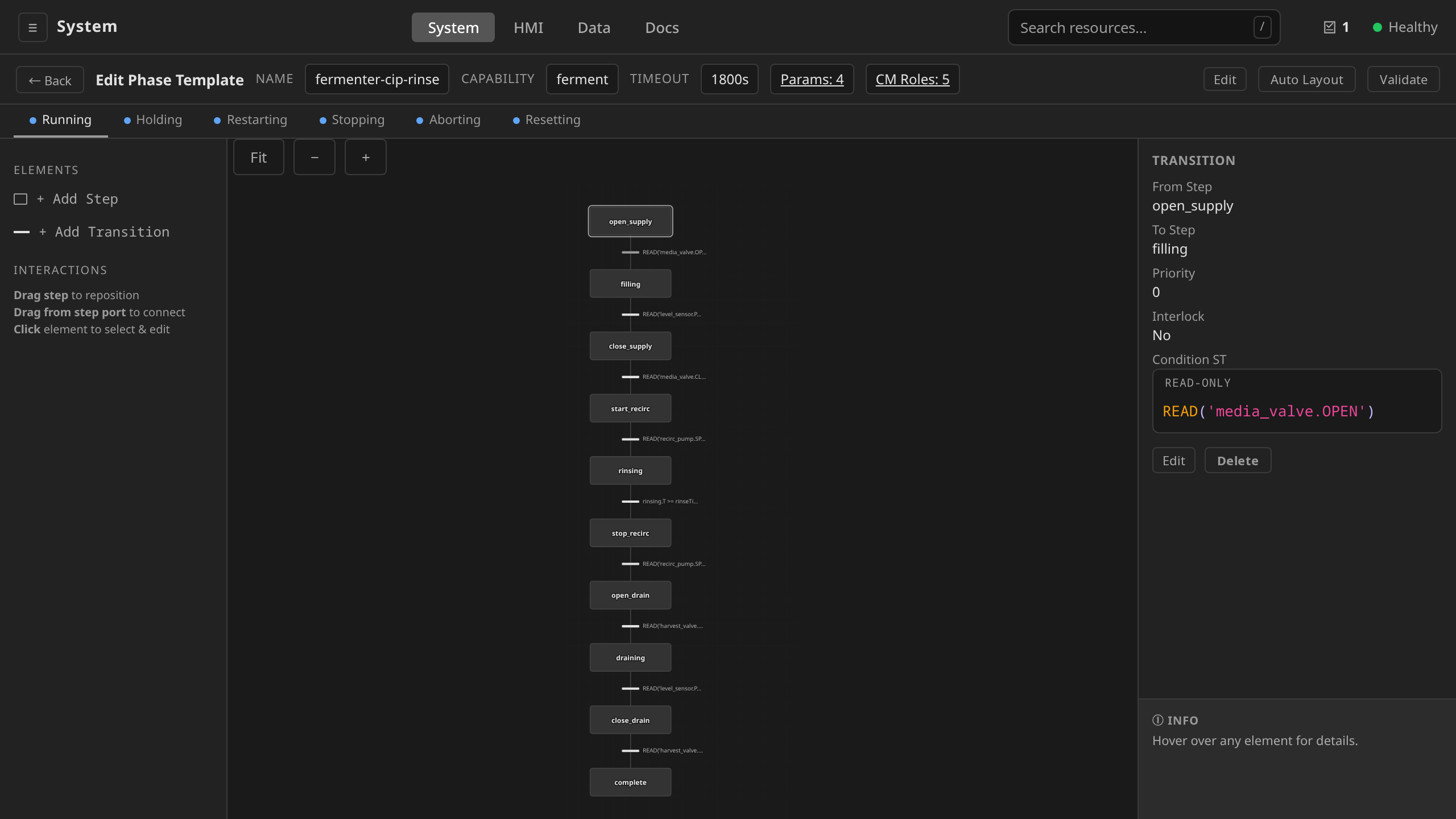
In the SFC editor, click a transition bar between two steps. The
condition-ST inspector opens with a single-line input. Type the
boolean expression there (e.g. READ('TT-101') >= target_temp).
Save commits it to the transition's conditionST field.
transitions:
  - fromStep: heat
    toStep: hold
    conditionST: "READ('TT-101') >= target_temp"
The expression is automatically wrapped and evaluated. No assignment or control flow is needed: just a boolean expression.
Validation
The gateway exposes POST /api/v1/validate/st (used by the inline
editor on blur) with two modes that map to the two SFC surfaces:
mode: "program"(default) — parses the source as a statement list (step action). Returns parse errors with line and column.mode: "expression"— parses the source as a single boolean expression (transition condition).
A separate POST /api/v1/validate/sfc-chart endpoint validates the
chart as a whole, including every step's action ST, every transition's
condition ST, plus chart-level structure (initial step exists, every
step is reachable, no unreachable transitions). Phase template apply
flows through this endpoint, so a malformed chart fails on dcs apply
with the offending field named in the response.
The recipe-parameter checks (unused parameters, read-before-assign) run
against the same parser via ValidateWithParams and surface as
Validated=False on the PhaseTemplate.
Unit-runtime — control-module template ST
A control module's logic has exactly one canonical form: its
function-block network (blocks + dataConnections). Structured Text
and Function Block Diagram are two co-equal, editable projections of
that one network. There is no separate stored ST field
(ADR 0012). Authoring
in ST does not add a second interpreter to the control runtime: the ST
you write is compiled down to the network (by pkg/cmlogic, the one
place the ST↔network transform lives), and the unit-runtime
function-block scan loop on the controller node executes that network
every scan cycle. The runtime addresses I/O directly through the
configured device drivers. The builtins therefore reference raw I/O
addresses, and a tag path means nothing on this surface.
Program shape and variable resolution
A control module's ST is the lossless serialization of its network,
wrapped as an IEC 61131-3 program. All I/O configuration is real code.
Analog scaling and output range are named arguments on the I/O
builtins, and no comment is load-bearing. The ST → network compiler
therefore recovers the full network from the ST alone:
PROGRAM <module_name>
(* description, scan interval *)

VAR
    <local> : <type> [ := <init> ];
    ...
END_VAR

(* Read inputs *)
<local> := AI('<addr>', rawMin := 4.0, rawMax := 20.0, engMin := 0.0, engMax := 100.0);
<local> := DI('<addr>');

(* Logic *)
<computation>;

(* Write outputs *)
AO('<addr>', <expr>, outMin := 0.0, outMax := 100.0);
DO('<addr>', <expr>);

END_PROGRAM
The three comments are section labels, and the layout is free. A program whose statement order carries meaning prints in declared block order, and a label may then come round more than once (see Reading a port of an output block).
Each VAR local is the projection of one block in the network: the
local's name is the block's name, so the ST you read is just the network
named the same way. An output block has no local. It is written by its
DO/AO statement and read back by a qualified reference. A template's tags array exposes named tag values
to the gateway / HMI by pointing at a block's output port
(blockRef/portRef). In the ST projection that is the local with the
matching name. Edit either view (flip the Diagram / ST toggle in the
template editor) and the other recompiles, because there is only one
network underneath.
The optional scanInterval on the template (e.g. 100ms) is the
period at which the runtime re-executes the compiled network from the
top. Each scan reads inputs, runs the logic, writes outputs, and
returns.
Built-in functions
| Function | Signature | Description |
|---|---|---|
AI |
AI(addr, rawMin := …, rawMax := …, engMin := …, engMax := …) |
Read an analog input from a raw I/O address and scale it; returns REAL |
AO |
AO(addr, value, outMin := …, outMax := …, rawMin := …, rawMax := …) |
Write a scaled REAL to an analog output address; optional rawMin/rawMax convert the engineering value to the device's raw range at the write |
DI |
DI(addr) |
Read a digital input from a raw I/O address; returns BOOL |
DO |
DO(addr, value) |
Write a BOOL to a digital output address |
The address argument is a string, typically the resolved IOModule
address such as 'reactor-io:discrete.5' (a Modbus coil on the
reactor-io IOModule). In template
sources you usually see template expressions ('{{.outputs.state}}')
that the template compiler resolves against the instance's binding
before the program reaches the runtime.
Analog scaling (rawMin/rawMax/engMin/engMax on AI) and output
range (outMin/outMax, plus optional rawMin/rawMax device-range
conversion, on AO) are named arguments in real parsed code. The
ST → network compiler round-trips
them exactly. Device interlocks are likewise real code: an interlocked
output compiles to an IF block that forces the configured safe value
while the trip is asserted, for example
IF DI('{{.params.interlockAddress}}') THEN
    AO('{{.outputs.valve_out}}', 0.0);  (* interlock: force safe value *)
ELSE
    AO('{{.outputs.valve_out}}', cmd, outMin := 0.0, outMax := 100.0);
END_IF;
The SFC-engine builtins (READ, WRITE, MESSAGE, PROMPT,
COMMAND, MODE) are not available here. There is no batch
execution context, no operator session, and no tag layer in scope on
the scan loop.
Worked example
A minimal binary valve (command, feedback, and a command/feedback comparison) is the shape an ST author writes directly:
PROGRAM discrete_valve
(* Recipe-driven binary (on/off) valve. ... *)
(* Scan interval: 200ms *)

VAR
    cmd_const : BOOL := FALSE;  (* BOOL_CONST *)
    read_fb   : BOOL;           (* DI @ {{.inputs.feedback}} *)
    eq_check  : BOOL;
    mismatch  : BOOL;
END_VAR

(* Read inputs *)
read_fb := DI('{{.inputs.feedback}}');

(* Logic *)
eq_check := cmd_const = read_fb;
mismatch := NOT eq_check;

(* Write outputs *)
DO('{{.outputs.state}}', cmd_const);

END_PROGRAM
The locals cmd_const, read_fb, and mismatch line up with a
template's CMD, FB, and MISMATCH tags. That is how the gateway
resolves their values at runtime. See
Templates in Control Modules for the
broader template model.
The shipped discrete-valve template
(examples/templates/discrete-valve.yaml) is this shape plus two things
the worked example above does not show. It compares the feedback against
the position the DO block actually drove (the worked example
compares against cmd_const), and it derives a CMD_BLOCKED tag from
the block's interlock state
(ADR 0054). Both
read a port on the output block, which is written as a qualified
reference (see below).
Reading a port of an output block
An output block writes, and it also publishes what it wrote. DO and
AO carry three data outputs: OUT (the value actually driven,
post-clamp and post-interlock), ILCK_ACTIVE (true while the interlock
is forcing the safe value), and ILCK_BYPASSED. A DO/AO write
statement has no assignment target to name. These ports are therefore
read with a qualified <block>.<port> reference, the IEC 61131-3
spelling for a function-block instance's output:
(* Write outputs *)
DO('{{.outputs.state}}', cmd_const);  (* @block: write_state *)

(* Logic *)
eq_check := write_state.OUT = read_fb;
Where the write statement sits is part of the logic. Each block
reads its sources' live outputs at execution time, so a source that
executes later in the scan hands over the previous scan's value. Written
as above, eq_check compares against the value driven this scan.
Written the other way round, with the comparison above the write, it
compares against the last scan's.
This is why the write prints between the two logic statements. Grouping
it under a single (* Write outputs *) section at the end would move it
across the readback. The
projection groups statements into the three sections whenever doing so
leaves every wired pair in the same relative order. That is the case
for almost every control module: inputs read first, outputs written
last, nothing read back. When grouping would move a source across
something that reads it, the projection prints in declared block order
instead, and a section label comes round again.
The name a write publishes under is the one in its @block: marker
(write_state above), or the generated DO_<address> when there is
none. A reference to a block that is not declared, or to a port the
block does not have, is rejected with a located diagnostic. Silently
dropping such a reference is the
#1484
failure this rejection exists to prevent.
Validation
Control-module ST is validated by compiling it to the network: the
gateway's POST /api/v1/control-logic/to-network endpoint parses the ST
(same lexer/parser as SFC ST) and runs the ST → network transform. A
ControlModuleTemplate create/update that carries ST flows through the
same compile step before the network is persisted. There is no stored
ST field to validate, only the network it compiles to.
The transform enforces the dataflow subset that both views can
express (see Limitations). ST that steps outside it (a
bare FOR/WHILE/REPEAT/CASE, procedural sequencing, or a
reference that resolves to no block or port) is rejected at author time with a located
diagnostic (line and column) and HTTP 422. The network is left empty,
and no logic is silently dropped. Plain parse errors surface the same
way. This is the same boundary every IEC 61131-3 tool enforces, and it
is inherent to the languages: ST is a strict superset of FBD, so not
every ST program can be drawn as a dataflow network.
A function block's configuration arguments take a literal. TON,
TOF and TP accept a preset as PT, and CTU and CTD accept one
as PV. IEC 61131-3 writes those beside the wired arguments. This
runtime reads them once when the block is created, and never again on a
later scan. TON(IN := run, PT := T#5s) is therefore
correct and TON(IN := run, PT := dwell) is rejected at author
time, with the same located diagnostic as anything else outside the
subset. A dynamic preset is not available on the control-module path.
Sequence a phase on the SFC path when a wait has to be computed.
Semantic validation that is specific to control modules happens at apply and reconcile time:
- The control-module reconciler resolves the template's network
(substituting input/output bindings) when materialising a
ControlProgramfor aControlModuleinstance. Unresolved or malformed addresses surface on the CR's status conditions. - Unknown function calls (e.g. an SFC builtin used in control-module ST, or vice versa) parse cleanly but fail at runtime in the scan loop or the SFC interpreter. There is no static check that catches a cross-runtime builtin mismatch.
Limitations
The following IEC 61131-3 ST features are not supported by either runtime:
- Derived data types (arrays, structs, enums)
- Multiple integer widths (DINT, LINT, UINT, LREAL, etc.)
- Pointers and references
- Dynamic memory allocation
GOTOand labels
User-defined functions and function blocks are not supported in either ST surface. For SFC step actions this is intentional. Step actions should be simple sequential logic, and reusable computation belongs in a control module. For control-module ST, the equivalent pattern is to compose smaller templates or to author the same logic in FBD. The two forms are co-equal projections of one network and so are fully interchangeable. See the FB Network Editor for the visual form.
The control-module ST subset
Control-module ST is constrained to the dataflow subset, the
subset that maps one-to-one onto a function-block network: variable
declarations, tag I/O, function-block instantiations, expressions,
function calls, and selection that compiles to SEL/MUX/EN-gated
blocks. The general control-flow constructs above (FOR, WHILE,
REPEAT, CASE) are not part of it, and neither is procedural
sequencing (assigning a variable twice in a scan, or reading a value a
later statement overwrites). A block produces one value per output per
scan, so there is nothing to draw either as. A control module's scan
reads inputs, runs them through blocks, and writes outputs. Such
constructs are rejected at author time (see
Validation).
Statement order still carries meaning within the subset, but only one: it is the order the scan executes the blocks in, which decides whether a readback of an output block's port sees this scan's value or the last one's (see Reading a port of an output block). Full ST (loops and all) remains available on the phase / SFC path, which interprets ST directly with no compile to a network.
Related Documentation
- SFC Authoring Guide — How to build Sequential Function Charts
- Control Modules — How tag bindings, the template/instance split, and the FBD/ST toggle fit together
- IEC 61131-3 Compliance — Standards traceability matrix
- Recipes — How recipes use SFC and ST
- Architecture — System execution model