Recipes¶
A recipe is the executable description of a product: what equipment to use, what parameters to dose, and the procedural sequence that drives the batch from start to finish. This guide walks through authoring, composing, and approving recipes against the ISA-88 procedural hierarchy.
Most steps are presented as tabs so you can pick the interface that fits how you work:
- UI —
/system→ Recipes. List, detail, visual SFC procedure editor, lifecycle buttons (Approve / Reject / Release / Activate / Withdraw) with reason dialogs. - CLI —
dcssubcommands (dcs get,dcs recipe approve, …). - YAML — author locally, apply with
dcs apply -f.
Which tabs appear on a given step depends on the action. Create/edit steps show UI + YAML, and imperative commands like Approve show UI + CLI. The lifecycle transitions also keep an API tab because the signed approval endpoints carry semantics (reason payloads, electronic signatures) integrators call directly. See STYLE-GUIDE § Tabbed Alternatives for the full rules. When a UI path is not yet implemented, the UI tab carries a placeholder admonition linking to the tracking issue. Silent omission is the thing the placeholder rule exists to prevent.
Integrators: see the API Reference for the REST equivalents of the actions on this page.
The ISA-88 procedural hierarchy¶
A recipe doesn't reach down directly to phases. It composes intermediate templates that group phases into reusable operations and unit procedures. The cascade, low to high:
| Level | What it is | CRD |
|---|---|---|
| Phase | One bounded equipment activity (charge, heat, drain). The leaf of the tree. Authored in Phases. | PhaseTemplate |
| Operation | An ordered sequence of phases that completes one logical step (e.g., a CIP rinse: fill → agitate → drain). | OperationTemplate |
| Unit Procedure | A sequence of operations that exercises one unit end-to-end (e.g., a full CIP cycle on a vessel). | UnitProcedureTemplate |
| Procedure | The recipe-level chart that orchestrates unit procedures across the cell. Authored as part of the master recipe itself. | MasterRecipe.spec.procedure |
Operations and unit procedures are reusable templates: author them once and reference from any number of recipes. The recipe procedure is unique to each recipe, and you author it inline alongside the recipe's header, formula, and equipment requirements.
flowchart TD
    P1[PhaseTemplate<br/>e.g. cip-fill] --> OT[OperationTemplate<br/>e.g. cip-rinse-op]
    P2[PhaseTemplate<br/>e.g. cip-agitate] --> OT
    P3[PhaseTemplate<br/>e.g. cip-drain] --> OT
    OT --> UPT[UnitProcedureTemplate<br/>e.g. cip-vessel-cleaning]
    OT2[OperationTemplate<br/>e.g. cip-hot-wash-op] --> UPT
    UPT --> MR[MasterRecipe.spec.procedure<br/>Recipe-level SFC]
Recipe hierarchy¶
flowchart TD
    MR[MasterRecipe<br/>namespaced<br/>bound to a ProcessCell + Units] --> CR[ControlRecipe<br/>namespaced<br/>immutable instance for one Batch]
You create the MasterRecipe. The batch controller automatically creates the ControlRecipe when a Batch is started.
ISA-88 Clause 6 defines five recipe information categories. All are supported on every recipe level:
- Header — batch sizing (nominal, min, max) via
spec.header - Formula — parameter sets for different batch sizes via
spec.formulas. Each formula contains enrichedFormulaParameterentries (ISA-88 Part 2 Table 10/41) with engineering units, value limits, tolerance bands, and scaling flags alongside the parameter value - Equipment Requirements — required capabilities via
spec.equipmentRequirements - Procedure — SFC-based procedural flow via
spec.procedure - Other Information — safety notes, regulatory notes, operator instructions, and document references via
spec.otherInformation
The batch controller copies all categories from MasterRecipe to ControlRecipe at instantiation time.
Authoring operation and unit-procedure templates¶
Operation and unit-procedure templates are reusable, site-scoped
sequences. Both are SFC charts whose steps reference the level below.
Operation steps reference PhaseTemplates, and unit-procedure steps
reference OperationTemplates. There is one chart per template (no
ISA-88 state tabs, which only exist on phase templates).
/system → Equipment Library → pick a site → choose
Operations or Unit Procedures from the sidebar →
+ New Operation Template / + New Unit Procedure Template.
Fill in name and equipment-role declarations on the metadata form,
then Save. On the detail page, Edit SFC opens the visual
editor with a CHILD TEMPLATES panel listing every template the
current chart can reference.
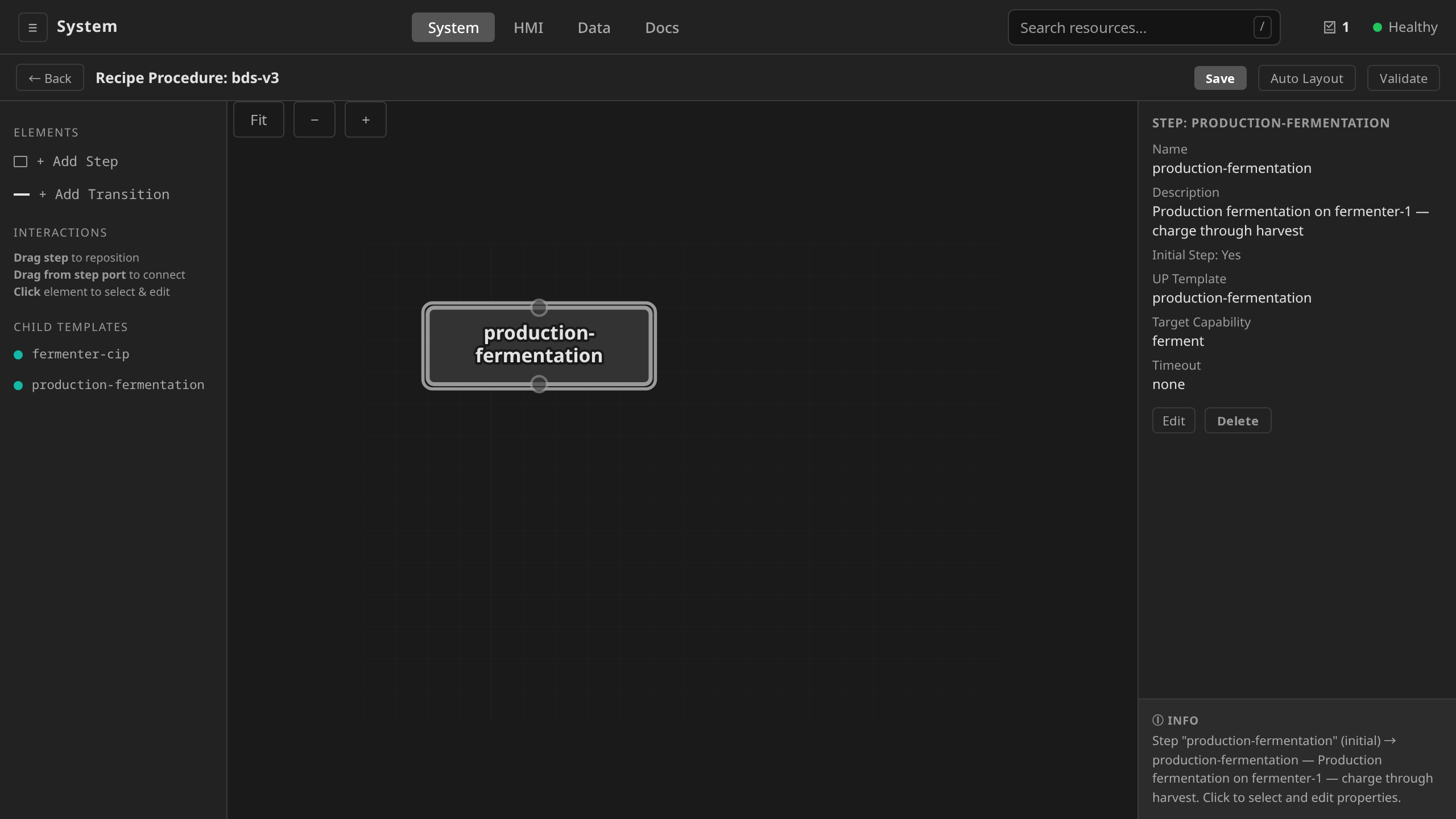
The operation level runs below: a phase template authored from scratch, then wired into a new operation template through the per-step template picker. The unit-procedure editor works the same way one level up, and the recipe-level picker appears in the Create a MasterRecipe clip.
dcs apply -f my-operation.yaml
dcs apply -f my-unit-procedure.yaml
dcs get operationtemplates -s $SITE
dcs get unitproceduretemplates -s $SITE
apiVersion: procedural.dcs.io/v1alpha1
kind: OperationTemplate
metadata:
  name: cip-rinse-op
  namespace: site-demo
spec:
  chart:
    initialStep: fill
    steps:
      - name: fill
        templateRef: cip-fill
        parameters:
          - name: target_level
            value: "0.85"
      - name: agitate
        templateRef: cip-agitate
        parameters:
          - name: duration
            value: "T#5m"
      - name: drain
        templateRef: cip-drain
    transitions:
      - fromStep: fill
        toStep: agitate
      - fromStep: agitate
        toStep: drain
The chart-authoring mechanics (adding steps, drawing transitions, editing conditions) are the same as phase chart authoring. See Building the chart in Phases. One difference is what the right-hand CHILD TEMPLATES panel exposes: phase templates at the operation level, operation templates at the unit-procedure level, unit-procedure templates at the recipe level.
The other is divergences. A recipe procedure chart does not take one, and the editor does not offer the parallel-branch drag there. Starting a batch creates one child procedural element per step of the recipe's chart. It creates them in the order the steps are declared. Branches drawn on such a chart would therefore run one after another. See Procedural SFC dialect → Divergences.
For the shipped riverbend operation and unit-procedure templates, see the Operations and Unit Procedures library.
1. Create a MasterRecipe¶
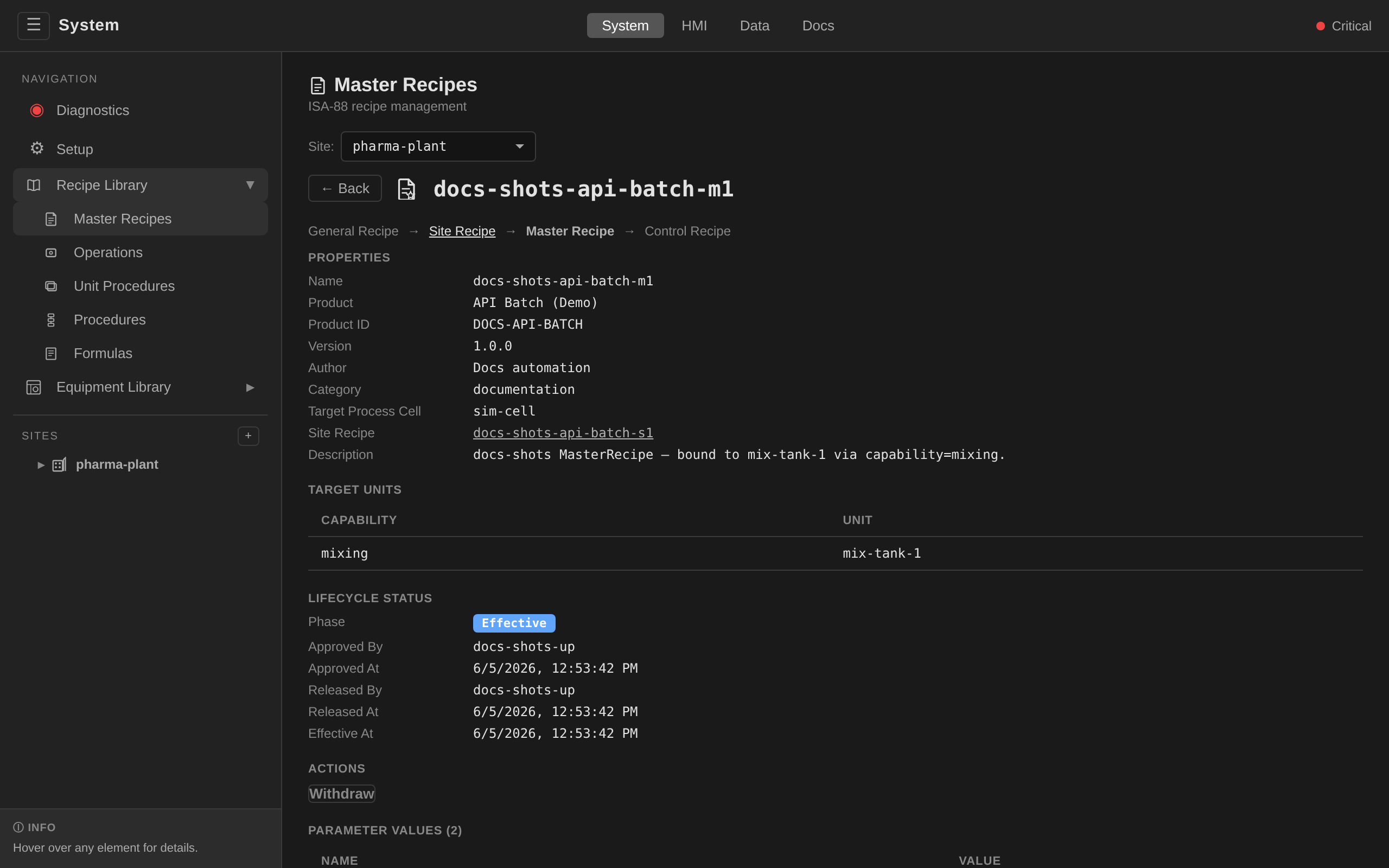
A MasterRecipe defines the product, parameters, equipment requirements,
procedure, and (via targetProcessCell + targetUnits) the concrete
Unit bindings used when a Batch runs against it. It lives in the site's
namespace (site-{siteName}).
/system → Recipes → site picker set to the target site
→ + New Master Recipe. The creation form carries the
recipe's identity: Name, Product Name, Product ID, Version
(pre-filled 1.0.0, while later versions come from New Version
on the detail page), Author, Category, Process Cell, Description,
and the
Other Information block (safety, regulatory, and operator notes plus
document references). Create lands the recipe in Draft.
Parameters, the batch-size header, and the capability→unit map
(targetUnits) are spec fields the form does not cover: author them
in the YAML tab and apply with dcs apply -f. Formulas have their
own editor under the Formulas tab. The detail page renders
targetUnits read-only as the Target Units table.
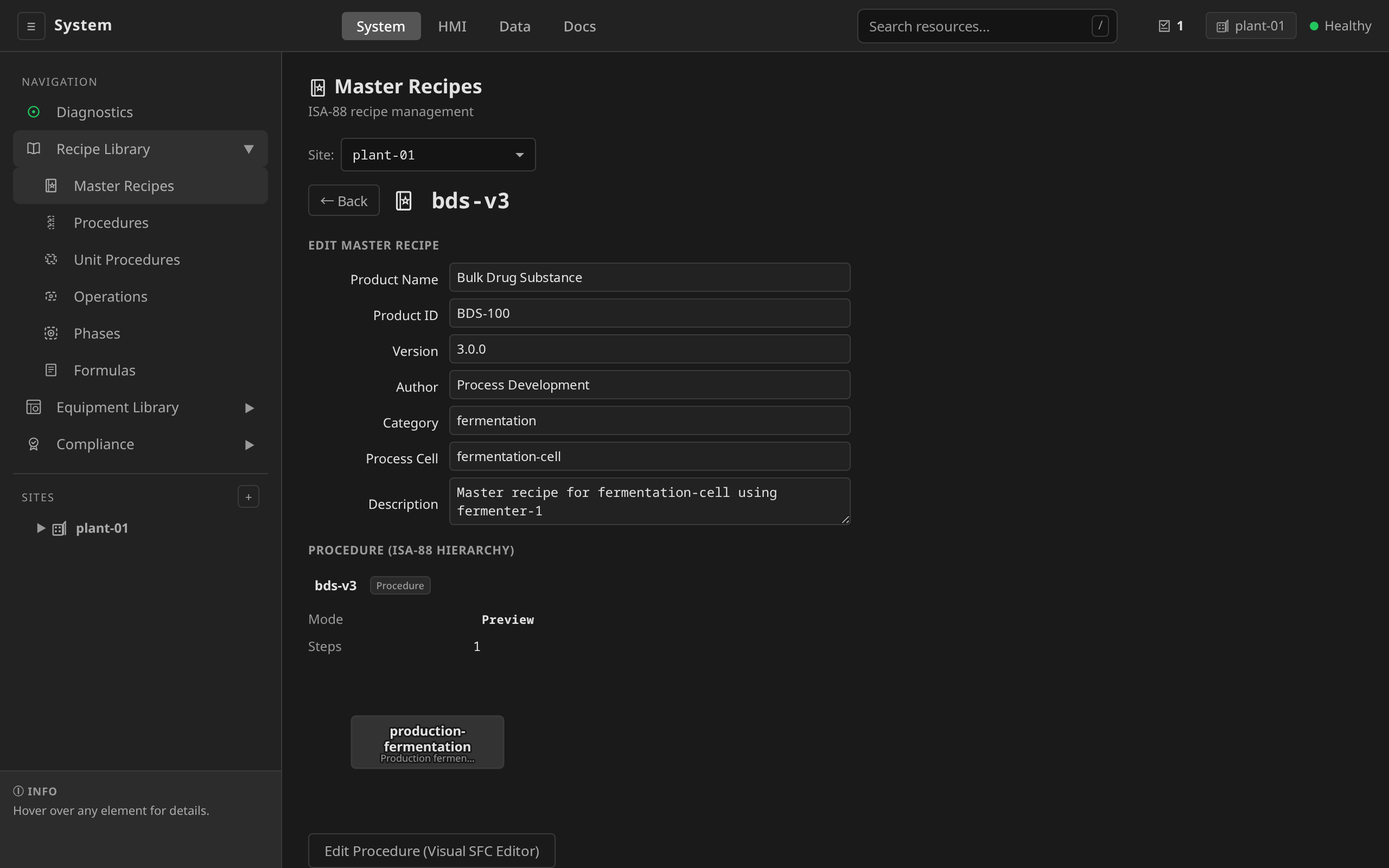
To author the procedure SFC, open the MasterRecipe detail →
Edit → Edit Procedure (Visual SFC Editor). Each recipe
procedure step binds a unit-procedure template and declares a
Target Capability. At batch time that capability key resolves
through targetUnits to a concrete Unit.
See Building the chart in Phases
for the canvas, child-template picker, and parameter bindings.
The whole path runs below: the creation form lands a Draft, a procedure step binds a template that nobody has authored yet, the controller surfaces the broken reference in the detail's red Validation Errors section, the reference is fixed from the template picker, and the seeded production recipe shows the Target Units table that closes the capability→unit loop.
Save the YAML in the YAML tab as masterrecipe.yaml, then:
dcs apply -f masterrecipe.yaml
dcs get masterrecipes -s houston-plant
apiVersion: recipe.dcs.io/v1alpha1
kind: MasterRecipe
metadata:
  name: chemical-mix-cell1
  namespace: site-houston-plant
spec:
  productName: "Chemical Compound A"
  productID: "CCA-001"
  version: "1.0.0"
  author: "Process Engineering"
  category: "chemical-mixing"
  description: "Master recipe for chemical mixing on mixing-cell-1"
  targetProcessCell: mixing-cell-1

  header:
    batchSize: "1000.0"
    minBatchSize: "500.0"
    maxBatchSize: "5000.0"
    batchSizeUnit: "kg"

  parameters:
    - name: targetTemp
      type: REAL
      defaultValue: "80"
      minValue: "20"
      maxValue: "200"
      engineeringUnit: "degC"
      description: "Target reaction temperature"
    - name: mixTime
      type: INT
      defaultValue: "3600"
      minValue: "600"
      maxValue: "7200"
      engineeringUnit: "seconds"
      description: "Mixing duration"

  # Map required capabilities to actual units in the process cell
  targetUnits:
    mixing: reactor-1
    heating: reactor-1

  parameterValues:
    - name: targetTemp
      value: "85"
    - name: mixTime
      value: "3600"
Parameter validation¶
The controller validates all parameters on creation:
- type must be an IEC 61131-3 elementary type: REAL, INT, STRING, BOOL, or TIME
- minValue must be less than or equal to maxValue for numeric types
- defaultValue must be within the min/max range
Cross-API validation¶
The MasterRecipe controller also validates that:
- Each unit in targetUnits exists as a physical.dcs.io/Unit resource
- Each unit has the required capability in its spec.capabilities
- Every control-module role declared by the phase templates the procedure
reaches is mapped in the target unit's spec.cmRoles, to a
ControlModule whose moduleType satisfies the role's declared type.
The outcome is surfaced as a BindingsResolved condition. Violations
block promotion, and an already-Effective recipe whose bindings break
(for example after a unit edit) is auto-reverted to Approved. Inspect
the full matrix with dcs recipe check-bindings <name>. The inverted
per-unit view is dcs unit check-bindings <unit>.
Check validation errors:
/system → Recipes → pick the recipe. The MasterRecipe
detail page surfaces validation errors (missing units, missing
capabilities, broken template references, type/range violations) as
a red Validation Errors section listing every finding. Binding
problems additionally surface as the BindingsResolved condition
described above.
dcs get masterrecipes -s houston-plant
dcs get masterrecipe chemical-mix-cell1 -s houston-plant
A new MasterRecipe starts in Draft phase and must be approved before batches can run against it (see Recipe Approval Workflow below).
Worked example: CIP master recipe¶
A complete recipe procedure for a typical pharma CIP sequence. Every step is a phase template reference, so phase logic stays reusable across recipes. Chemical-wash and rinse share their templates with other CIP products, and the two drain steps each bind a single-action phase template that toggles the drain valve.
/system → Recipes → Master Recipes → + New
Master Recipe creates the recipe shell: name, product identity,
target process cell, description. The override Parameters
(duration, temperature) and the flat phase-level chart of this
example are YAML territory. Apply the manifest from the YAML tab
with dcs apply -f and the recipe detail renders the seven-step
sequence in its procedure preview.
In the visual editor a recipe procedure step binds a unit-procedure template (the recipe-level CHILD TEMPLATES panel lists them). A chart that references phase templates directly, as this CIP sequence does, stays a YAML-side pattern. The visual editor still renders it for review.
# Single-action phase templates the recipe will reference. In a
# real plant these live in the phase-template library next to
# rinse / chemical-wash.
apiVersion: procedural.dcs.io/v1alpha1
kind: PhaseTemplate
metadata:
  name: drain-open
  namespace: site-demo
spec:
  description: "Open the drain valve"
  capability: draining
  actionChart:
    initialStep: open
    steps:
      - name: open
        actionST: |
          valve_drain := TRUE;
    transitions: []
---
apiVersion: procedural.dcs.io/v1alpha1
kind: PhaseTemplate
metadata:
  name: drain-close
  namespace: site-demo
spec:
  description: "Close the drain valve"
  capability: draining
  actionChart:
    initialStep: close
    steps:
      - name: close
        actionST: |
          valve_drain := FALSE;
    transitions: []
---
apiVersion: recipe.dcs.io/v1alpha1
kind: MasterRecipe
metadata:
  name: cip-standard
  namespace: site-demo
spec:
  description: "Standard CIP sequence for reactor vessels"
  version: "1.0"
  targetProcessCell: cip-cell
  parameters:
    - name: duration
      type: TIME
      description: "Override rinse duration"
    - name: temperature
      type: REAL
      description: "Override wash temperature"
  procedure:
    # Bounds the batch's Procedure as a whole. Copied onto
    # Procedure.spec.timeoutSeconds at instantiation; wall-clock from the
    # procedure starting, holds included, and a Hold (not an abort) when it
    # elapses. Omit for no limit — there is no default above the phase.
    # See phases.md § Budgets above the phase.
    timeoutSeconds: 7200
    chart:
      initialStep: pre-rinse
      steps:
        - name: pre-rinse
          templateRef: rinse
          templateKind: PhaseTemplate
          parameters:
            - name: duration
              value: "T#5m"
            - name: water_source
              value: "'WFI'"

        - name: caustic-wash
          templateRef: chemical-wash
          templateKind: PhaseTemplate
          parameters:
            - name: chemical
              value: "'NaOH'"
            - name: concentration
              value: "0.5"
            - name: temperature
              value: "75.0"
            - name: duration
              value: "T#20m"

        - name: intermediate-rinse
          templateRef: rinse
          templateKind: PhaseTemplate
          parameters:
            - name: duration
              value: "T#5m"
            - name: water_source
              value: "'WFI'"

        - name: acid-wash
          templateRef: chemical-wash
          templateKind: PhaseTemplate
          parameters:
            - name: chemical
              value: "'H3PO4'"
            - name: concentration
              value: "0.3"
            - name: temperature
              value: "65.0"
            - name: duration
              value: "T#15m"

        - name: final-rinse
          templateRef: rinse
          templateKind: PhaseTemplate
          parameters:
            - name: duration
              value: "T#10m"
            - name: water_source
              value: "'WFI'"

        - name: drain-open
          templateRef: drain-open
          templateKind: PhaseTemplate

        - name: drain-close
          templateRef: drain-close
          templateKind: PhaseTemplate

      transitions:
        - fromStep: pre-rinse
          toStep: caustic-wash
        - fromStep: caustic-wash
          toStep: intermediate-rinse
        - fromStep: intermediate-rinse
          toStep: acid-wash
        - fromStep: acid-wash
          toStep: final-rinse
        - fromStep: final-rinse
          toStep: drain-open
        - fromStep: drain-open
          toStep: drain-close
          conditionST: "drain-open.T >= T#3m"
Batch-size scaling worked example¶
ISA-88 Clause 6.3 lets a single recipe serve a range of batch sizes. A
Master Recipe declares its spec.header bounds and multiple spec.formulas,
each keyed to a batch size and supplying parameter values. The batch
controller selects the formula that matches the requested batch size and
cascades its values into the ControlRecipe at instantiation.
Here is a simplified reactor heating recipe with three formulas, one for each of the min, nominal, and max batch sizes.
/system → Recipes → Master Recipes → + New
Master Recipe. In the Header section, set
batchSize (the nominal size) / minBatchSize / maxBatchSize
and the units. In the Formulas section, click + Add Formula
three times (one per batch size) and fill each formula's
batchSize and the parameter values (solventCharge,
heatSetpoint, holdDuration). The batch controller picks the
closest formula at batch creation and cascades its values into
the ControlRecipe.
apiVersion: recipe.dcs.io/v1alpha1
kind: MasterRecipe
metadata:
  name: reactor-heat-m1
  namespace: site-demo
spec:
  targetProcessCell: sim-cell
  header:
    batchSize: "500.0"
    minBatchSize: "250.0"
    maxBatchSize: "750.0"
    batchSizeUnit: "kg"
  formulas:
    - name: "formula-min"
      batchSize: "250.0"
      parameters:
        - name: solventCharge
          value: "125.0"
          engineeringUnit: "L"
        - name: heatSetpoint
          value: "60.0"
          engineeringUnit: "degC"
        - name: holdDuration
          value: "1800"
          engineeringUnit: "s"
    - name: "formula-nominal"
      batchSize: "500.0"
      parameters:
        - name: solventCharge
          value: "250.0"
          engineeringUnit: "L"
        - name: heatSetpoint
          value: "60.0"
          engineeringUnit: "degC"
        - name: holdDuration
          value: "2400"
          engineeringUnit: "s"
    - name: "formula-max"
      batchSize: "750.0"
      parameters:
        - name: solventCharge
          value: "375.0"
          engineeringUnit: "L"
        - name: heatSetpoint
          value: "60.0"
          engineeringUnit: "degC"
        - name: holdDuration
          value: "3000"
          engineeringUnit: "s"
  procedure:
    # ... SFC chart referencing phase templates ...
At batch creation, the operator supplies a batch size, and the batch controller:
- Validates it falls between
minBatchSizeandmaxBatchSize. - Selects the closest-matching formula (or interpolates, depending on
the scaling mode configured. The shipped path picks the formula
whose
batchSizeis closest without exceeding the request). - Copies the chosen formula's parameters into the new ControlRecipe.
- Each phase step then receives its parameter values through the normal parameter-binding chain (see Parameter Binding).
Observe what scales and what does not:
| Parameter | Scales with batch size? |
|---|---|
solventCharge |
Yes — linear with batch size (125 → 250 → 375 L) |
holdDuration |
Partially — longer at bigger charge to maintain mass-specific energy input, but not linearly |
heatSetpoint |
No — setpoint is a product specification and never scales |
This mirrors real pharma practice: quantity parameters scale, time parameters scale slower than quantities (surface area vs volume asymmetry), and quality-defining setpoints are constant. The recipe author's job is to decide which column each parameter belongs in. Rebuilding the recipe for every batch size is exactly what the formulas replace.
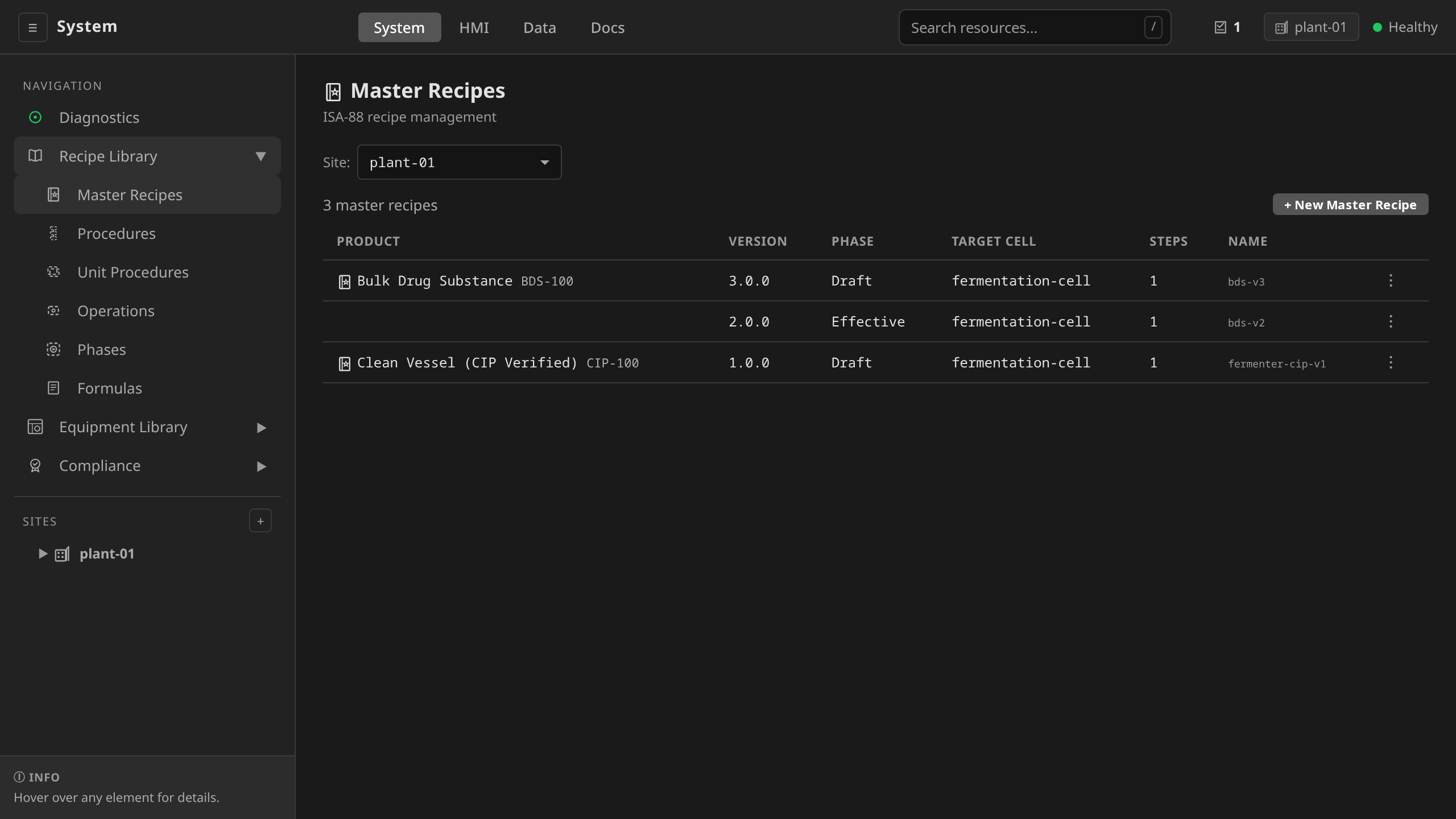
The Recipes view in the System endpoint lists all master recipes with their approval status:
2. ControlRecipe (automatic)¶
You do not create ControlRecipes directly. When a Batch is created, the batch controller:
- Reads the MasterRecipe
- Selects a formula (if the MasterRecipe defines
formulas): - If the Batch specifies
formulaRef, uses that named formula - Otherwise, auto-selects the formula whose
batchSizeis closest to the Batch'sbatchSize - Merges parameters in order: MasterRecipe defaults → selected formula → Batch
parameterOverrides - Creates a ControlRecipe with the unit bindings, resolved parameters, and
formulaRef(for audit traceability) - Resolves parameter bindings —
${paramName}template variables and explicitparameterBindingson SFC steps are substituted with the actual recipe parameter values
The resolved ControlRecipe captures the final parameter values, the selected formula name, and the parameterBindings metadata, creating a traceable link from recipe formula to phase execution for audit compliance.
ControlRecipes are immutable once their phase reaches Active or Complete. Any attempt to modify the spec is rejected by the controller. This supports audit trail integrity for 21 CFR Part 11 compliance.
Recipe Approval Workflow, End-to-End¶
Recipes cascade through the lifecycle Draft → Approved → Released →
Effective → Withdrawn, with a Rejected state for drafts that fail
review. Each transition is gated on role and
emits an immutable AuditRecord with an HMAC-SHA256 electronic signature
per 21 CFR Part 11 §11.50/§11.70. This section walks a fresh Master
Recipe through the whole path.
Starting state: Draft¶
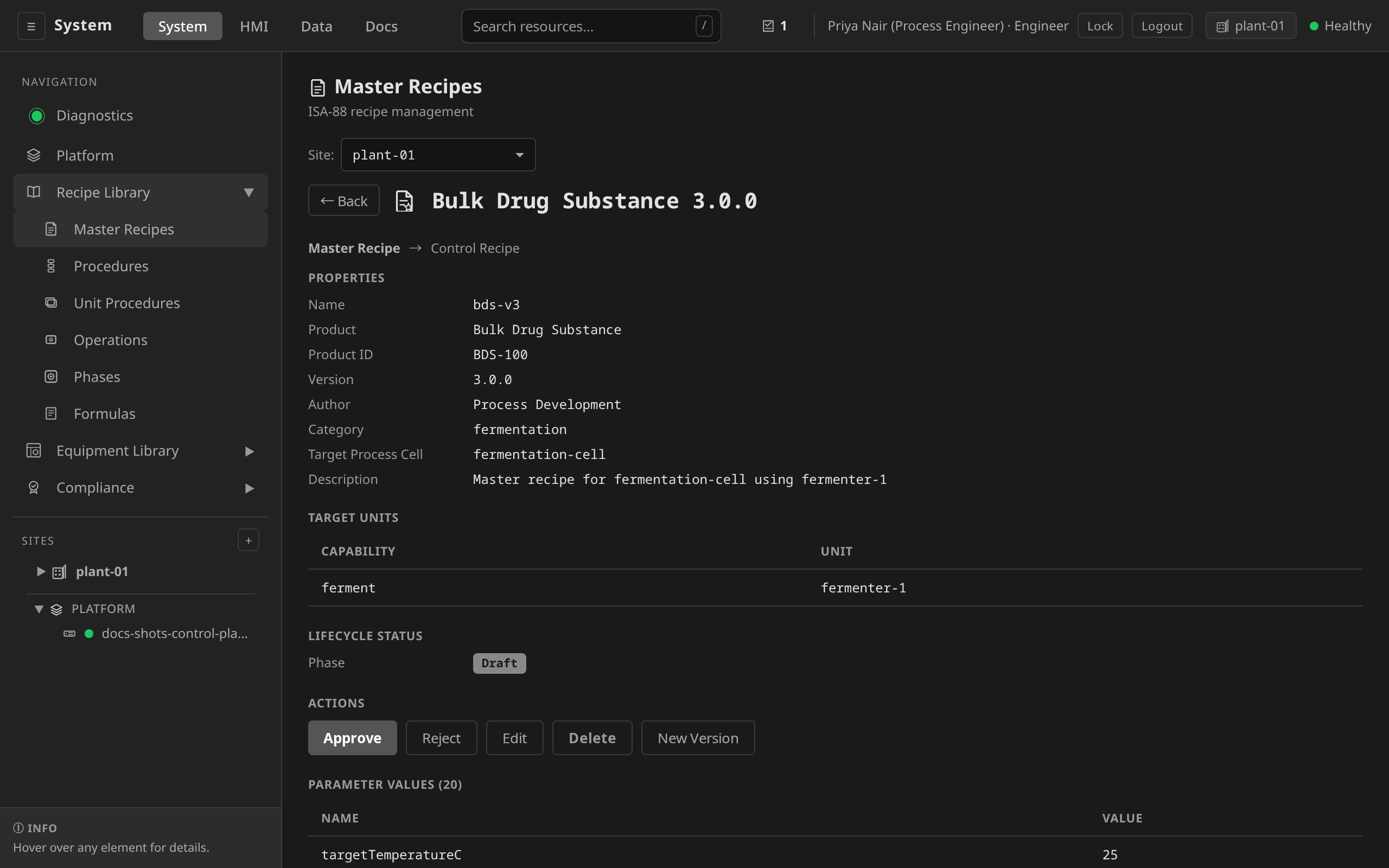
When an engineer creates a MasterRecipe it lands in the Draft state. Draft recipes are editable and not eligible to run batches.
/system → Recipes → + New Master Recipe. Fill in
name, target site and process cell, and the author email. Save to
create the recipe in Draft.
Author a MasterRecipe manifest locally (see the worked CIP example above for the full shape), then apply:
dcs --site houston-plant apply -f product-x-heat-m1.yaml
The recipe lands in Draft and can then be opened in /system →
Recipes for further editing or moved through the lifecycle below.
Transition 1: Draft → Approved¶
Approval is a quality gate. Only members of the dcs-supervisor or
dcs-admin OIDC group can approve. The approver must supply a reason.
The reason becomes part of the audit record and the electronic signature
payload.
/system → Recipes → open the Draft recipe → under
ACTIONS click Approve. A dialog asks for a reason and the
Approve button stays disabled until the reason meets the deployment
reason policy. Cancel aborts the approval.
ACTIONS panel content tracks the ISA-88 lifecycle phase. Draft shows Approve/Reject/Edit/Delete, Approved shows only Release, Released shows only Make Effective, and Effective shows only Withdraw (New Version is available in every phase). Approve, Reject, Release, and Make Effective use the reason dialog. Withdraw and Delete run the typed-name ceremony, because retiring or removing a recipe is hazard-class.
The panel tracks the signed-in session as well as the phase. A
control is rendered only when the deployment's role table admits
the action behind it, so a deployment that keeps approval apart
from authoring shows a supervisor the transitions he decides and
none of the ones he would author. Approve, Reject, Release, Make
Effective and Withdraw are supervise actions, and Edit, Delete
and New Version are engineer actions. The gateway refuses the
request either way, and the panel is what keeps a ceremony from
opening in front of a session that cannot finish it.
The whole ladder runs below on one throwaway recipe, and it takes two people. A supervisor signs in and walks it as far as Withdrawn, where his panel runs out of transitions. An engineer signs in after him for the delete.
dcs recipe approve product-x-heat-m1 \
  --reason "Validated against IQ protocol iq-2026-04-15; reviewed by J. Smith" \
  -s houston-plant
POST /api/v1/sites/{site}/recipes/master/{name}/approve
{"reason": "Validated against IQ protocol iq-2026-04-15"}
Behind the scenes:
- Gateway verifies OIDC group membership (
dcs-supervisorordcs-admin). HTTP 403 otherwise. - Gateway computes an HMAC-SHA256 digest over the canonical JSON of
{content: recipe spec, signerID: OIDC sub, timestamp: now,
   meaning: "approved"}
using thedcs-signing-keySecret. - An AuditRecord with
action=Approve, actor identity, reason, and the ElectronicSignature struct (signerID, signerName, signedAt, meaning, digest) is created. - The recipe's
status.phasemoves toApproved, itsstatus.approvedByandstatus.approvedAtfields are populated, and a new RecipeRevision immutable snapshot is written.
Approved recipes are locked against edit. Any change requires a new revision, which re-enters Draft and must go through approval again. This is the §11.10(k) "use of appropriate controls over systems documentation" story for recipe changes.
Transition 2: Approved → Released¶
Release is a deployment gate. It signals that the recipe is ready for production batches, distinct from "approved by QA in principle." Release requires the same role gate and a reason.
Detail page → ACTIONS → Release → enter reason → confirm. The ACTIONS panel and reason modal are the same controls shown in Draft → Approved above. Only the active button changes.
dcs recipe release product-x-heat-m1 \
  --reason "Cleared for site houston-plant production runs" \
  -s houston-plant
POST /api/v1/sites/{site}/recipes/master/{name}/release
{"reason": "..."}
A second AuditRecord and a second ElectronicSignature with
meaning="released" are created. The recipe's status.releasedBy /
status.releasedAt fields populate.
Transition 3: Released → Effective¶
Activation is the production gate. An Effective recipe is the one operators can actually select in the HMI's batch creation form.
Detail page → ACTIONS → Make Effective (the button's label, while its dialog is titled Activate Recipe) → enter reason → confirm. Same ACTIONS panel and reason modal as above.
dcs recipe activate product-x-heat-m1 \
  --reason "Effective for production starting batch-001" \
  -s houston-plant
POST /api/v1/sites/{site}/recipes/master/{name}/activate
{"reason": "..."}
Only recipes in Effective state appear in the HMI batch-creation
picker. Recipes in Draft / Approved / Released are visible only from
/system → Recipes, so engineers can author without confusing operators.
Transition 4: Effective → Withdrawn¶
Withdrawal retires a recipe. Batches already running against the recipe continue to completion. No new batches can start against a Withdrawn recipe.
Detail page → ACTIONS → Withdraw → enter reason → confirm. Same ACTIONS panel and reason modal as above.
dcs recipe withdraw product-x-heat-m1 \
  --reason "Superseded by product-x-heat-m2; last batch completed 2026-04-14" \
  -s houston-plant
POST /api/v1/sites/{site}/recipes/master/{name}/withdraw
{"reason": "..."}
Auditing the full history¶
Every transition is queryable:
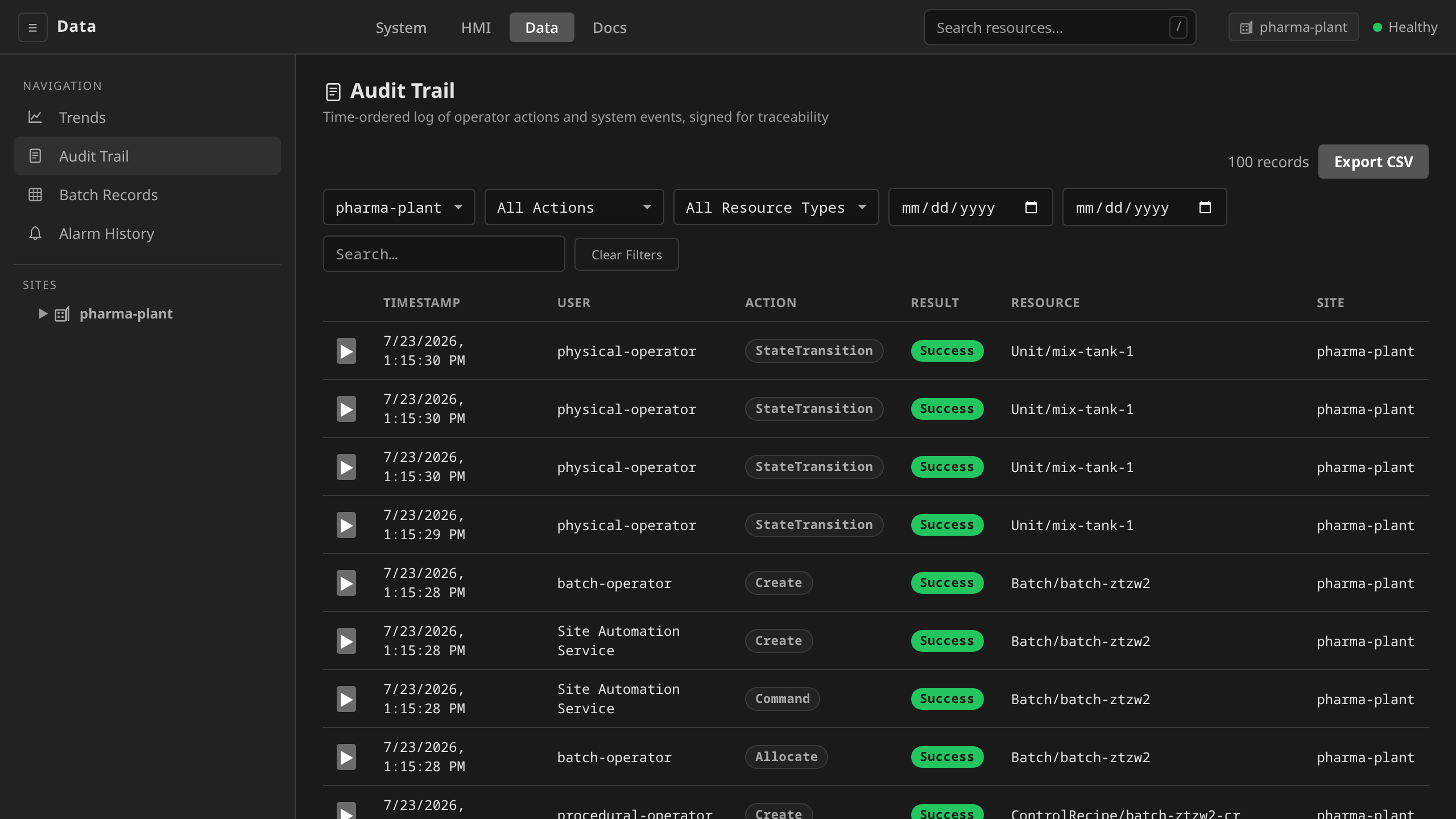
/data → Audit Trail. Filter by target kind = MasterRecipe
and target name to narrow to one recipe's lifecycle. Each row shows
actor, action, timestamp, reason, and the HMAC signature anchor.
Click through for the full AuditRecord detail.
# Filter audit records by target kind, time range, and action
dcs audit export --target-kind MasterRecipe \
  --action Approve --format csv -s houston-plant

# Drill into one specific approval by correlation ID
dcs audit trace <correlationID> -s houston-plant
During an FDA inspection, the Audit Trail is the primary evidence for §11.10(e) "secure, computer-generated, time-stamped audit trails" on the recipe lifecycle.
dcs audit verify --archived.Role summary¶
| Action | Required OIDC group |
|---|---|
| Create / edit Draft | dcs-engineer, dcs-supervisor, dcs-admin |
| Approve | dcs-supervisor, dcs-admin |
| Release | dcs-supervisor, dcs-admin |
| Activate | dcs-supervisor, dcs-admin |
| Withdraw | dcs-supervisor, dcs-admin |
| Start a Batch against an Effective recipe | dcs-operator, dcs-supervisor, dcs-admin |
For the full compliance mapping, see 21 CFR Part 11 Traceability and Electronic Signatures in Security Operations.
Recipe approval covers the recipe lifecycle (Draft → Approved → Released
→ Effective). The control logic those recipes invoke (the
ControlProgram / ControlModule resources) is governed separately by
the Change Control for Production ControlPrograms
gate, which enforces segregation of duties on edits to the underlying
control code in namespaces labelled dcs.io/production=true.
Recipe versions¶
A product's versions are separate MasterRecipe resources. That is what
lets version 2 stay Effective in production while version 3 sits in
Draft awaiting approval. What ties them together is spec.productID:
every recipe carrying the same product ID is one product family, and
within a family each spec.version identifies exactly one recipe (the
gateway rejects a duplicate product + version pair on create, update,
and dcs apply).
You never compose a version number or a resource name by hand. New
Version (on the master recipe detail page or the list row menu)
clones the recipe into a new Draft: the version increments across the
whole product family (choose major, minor, or patch), the resource name
is derived from the product ID and new version, and the author is
stamped from your session. The same operation is available to
integrations as POST …/recipes/master/{name}/new-version (see the
API Reference). Creating a
recipe from scratch starts its product at version 1.0.0.
Two version notions coexist deliberately. spec.version is the
document-control version of the recipe as an ISA-88 recipe-header
identification, the thing quality signs off on. The numbered
revision snapshots audit every
approved edit within one version. Fixing a typo in a Draft bumps
nothing, and running a changed process is a new version.
Viewing recipes¶
/system → Recipes. The site picker at the top filters the
list. Recipes group by product: each row shows Product, Version,
Phase, Target Cell, Steps, and (demoted, in monospace) the resource
name. Click a row for the full detail page with parameters, target
units, procedure preview, lifecycle buttons, and audit history.
dcs get masterrecipes  -s houston-plant
dcs get controlrecipes -s houston-plant
Deleting recipes¶
Two preconditions apply to a MasterRecipe, and they answer different questions.
The first is the approval lifecycle. A MasterRecipe can only be deleted while it is Draft, Rejected, or Withdrawn. Approved, Released, and Effective recipes are in active use and must be Withdrawn first.
The second is execution, and it holds in every phase the first one admits. A recipe a batch has not finished with cannot be deleted at all. A running batch re-reads its MasterRecipe on every reconcile, and the ISA-88 §8.6 unit-failure supervision runs downstream of that read. Deleting the recipe therefore switches those checks off silently while the equipment keeps running. The lock stays on past the terminal phase until the batch production record is written, because that record freezes the recipe spec as the batch's as-run snapshot (21 CFR Part 11).
The gateway returns HTTP 409 in either case and records the refused attempt in the audit trail. Every deletion captures a reason in the audit trail (21 CFR Part 11 §11.10(k)).
/system → Recipes → Master Recipes → click the recipe.
The Delete button appears in the Actions section when the recipe's
phase allows deletion (Draft, Rejected, or Withdrawn). It also requires
the session to hold recipe:delete, which is an engineer action.
Clicking it opens
the standard destructive-action confirmation dialog: type the recipe name
to confirm, enter a reason, then click Delete.
dcs delete masterrecipe chemical-mix-cell1 -s houston-plant
ControlRecipes are owned by their Batch (via ownerReference) and are automatically garbage-collected when the Batch is deleted.
Deleting one directly is refused for as long as its batch exists. The ControlRecipe is that batch's as-run recipe, carrying the resolved parameters and the unit bindings the batch actually ran on, and nothing else in the cluster holds a copy of them. Delete the batch instead, which removes the ControlRecipe with it.
The procedural templates a recipe names are locked the same way. A PhaseTemplate, OperationTemplate, UnitProcedureTemplate, or ProcedureTemplate that an unfinished batch's recipe resolves cannot be deleted, because the procedural tree is instantiated from those templates and a batch whose tree has not been built yet would park at Running with nothing under it. Templates a finished batch used are free to delete, since a finished batch instantiates nothing further.