Batch Production Records¶
A BatchRecord is automatically created when a batch reaches a terminal
state (Complete, Stopped, Failed, or Aborted). It is the system of
record for the run, the ISA-88 Part 4 batch production record (BPR), and
tracks finalization status for 21 CFR Part 11 compliance.
BPRs are a Data-endpoint concern: their readers are quality, management,
and compliance users. The HMI is for running batches, and
the Data endpoint at /data → Batch Records is for reviewing,
finalizing, and exporting the consolidated record after a batch has
finished. The full record data stays in the historian and audit trail. The
BatchRecord CRD itself just tracks the finalization state machine.
Parameter values and process outputs (ISA-88 Part 4 §5.3 + Part 1 §6.3.3)¶
The BPR records inputs and outputs on separate lists:
| Section | Provenance | Source |
|---|---|---|
Parameter Values (spec.parameterValues[]) |
Recipe-layer (commanded setpoints) | formula-scaled / override / default |
Process Outputs (spec.outputs[]) |
Chart's ST (writes at terminal time) | None — the chart is the producer by definition |
Outputs are values the chart's ST writes to declared output names. The runtime snapshots the final value of each declared output from the ST environment at phase terminal time. Outputs the chart never assigned to are omitted, and there is no sentinel "missing" row.
Capture timing is controlled by the chart itself. To capture only on
successful Complete, only assign in the terminal step. To capture on
any terminal state, also assign in the stopping/aborting charts. There
is no separate captureOn field.
See Declaring parameters and process outputs for the authoring patterns, and Procedural SFC Dialect for the ST conventions.
Failover events (ISA-88 Part 4 Table 7 Message/System)¶
A controller failover during a running batch produces a bounded control
gap and a bounded data gap (HA and Failure Modes).
ALCOA+ Consistent permits an explained gap, and a gap explained only in
an operator log is unexplained as far as the record is concerned. So the
reconciler materializes each failover into spec.failoverEvents[] at
batch-terminal time (ADR 0041,
issue #1308). Each event names the unit, the re-bind time, and the
attributed cause, and carries the two gaps separately, because a held
output and a missing sample are different facts:
| Gap | Meaning | Opened by | Closed by | Bounds |
|---|---|---|---|---|
| Control gap | The procedure was not driving the process; outputs held, sat at device fail-safe, or ran an armed safe-state sequence | The batch Hold transition | The explicit ISA-88 Restart back into Running | Exact |
| Data gap | No collector was on the field; historian samples for the unit are missing | The last exchange with the failed runtime the control plane had acknowledged | The lease re-establishment on the replacement runtime | Containing, or Overlapping where the opening bound fell back |
Each gap carries a bounds field saying which of those it is, and the
distinction is not a nicety (issue #1805). The control gap's bounds are
its own edges: between the Hold and the Restart the procedure was not
driving, by definition. The data gap's bounds contain it wherever it opens
at an acknowledged contact. The hole in the historian lies inside the
published interval and data may be present near either edge, because the
control plane observes a runtime's liveness and never its samples.
Both of the data gap's bounds err outward, and they do it for different reasons.
The opening is the last renewal or heartbeat this control plane had acknowledged. That is the last instant it can evidence the runtime was alive, and it is early by at most one renewal interval. It is deliberately not the lease expiry. An expiry is a detection, declared a whole lease duration after the last acknowledgement, and the samples stopped when the runtime died. Measured on the bench that put the published bracket 28.0 s later than the hole it describes, on a hole of 45.2 s (#942 drill 10, n = 3).
The closing is late, by the one-writer guarantee. The replacement runtime reads the field and publishes 8.01 s before it takes the control lease, on the same reps. Every instrument that fires earlier than the lease also fires earlier than that first sample, so moving the bound would re-create at the closing end the defect the opening end was fixed for.
Not every failover is driven by the control lease, and the ones that are
not produce neither lease record. A planned-maintenance failover is taken
while the old lease is still held, so nothing expires and nothing is
re-established. A unit in Autonomy mode holds no lease at all, and
Autonomy is the default. On both paths the closing bound is the re-bound
runtime returning to normal, where normal means Ready and, in Failover
mode, holding the control lease on the new node (issue #1753). The opening
bound is the same last acknowledged contact as everywhere else, carried on
the re-bind record.
Where nothing was ever acknowledged the opening falls back to the record
of the loss itself, and the record says so twice. That bound is late: a
lease expiry by up to a lease duration, a re-bind by however long ago the
operator fenced the node. Which fallback was taken is disclosed on the
PartialData condition. The gap's own bounds field reads Overlapping,
not Containing (issue #1822).
Overlapping is a claim about the data, the way the other two values are.
The closing bound still errs outward, and the opening bound is one the
assembler has established lies inside the hole. Samples are therefore
missing before the published start as well, back to an instant nothing
observed. A reviewer must not read that start as the start of the absence,
and finding data before it is not evidence that the record is whole.
The two disclosures are not redundant. bounds answers where the data is,
and both fallbacks answer that question identically. The PartialData
condition answers which instrument was used and why it is late, which
differs between them. A reviewer who reads only bounds is still told the
interval understates the gap.
The record publishes no start time it cannot stand behind, and no bound kind it cannot stand behind either.
Every bound references the AuditRecord that evidences it, so the record
points into the immutable Part 11 trail and duplicates nothing. A
bound with no evidence stays empty and is called out on the record's
PartialData condition. A batch aborted before recovery thus reports an
unclosed gap, where a fabricated end time would be the falsification the
condition exists to prevent. The events ride the
record into every wire form: the UI detail view (an expanded Failover
Events section), the consolidated JSON record, the BatchML XML export
(FailoverEvent elements), and the bulk CR export.
Execution events (ISA-88 Part 4 Table 7 Message/System)¶
A batch records the conditions it encounters as it runs. A procedural
hold, an aborted unit, a re-asserted equipment allocation and a rejected
restart are all conditions the batch did not choose, and a reviewer needs
to see them before releasing the run. The reconciler freezes the batch's
own event log into spec.executionEvents[] at batch-terminal time
(issue #1686), and the UI renders it as an expanded Execution Events
section alongside Failover Events.
Freezing the log is what makes it survive. The consolidated record used to
read these events from the live Batch resource, so they disappeared the
moment the Batch was garbage collected. That is precisely when the
production record has to stand on its own, and a record whose only trace of
an interruption has expired reads as a clean run.
The copy is verbatim, and it is not a selection. The producer already decided an event was significant enough to write down, and a reviewer is entitled to the same list.
Phase entries frozen mid-transition¶
A batch reaches its terminal phase before every one of its phases has
written its own terminal status. A record snapshotted at that instant can
hold a phase entry reading Running, with no end time and none of the
process outputs the phase publishes when it finishes, inside a record whose
own outcome is Complete (issue #1686).
The reconciler does not freeze such a record once and walk away. It keeps reconciling until every phase entry rests at an ISA-88 resting state, then rewrites the phase history and the process outputs, and it records the repair in the audit trail with the entries it moved. A repair that would return fewer entries than the snapshot already holds is refused, because deleting execution history to correct a state string is the worse of the two errors.
The verdict is written on every record as a PhaseHistorySettled condition,
so the condition's absence means the record predates the check rather than
meaning the check passed:
| Reason | Meaning |
|---|---|
AllPhasesAtRest |
Every phase entry is at an ISA-88 resting state |
PhasesStillTransitional |
Entries are provisional, and the reconciler is still waiting for them |
SettleDeadlineExceeded |
The wait ran out, and the entries stay provisional |
RepairWouldLoseEntries |
The repair was refused because the fresh walk was shorter |
A finalized record is never repaired. It is sealed under 21 CFR Part 11 §11.10(e), and the repair stops at the same line the admission webhook draws. The UI marks a provisional entry in the Phase History section and expands the section, so a reviewer reads the disclosure without opening anything.
Reading and finalizing records¶
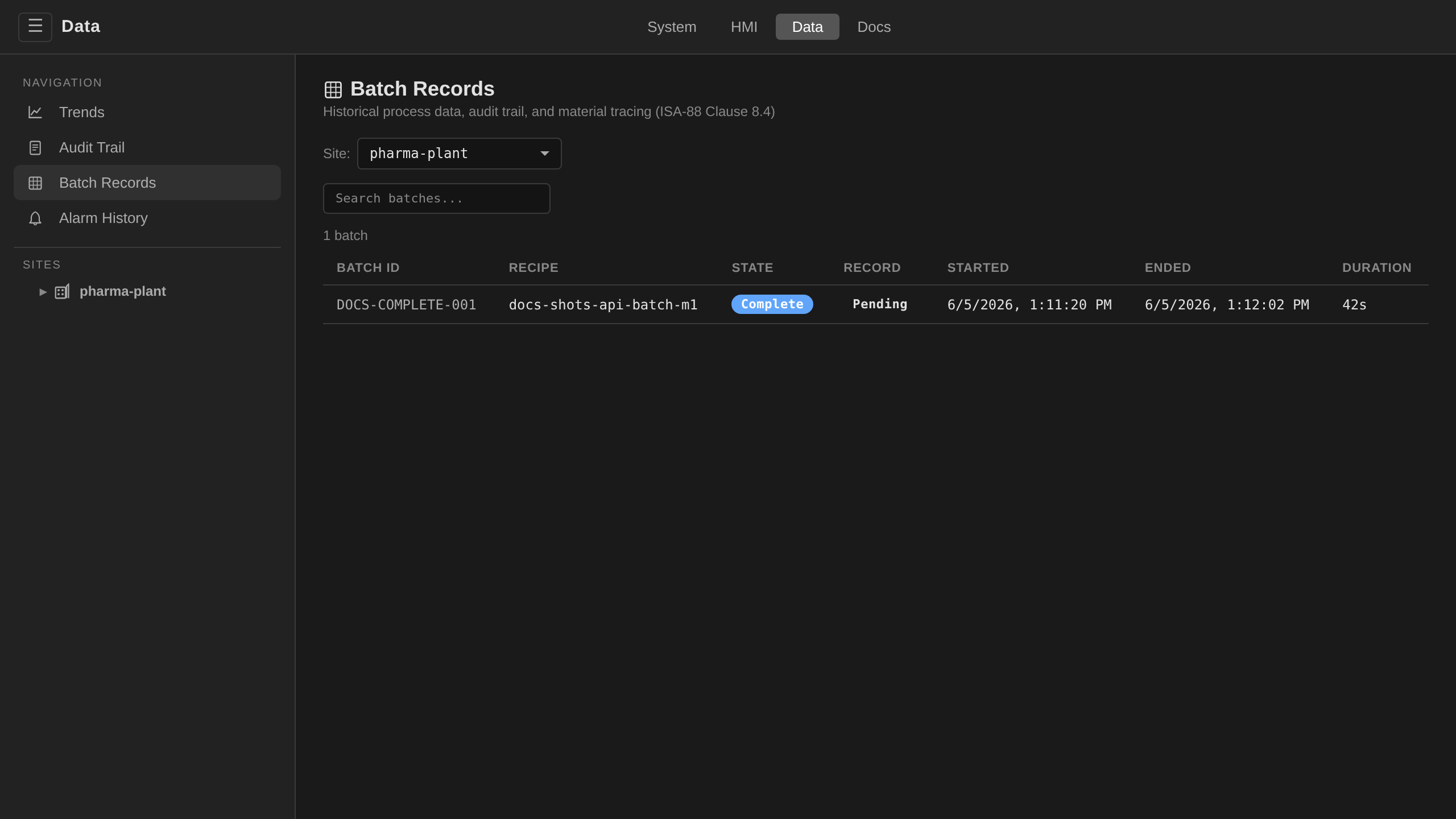
/data → Batch Records. The list shows every completed
batch with its recipe, outcome, duration, and finalization status.
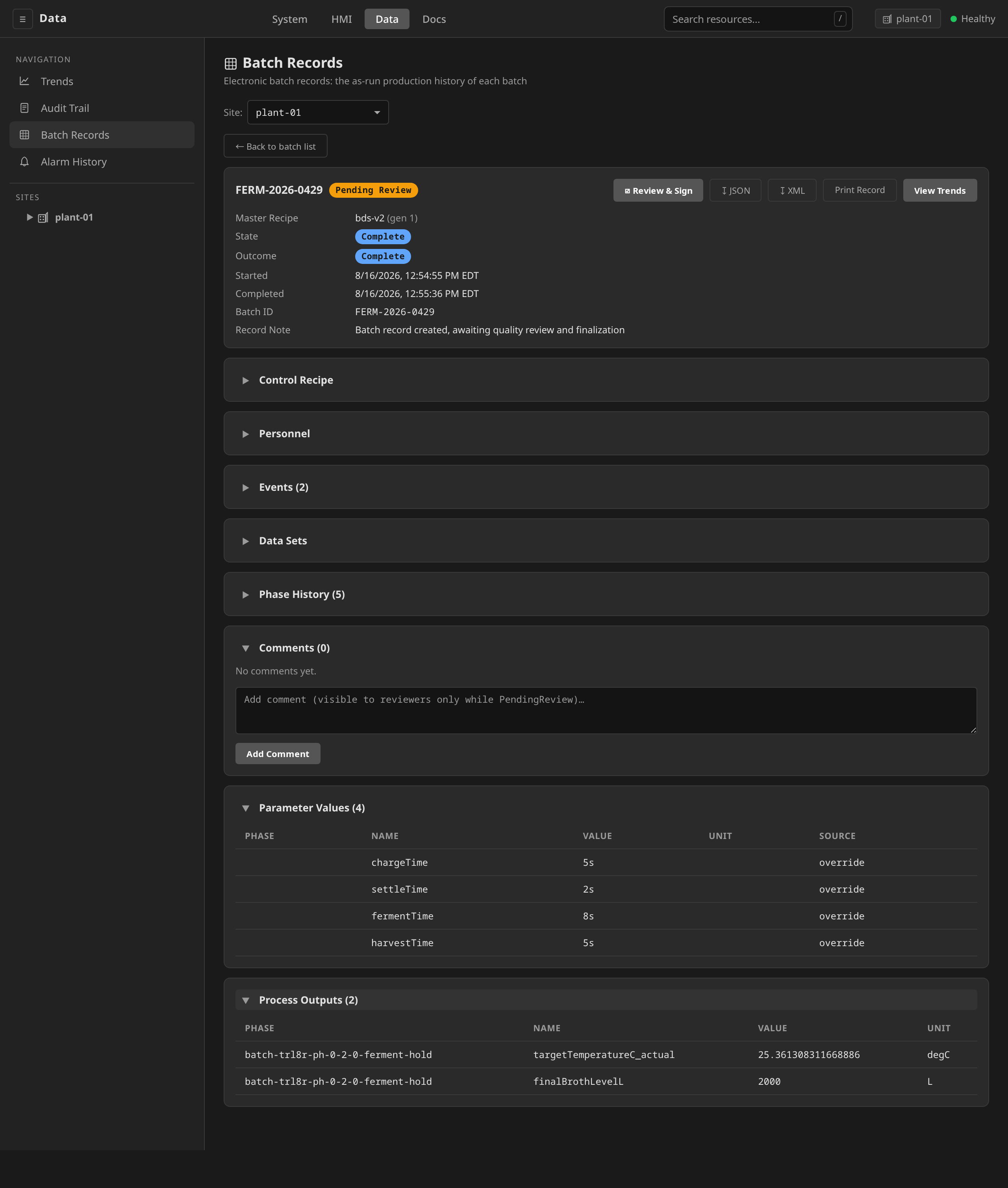
Click a row to open the consolidated production record with
collapsible sections. Review & Sign opens the e-signature
ceremony whose confirm button reads Approve & Finalize, and
applies the electronic signature that seals the record. The button
asks the session's resolved action set for batchrecord:review
(supervise, so a supervisor or an admin by default) and is not
drawn without it. The signature that seals the record is applied by
that same review call. The UI therefore reaches no separate
batchrecord:finalize action at all. The CLI and API tabs below
reach the finalize route directly. The detail header
also carries ↧ JSON / ↧ XML buttons: the same
exports as the CLI/API tabs, from the browser.
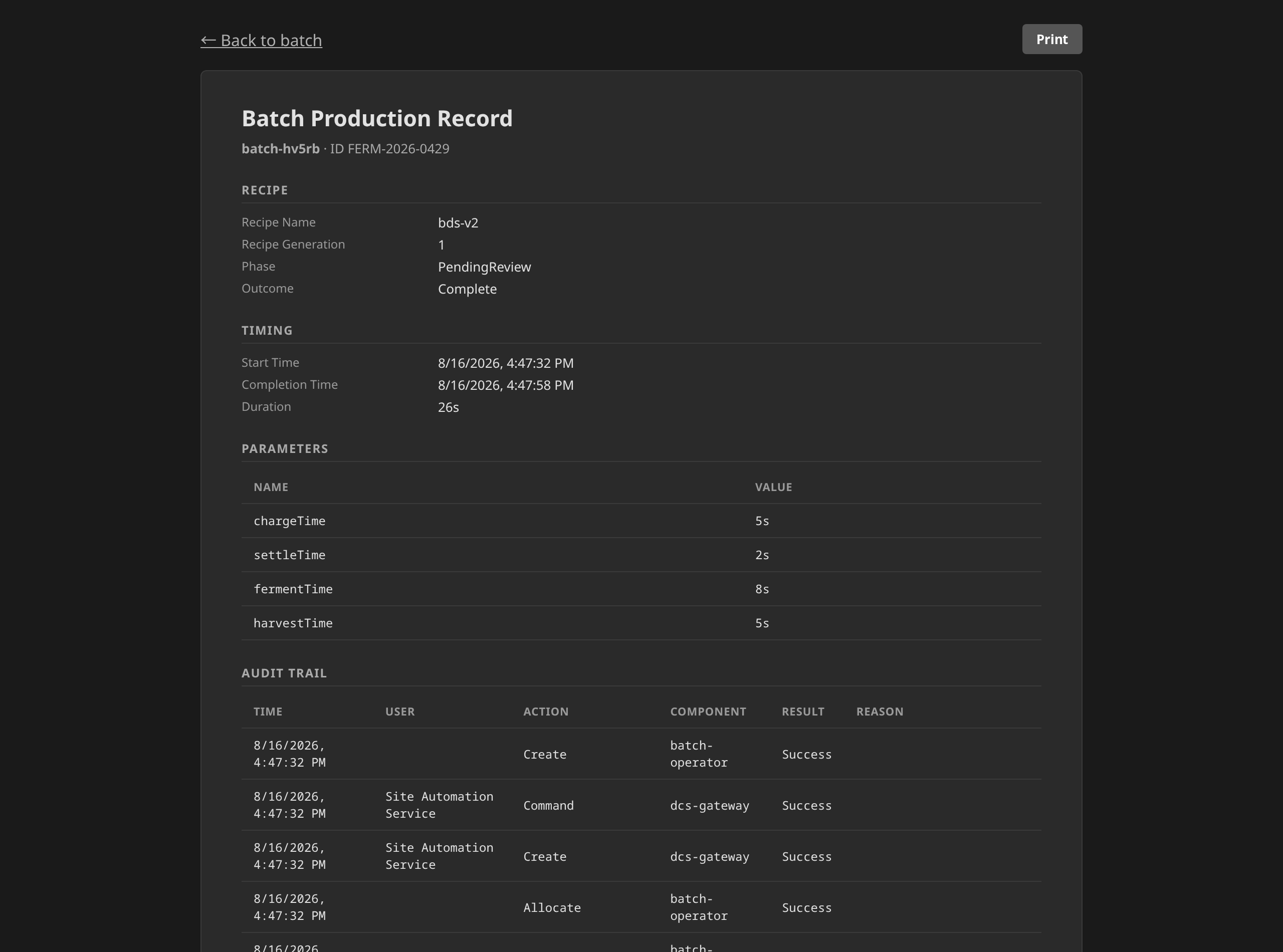
Print Record opens the printable record at
/record?site=<site>&batch=<batch>. It is a page of its own rather
than a dialog. It survives a reload and it can be bookmarked or sent
to a reviewer, and Ctrl+P prints the record without any of the
surrounding console. The same button sits on the batch detail under
Batch Production Record. The page renders the same consolidated
record the JSON export carries: recipe and timing, parameters,
material inputs and outputs, the audit trail, the quality review, and
the electronic signature with its full digest.
The signing panel expands at the foot of the record, so what you are signing stays on screen while you sign it. It carries an attestation statement that follows your Approved or Rejected decision, and a Signing as line with your name, account, and the signature meaning. Your authenticated session is the signing credential. If it is too old for signature actions the gateway asks you to sign in again first.
/data → Batch Records.
Floor-facing operators reach the same record from the HMI: on an
occupied unit's dashboard, the Active Work block carries a
Batch Record button that opens the printable record page for the
lot on that unit, in a new tab. The process display the operator was
watching stays where it was. (The button rides Active Work, so it is
an in-flight affordance. Once the batch reaches a terminal state the
record is reached from /data → Batch Records, which opens
the same page.)
# List batch records
dcs get batchrecords -s houston-plant

# Download the consolidated production record (JSON)
dcs batch record batch-001 -s houston-plant

# Download as BatchML XML
dcs batch record batch-001 -s houston-plant --format xml

# Finalize with electronic signature
dcs batch finalize record-batch-001 -s houston-plant \
  --reason "Reviewed and approved"
# List batch records
GET /api/v1/sites/houston-plant/batchrecords

# Consolidated production record
GET /api/v1/sites/houston-plant/batches/batch-001/record           # JSON
GET /api/v1/sites/houston-plant/batches/batch-001/record?format=xml  # BatchML

# Finalize with electronic signature
POST /api/v1/sites/houston-plant/batchrecords/record-batch-001/finalize
{"reason": "Reviewed and approved"}
Consolidated record assembly¶
The consolidated record assembles data from three sources: the Batch CR, AuditRecord CRDs (correlated by batch ID), and historian time-series data (tag values, alarms, state transitions). Once finalized, the BatchRecord is sealed, and a validating webhook rejects any further modifications.
Because the audit half of that assembly correlates on the batch ID alone,
the ID has to identify one batch. It does: a Batch whose spec.batchID is
already held by another Batch in the site is refused at admission
(ADR 0051). Two batches
sharing an ID would give each one's record the other's operator actions,
change history and failover events.
Operator actions and external results are separate lists¶
The record keeps two lists of values that entered the batch from outside the control logic, and the split is deliberate (ADR 0055).
spec.operatorActions[] holds what a person did: a prompt
acknowledged, a value entered, each under an electronic signature. Its
fields say so. acknowledgedBy is a person's name, and the
auditRecordRef it carries points at a signature you can verify.
spec.externalResults[] holds what a system delivered: a laboratory
assay, an analyser reading, any measurement produced outside the DCS and
handed to a phase waiting on it. These rows carry the delivering system,
the sample id, and the credential that presented the value. The
AuditRecord they reference carries no signature at all, because no person
saw the number.
Reviewing a record means reading both. The lists are not merged, and no row carries a flag distinguishing them, because a flag is only as good as the least careful reader: filing a machine delivery among the operator actions would have made the record assert that somebody acknowledged a value nobody had seen, and nothing in the row would have shown it.
When a laboratory cannot deliver and an operator types the number in
instead, that entry lands in operatorActions[], correctly, because a
person did sign for it. It carries the signature meaning
external-result-manual-entry, so those values remain retrievable as
their own population.
Materials and genealogy¶
The record's Materials section (ISA-88 Part 4 §5.2) lists the lots the
batch consumed and produced. The DCS does not capture this during
execution: material lots and traces are declarative resources, fed by an
MES integration or applied from git alongside the rest of the plant
model. At assembly time the gateway computes forward and backward
genealogy over those resources (which lots fed a batch, and which
downstream batches a lot reached), and the same read-only queries back
the Material Genealogy view at /data (open a lot from a batch
record's Materials section, or deep-link to
#/prodinfo/materialtracing).