Parameter Binding¶
How a value typed into a recipe ends up driving a specific tag on a specific control module on a specific unit. This is the "how do recipes connect to hardware" question that's implicit everywhere in the library but never spelled out in one place.
The five-layer binding chain¶
A running batch step touches five layers of binding. From the recipe down to the wire:
graph TD
A["Recipe parameter<br/>(reactorChargeRate = 75)"] -->|"parameterBindings map<br/>(MasterRecipe/ControlRecipe)"| B["Recipe step<br/>(charge-reactor calls fillPercent = 75)"]
B -->|"templateRef + templateKind"| C["PhaseTemplate parameter<br/>(charge-reactor.fillPercent)"]
C -->|"step actionST<br/>WRITE('solvent_valve.CMD', fillPercent)"| D["ControlModule role<br/>(solvent_valve)"]
D -->|"Unit.spec.cmRoles map"| E["ControlModule instance<br/>(r1-solvent-valve)"]
E -->|"ControlModule tagBindings<br/>valve_out: reactor-sim:analog.6"| F["IOModule channel<br/>(reactor-sim analog.6)"]
Each arrow is a separate binding mechanism, with its own location in the YAML and its own validation rules. Understanding them in order lets you trace any recipe parameter all the way down to the wire, and lets you debug a "phase ran but the valve didn't move" failure by walking the chain.
Concrete worked example: tracing fillPercent¶
You can trace one parameter end-to-end through a real example recipe,
sim-api-isolation-m1.
The same walk, filmed on the plant-01 fermentation plant: the recipe's parameter declarations, the procedure viewer's bindings panel, the phase contract, the Unit's role map, the instance's tag binding, and then a batch created with a formula value that comes back out of the pre-start preview.
plant-01: declaration → binding → contract → role map → wire, and the formula-picked value read back from the un-started batch's preview.Layer 1 — Recipe parameter declaration¶
The recipe declares its top-level parameters in spec.parameters.
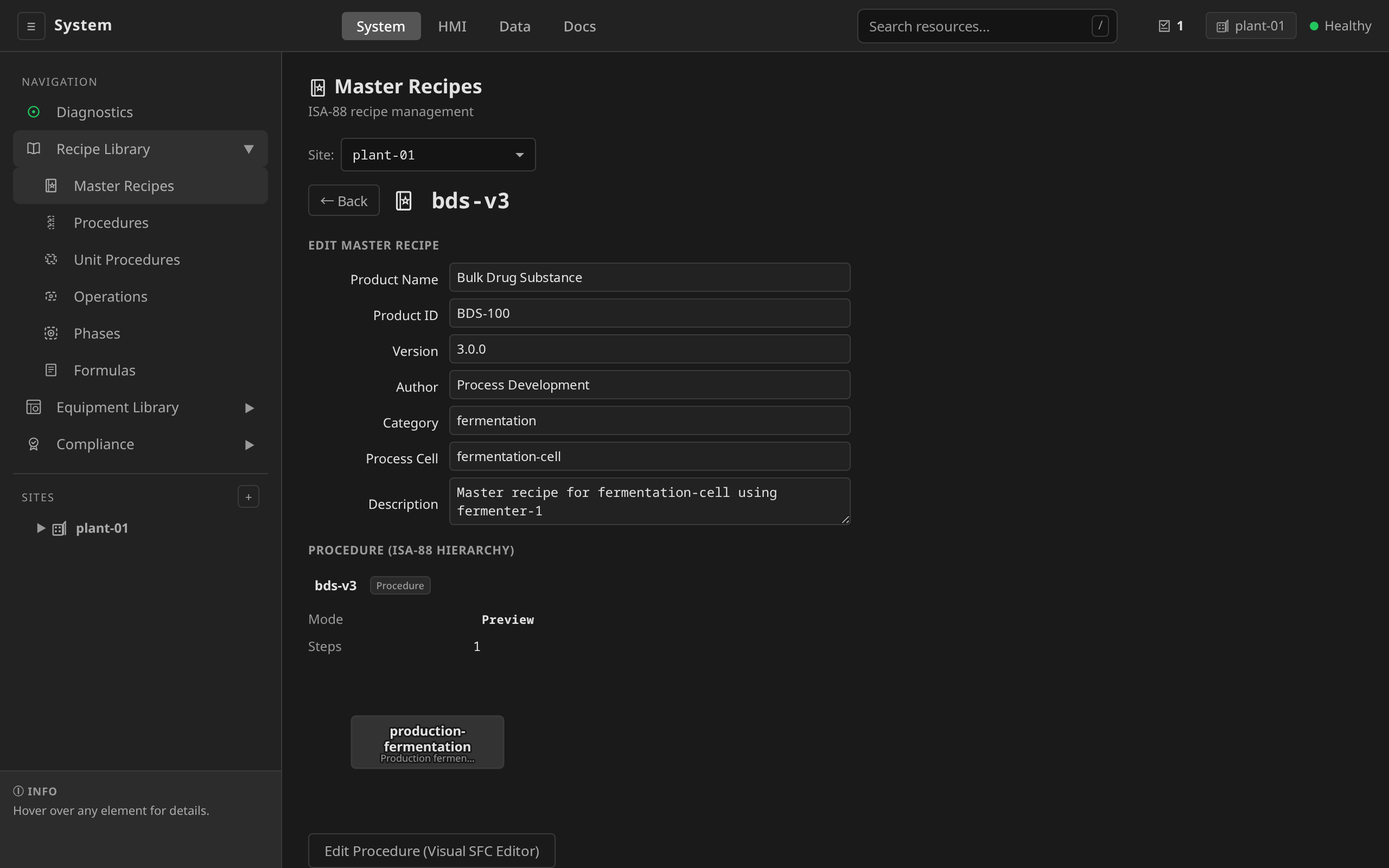
/system → Recipes → Master Recipes → pick
sim-api-isolation-m1 → Parameters section. Each
row is one declared parameter: name, type, default, min, max,
engineering unit, and description. + Add Parameter adds a
row when editing.
# examples/riverbend/19-api-isolation-recipes.yaml — MasterRecipe sim-api-isolation-m1
spec:
  parameters:
    - name: reactorChargeRate
      type: REAL
      defaultValue: "75"
      minValue: "10"
      maxValue: "100"
      engineeringUnit: "%"
      description: "Reactor inlet valve opening during charge"
    # ... many more parameters ...
These are the knobs that get set at batch creation time. The
create form itself carries no per-parameter inputs, and a batch's
values arrive one of two ways. MasterRecipes define named parameter
sets via spec.formulas (RecipeFormula). Each formula is a
collection of parameter name-value pairs pre-tuned for a specific
batch size or product grade, and the + New → Batch form offers a
formula dropdown whenever the recipe defines any. Alternatively,
Batch.spec.parameterOverrides overrides individual values on the
API/YAML path. A parameter no formula or override touches runs at its
defaultValue. See
Batch Execution
for both mechanisms.
Layer 2 — Recipe step parameter binding¶
Down in the procedure, a recipe step references a phase template and binds each of the phase template's parameters to a recipe-level parameter. There are two forms depending on which recipe level you're looking at.
MasterRecipe and ControlRecipe use a parameterBindings map
(phase-parameter: recipe-parameter).
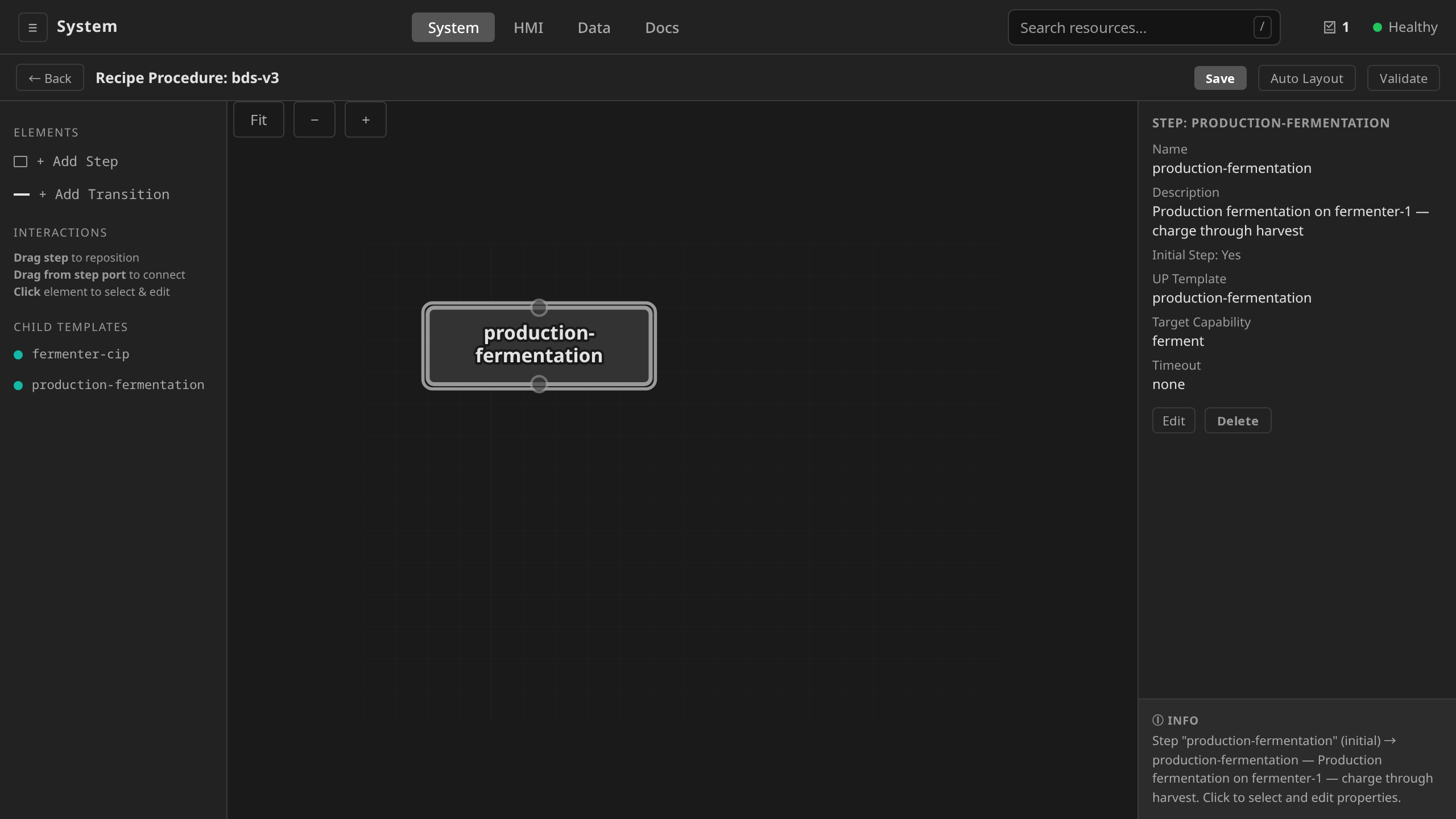
On the same MasterRecipe detail view, the procedure viewer's
Parameter Bindings panel lists every step's bindings: the
step parameter, the recipe parameter it binds to, and the value
it currently resolves to. The bindings themselves are recipe
YAML: Edit SFC opens the procedure editor, which preserves
a step's parameterBindings on save, but rewriting one is an
apply-path edit.
# examples/riverbend/19-api-isolation-recipes.yaml — MasterRecipe sim-api-isolation-m1
procedure:
  chart:
    steps:
      - name: charge-reactor
        description: "Transfer solution from tank to reactor"
        templateRef: charge-reactor
        templateKind: PhaseTemplate
        targetCapability: reaction
        parameterBindings:
          fillPercent: reactorChargeRate
          duration: reactorChargeDuration
When does substitution happen? Not at dcs recipe approve. The
batch operator resolves the bindings when it instantiates a
ControlRecipe from the MasterRecipe at batch creation
(internal/controller/batch/recipe_instantiator.go). The
ControlRecipe is the post-substitution snapshot, the literal values
that actually drive the run. If the operator started this batch with
reactorChargeRate = 75, the resulting ControlRecipe step has
fillPercent: 75 literally embedded, and that is what flows to the
phase's input.
Substitution is recursive. Nested OperationTemplate and UnitProcedureTemplate parameters are substituted the same way, so the chain above can be deeper than five layers when a recipe calls through OperationTemplates.
Layer 3 — PhaseTemplate parameter declaration¶
The phase template declares the parameter on its end.
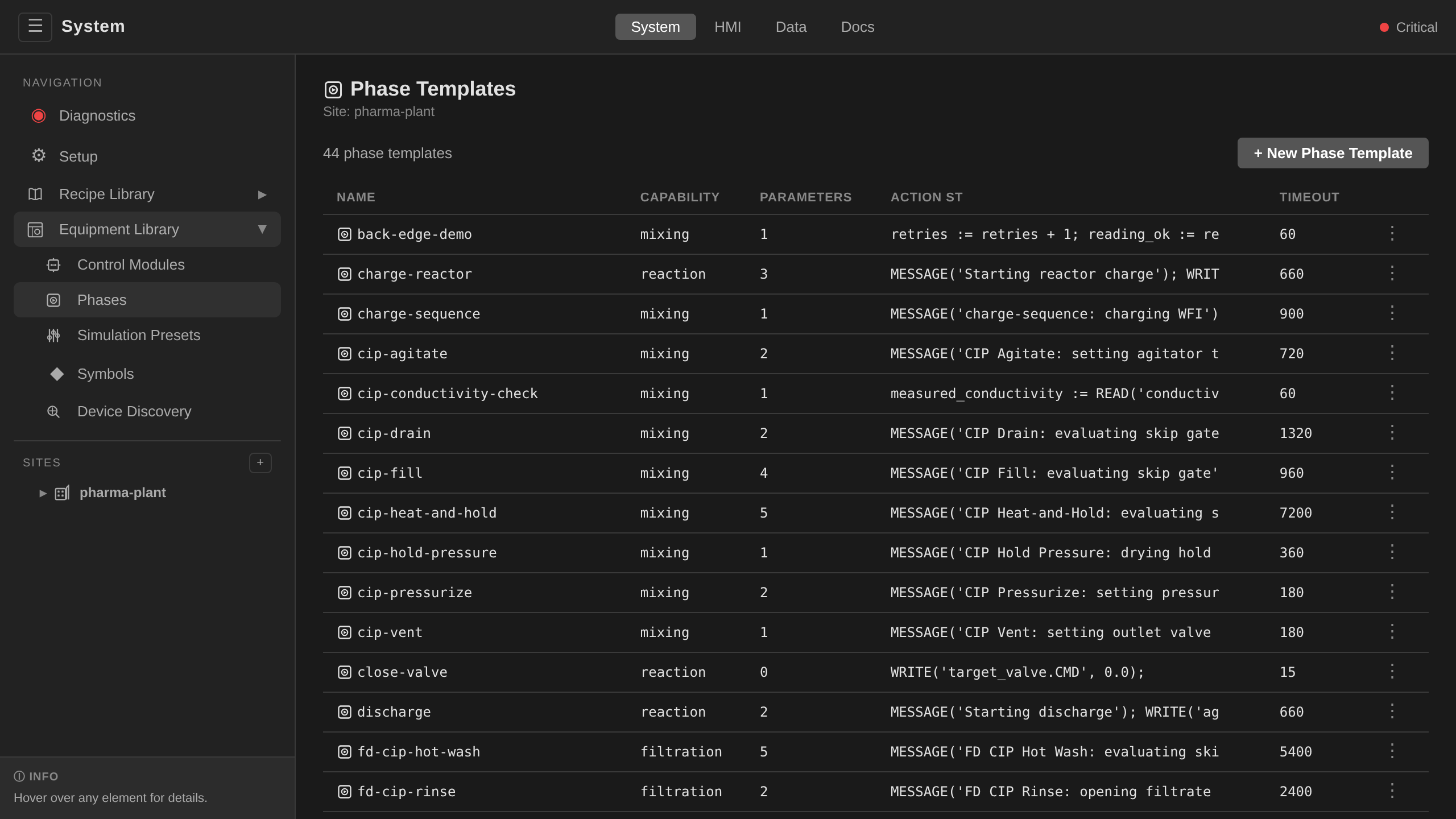
/system → Equipment Library → Phases → click
charge-reactor. The Parameters section shows every
declared parameter (name, type, required, min, max, default,
unit). Edit on the detail view rewrites the contract. See
Adaptation Guide Step 5
for the authoring pattern.
# examples/riverbend/11-phase-templates.yaml
apiVersion: procedural.dcs.io/v1alpha1
kind: PhaseTemplate
metadata:
  name: charge-reactor
spec:
  parameters:
    - name: fillPercent
      type: REAL
      required: true
      minValue: "10"
      maxValue: "100"
      unit: "%"
This is the template's contract. The MasterRecipe controller
validates that every required phase parameter has a binding in the
recipe step and that the referenced PhaseTemplate exists. It does
NOT range-check values against minValue / maxValue today. Try
to bind fillPercent: 150 and dcs recipe approve will accept it.
If you need a hard range stop, layer an AlarmDefinition on the
downstream tag. See Validation below.
The phase template can use fillPercent directly inside its action
steps.
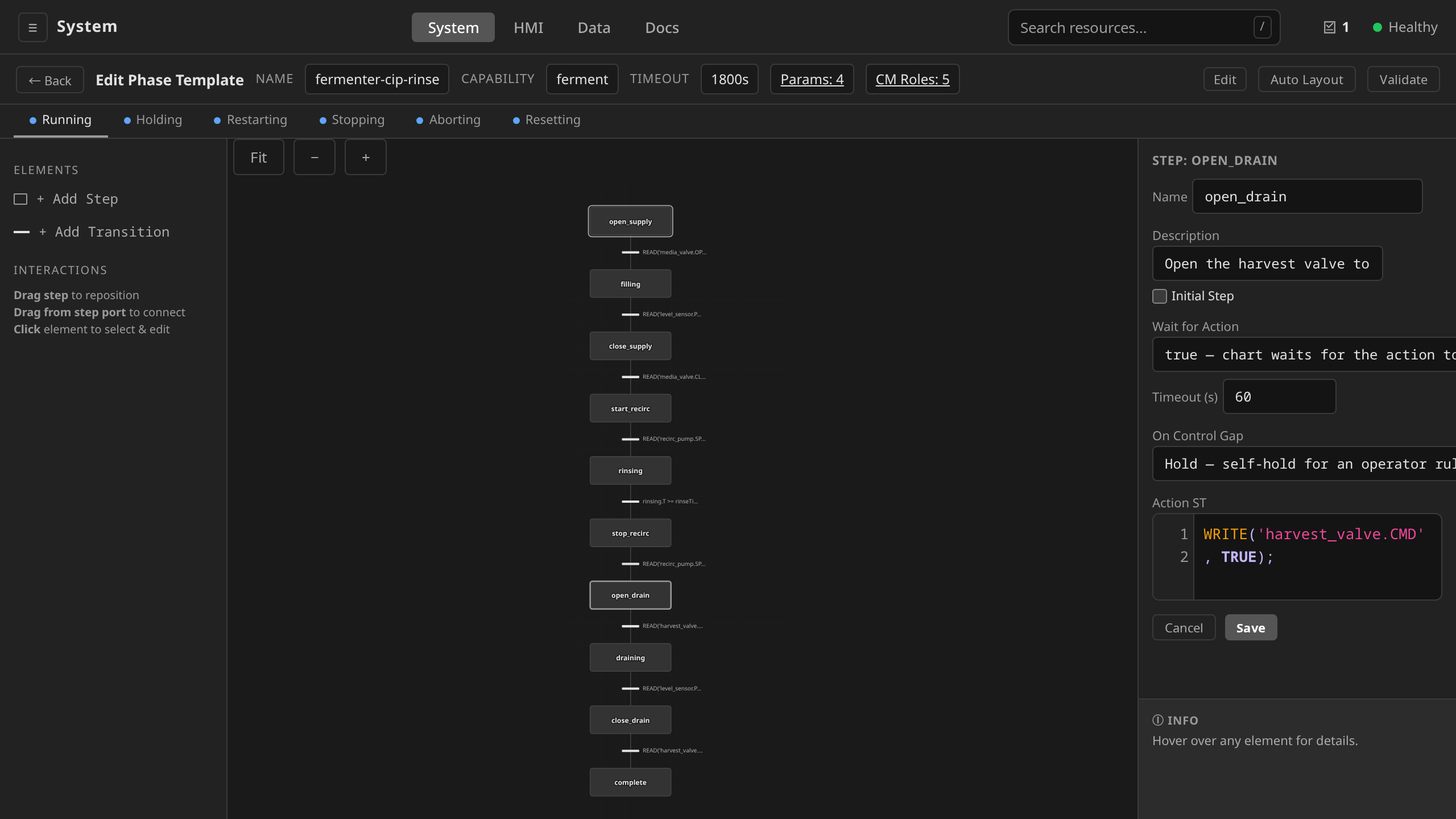
From the PhaseTemplate detail view, click Edit SFC →
click the start_charge step → the Action ST editor
references the parameter by name. The editor's context panel
lists declared parameters (from Layer 3) so the reference is
autocompletable.
spec:
  actionChart:
    steps:
      - name: start_charge
        actionST: |
          WRITE('agitator.CMD', agitatorSpeed);
          WRITE('solvent_valve.CMD', fillPercent);   # ← the parameter
At runtime the SFC engine substitutes the resolved value into the ST
expression, so fillPercent evaluates to 75 (or whatever the
operator provided).
Layer 4 — Role binding (logical → physical)¶
Notice the action step writes to 'solvent_valve.CMD', with no
instance name in it. The phase template references the
role solvent_valve. It never names a specific instance. Roles
are declared in the PhaseTemplate's cmRoles.
On the PhaseTemplate detail view, the CM Role Requirements section lists each role the template contracts for: role name, required module type, and description. Each row is a contract the Unit's role map (below) must satisfy.
spec:
  cmRoles:
    - role: solvent_valve
      moduleType: analog-control
      description: "Reactor solvent valve for material feed"
The role-to-instance binding lives on the Unit. The recipe step
carries none of it. Each Unit declares a cmRoles map that names a
specific ControlModule for each role the unit fulfills.
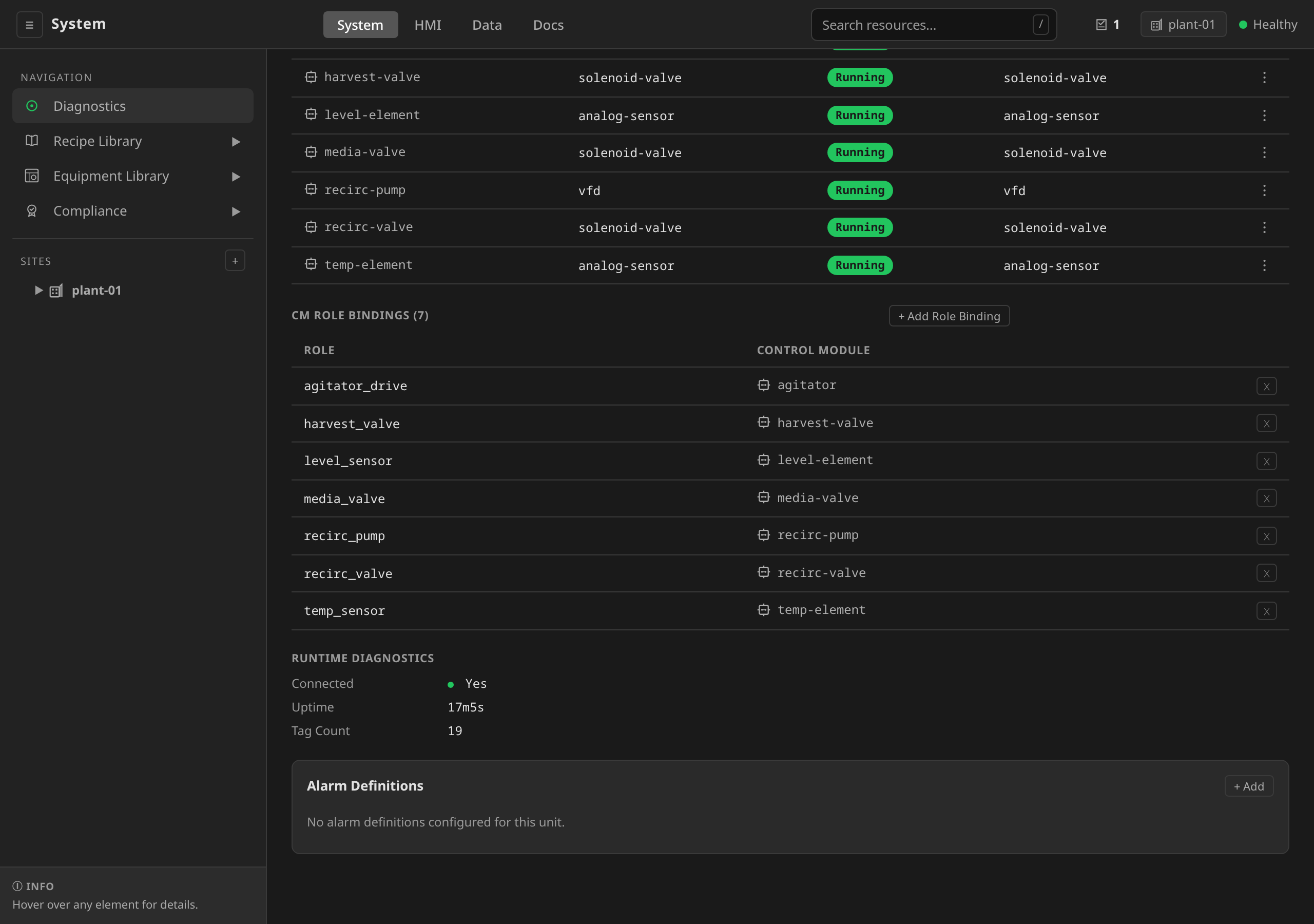
/system → expand the site in the left sidebar →
click the Unit (fermenter-1). The CM Role Bindings section
shows one row per role the unit fulfills with the bound
ControlModule name on the right. Editing rewrites the map.
# examples/riverbend/10-unit-patches.yaml — Unit reactor-1
spec:
  cmRoles:
    temp_sensor:    r1-temp-sensor
    solvent_valve:  r1-solvent-valve   # ← role → instance
    outlet_valve:   r1-outlet-valve
    agitator:       r1-agitator
    # ... etc
When the runtime executes a phase on reactor-1, it resolves
solvent_valve through reactor-1.spec.cmRoles to the concrete
instance r1-solvent-valve. A different unit (reactor-2,
reactor-7) has its own cmRoles map pointing at its own solvent
valve. The same PhaseTemplate works against any of them.
The platform validates that each bound instance's moduleType
(derived from its templateRef) satisfies the role's moduleType
declared in the phase template. Try to point
cmRoles.solvent_valve at a discrete-valve ControlModule when the
phase template requires analog-control and the recipe's
BindingsResolved condition goes False (blocking promotion), and a
batch started anyway fails its role-contract check at instantiation.
A more specific type satisfies its generic parent, but never the
reverse. vfd, pid, and pid-cascade satisfy analog-control.
solenoid-valve and on-off-valve satisfy discrete-valve.
Inspect the full matrix with dcs recipe check-bindings <recipe>.
The single most important idea in parameter binding is that phase
templates never know which physical equipment they're driving. They
write to a role name, and the Unit decides which instance
fulfills the role. That's what makes the same charge-reactor
template work for reactor-1 in the reference plant and for reactor-7 in
your plant. Both have a solvent_valve role bound to whatever the
real solvent inlet is on each unit.
There is no per-step or per-recipe override of this mapping today. If you need a different binding for a specific recipe (e.g., a modulating inlet on the same unit), clone the unit. See Adaptation Guide § Step 7.
Layer 5 — Tag binding (instance → IOModule channel)¶
The ControlModule instance binds the template's declared
inputs/outputs to physical I/O channels. The keys on the left of
tagBindings are the input/output names the ControlModuleTemplate
declares. The user-facing tag names are a separate vocabulary. For the
analog-control
template those are position_fb (input) and valve_out (output).
/system → expand the Unit → click the ControlModule
(r1-solvent-valve). The Configuration section's table
carries one row per bound template input/output: the declared
name (with its in/out direction) on the left, the IOModule
address (<iomodule>:<address>) on the right. The inputs and
outputs themselves come from the referenced
ControlModuleTemplate, so the list of bindable names is fixed
by the template.
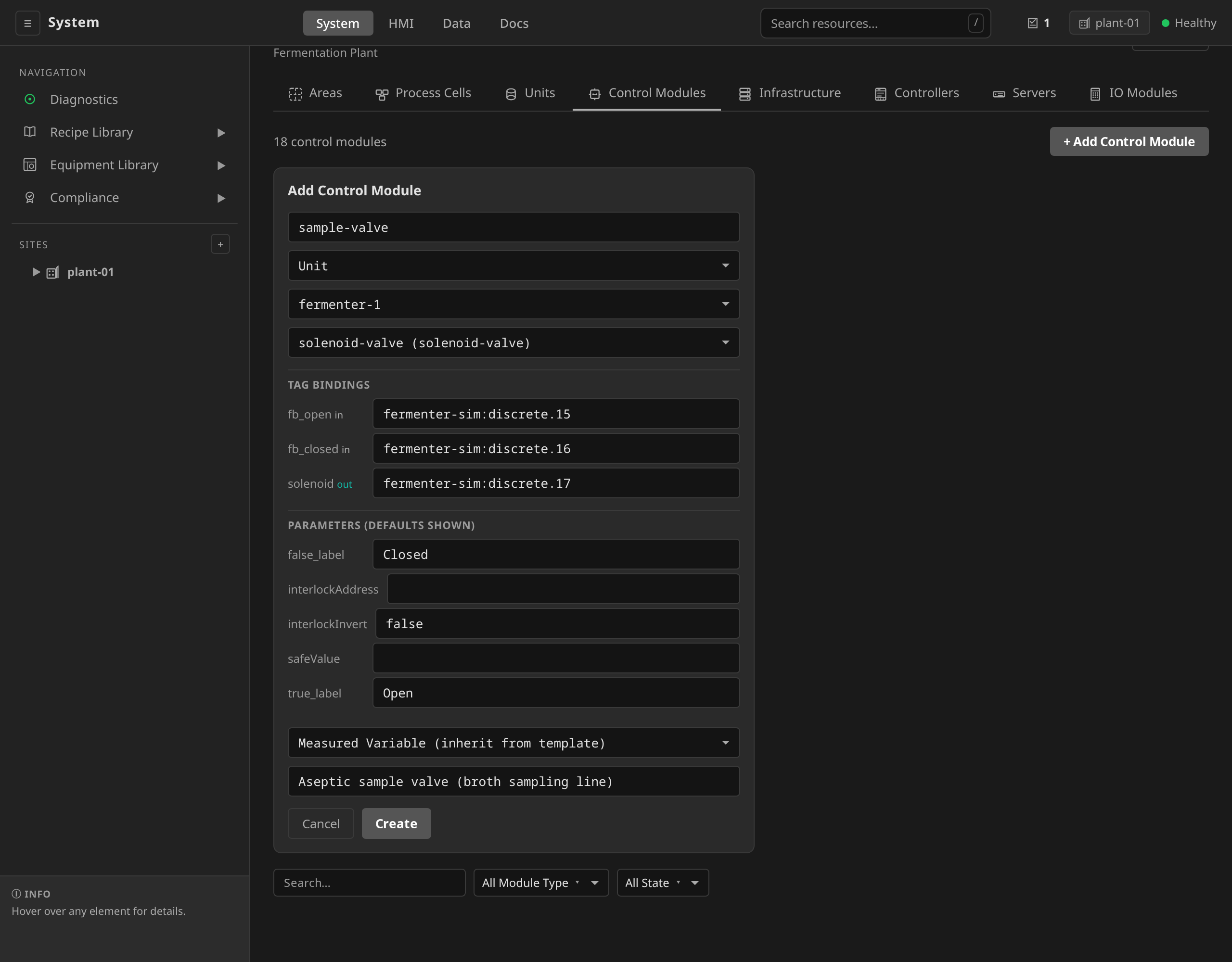
iomodule:channel string entered at Create, and the instance polling live values seconds later. The Configuration table on the instance detail is where Debug step 5 reads the same binding back.
# examples/riverbend/07-controlmodules.yaml
apiVersion: physical.dcs.io/v1alpha1
kind: ControlModule
metadata:
  name: r1-solvent-valve
spec:
  parentName: reactor-1
  parentKind: Unit
  description: "Reactor solvent inlet valve (simulated)"
  templateRef: analog-control
  tagBindings:
    position_fb: "reactor-sim:analog.9"   # AI from the valve
    valve_out:   "reactor-sim:analog.6"   # AO to the valve
The user-facing CMD tag is backed inside the template by a
REAL_CONST block (sp_cmd) whose output feeds the AO block
named write_valve. When the runtime writes to
r1-solvent-valve.CMD, the function-block network updates
sp_cmd.OUT. That output propagates to write_valve, which writes
to whatever address the valve_out output is bound to. Here that is
channel 6 on the reactor-sim IOModule. A real hardware deployment
would swap "reactor-sim:analog.6" for something like
"wago-rack-1:holding/40006" and the same phase template would drive
a Modbus device. See
io/index.md for IOModule details.
Summary table¶
| Layer | What it does | Where in YAML | Where validated |
|---|---|---|---|
| 1. Recipe parameters | Operator-tunable knobs | spec.parameters on MasterRecipe |
At apply time (schema) |
| 2. Recipe step parameter binding | Bind recipe knobs to phase inputs | spec.procedure.chart.steps[*].parameterBindings |
At recipe approval (required params present, templateRef resolves); substitution resolves at batch instantiation |
| 3. PhaseTemplate parameters | The phase's input contract | spec.parameters on PhaseTemplate |
At apply time (schema) |
| 4. Role binding | Logical role → physical instance | spec.cmRoles on Unit (map: role → ControlModule name) |
At recipe reconcile (BindingsResolved condition; violations block promotion) and again at batch instantiation (bound CM's moduleType must satisfy the role's declared moduleType) |
| 5. Tag binding | Template input/output → IOModule channel | spec.tagBindings on ControlModule |
At save time the gateway refuses a binding naming no IOModule; whether the channel exists on that module is checked nowhere (#1745) |
Validation¶
Keep in mind what does and does not get enforced:
| Check | Enforced? | Where |
|---|---|---|
| Required phase parameters all bound | Yes | MasterRecipe controller, at dcs recipe approve |
| Every declared cmRole mapped on the target unit | Yes | MasterRecipe controller (BindingsResolved), and at batch instantiation |
| Referenced PhaseTemplate / OperationTemplate exists | Yes | MasterRecipe controller, at approve |
Parameter value within minValue / maxValue |
No | Document the limit in the template; enforce via AlarmDefinition on the downstream tag |
ControlModule's moduleType satisfies role moduleType |
Yes | MasterRecipe controller (BindingsResolved condition, blocks promotion) and at batch instantiation; dcs recipe check-bindings shows the matrix |
tagBindings address names an IOModule at all |
Yes | Gateway, on ControlModule create and update (#1745) |
tagBindings address exists as a channel on that IOModule |
No | Nowhere on a cluster. A driver answers an address it does not carry the way it answers any other unknown one, and a simulation driver answers it Bad for the life of the plant. dcs lint bindings <dir> checks it in a tree of documents, before any of it is applied, and dcs lint <dir> runs that check with the rest |
If you need hard enforcement of a parameter range at runtime, define
an AlarmDefinition with conditionType: TagHigh / TagLow on the
downstream tag and set exceptionAction: Stop. See
Alarms & Interlocks.
How to debug a binding failure¶
When something doesn't work, walk the chain in order. Every step is an observe action, so each shows a UI path and a CLI fallback.
1. Did the operator's value reach the recipe step?¶
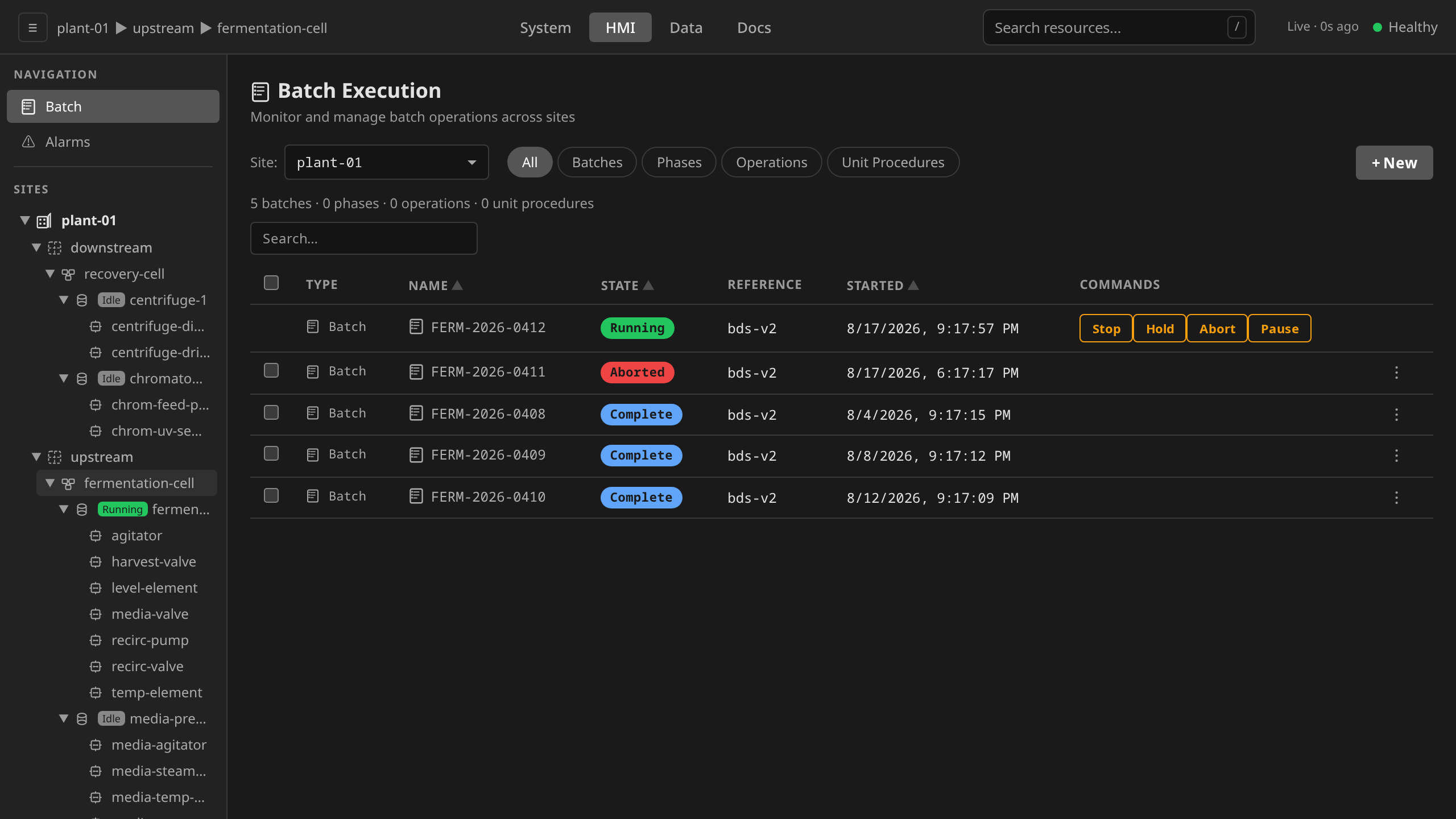
/hmi → Batch Execution → click the batch. The
Parameters section shows the literal values the operator
supplied at batch creation. Cross-check reactorChargeRate
against what you expected. Accidental overrides show up here.
dcs get batch <name> -o yaml | grep -A 5 parameters
2. Did the recipe substitution resolve?¶
/hmi → Batch Execution → click the batch →
Recipe SFC Preview. Its Parameter Bindings table lists
every step parameter against the recipe parameter it binds to
and the resolved value. Any ${reactorChargeRate} still
showing in the Value column means substitution didn't run.
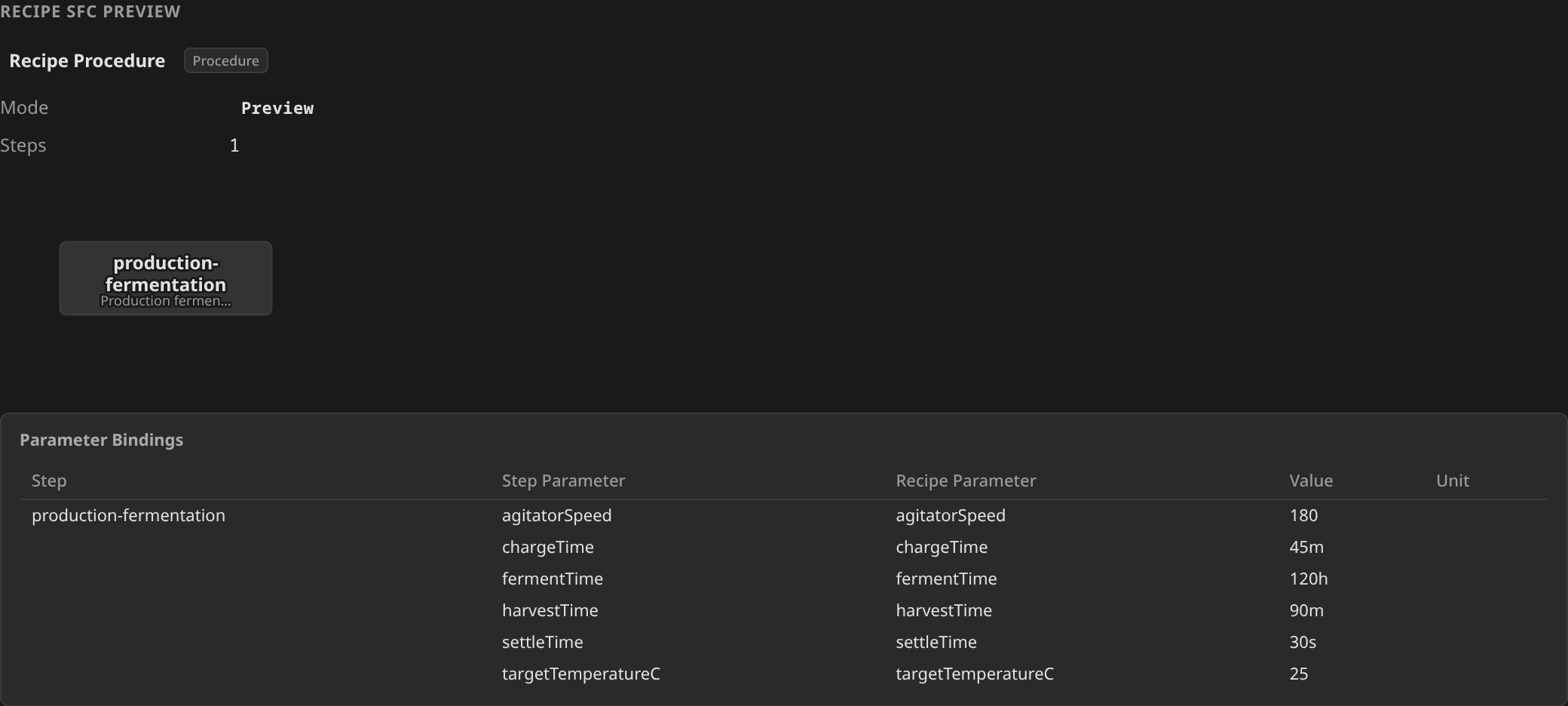
This section renders only while the ControlRecipe exists and execution has not started. Once the batch starts it is replaced by the live Procedural SFC, so for a batch already running use the CLI tab.
dcs get controlrecipes <name> -o yaml
The ${reactorChargeRate} should be replaced with a literal.
This works whatever state the batch is in, which is why it is
the reliable answer for a batch that has already started.
3. Did approval pass?¶
/system → Recipes → Master Recipes → click
the MasterRecipe. The status header shows Phase and any
Validation Errors from the approval controller.
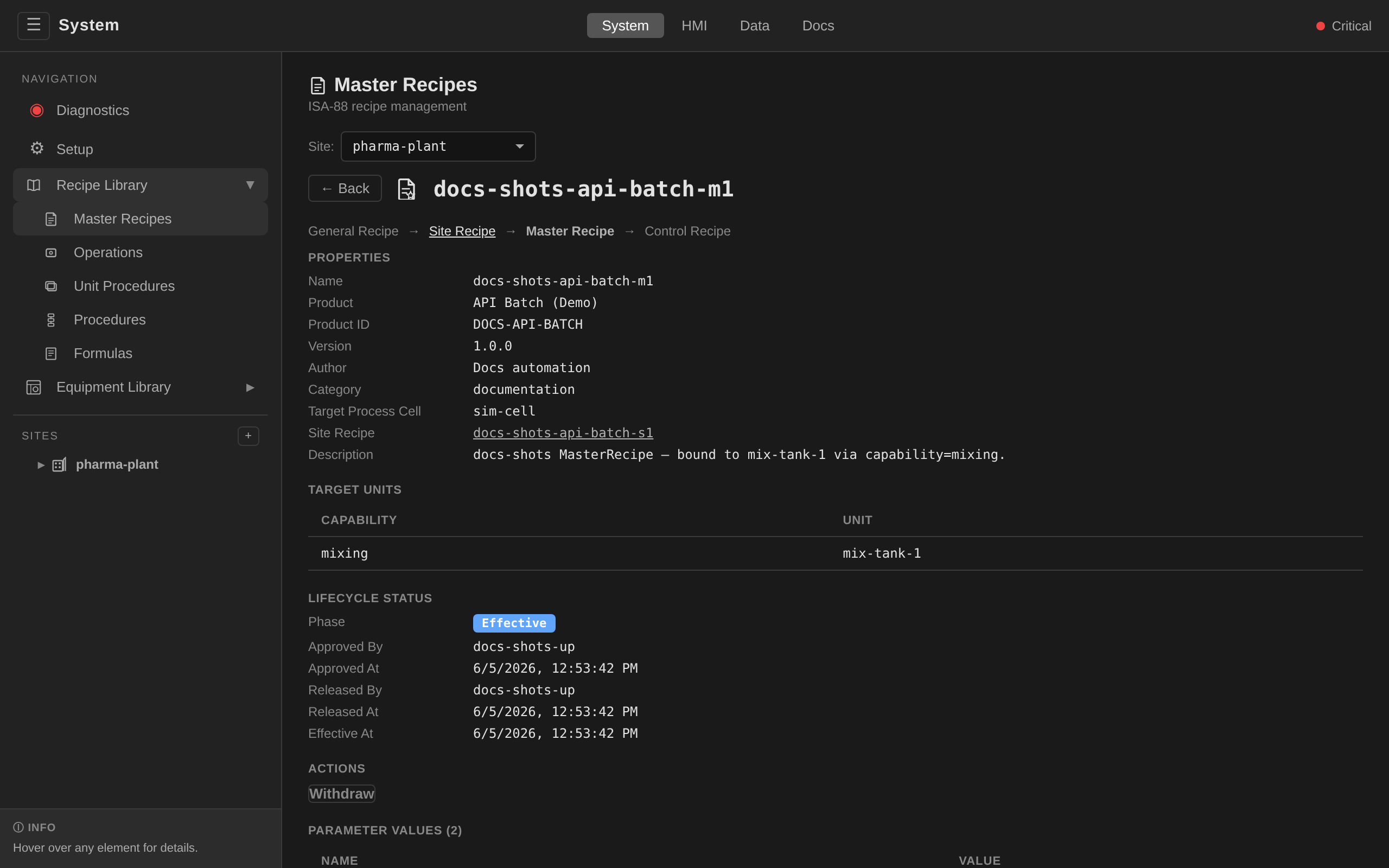
templateRef is fixed from the picker.
dcs get masterrecipes <name> -o yaml
Check status.phase and status.validationErrors.
4. Is the role bound to the right instance type?¶
Open the PhaseTemplate in /system → Equipment Library
→ Phases to see its CM Role Requirements (contract).
Then open the Unit under the site sidebar to see its CM Role
Bindings (actual). Each bound ControlModule's template type
must match the role's required moduleType.
dcs get phasetemplate <name> -o yaml
dcs get unit <unit> -o yaml
Cross-check each bound ControlModule's templateRef against
the role's declared moduleType.
5. Is the ControlModule tag bound to a real channel?¶
/system → expand the Unit → click the ControlModule.
The Configuration section's table shows each bound template
input/output and its IOModule address. Cross-check the address
against the IOModule's own detail view (site →
IO Modules) to confirm the channel is declared.
dcs get controlmodule r1-solvent-valve -o yaml
dcs get iomodule reactor-sim -o yaml
6. Is the channel actually wired in the IOModule?¶
On the IOModule detail view, the Simulation section (for
sim IOModules) lists addressMap entries and the referenced
SimulationPreset or inline behaviors. For real hardware,
the tag live-values view under /hmi shows whether the wire
is producing plausible readings. Otherwise grab a multimeter.
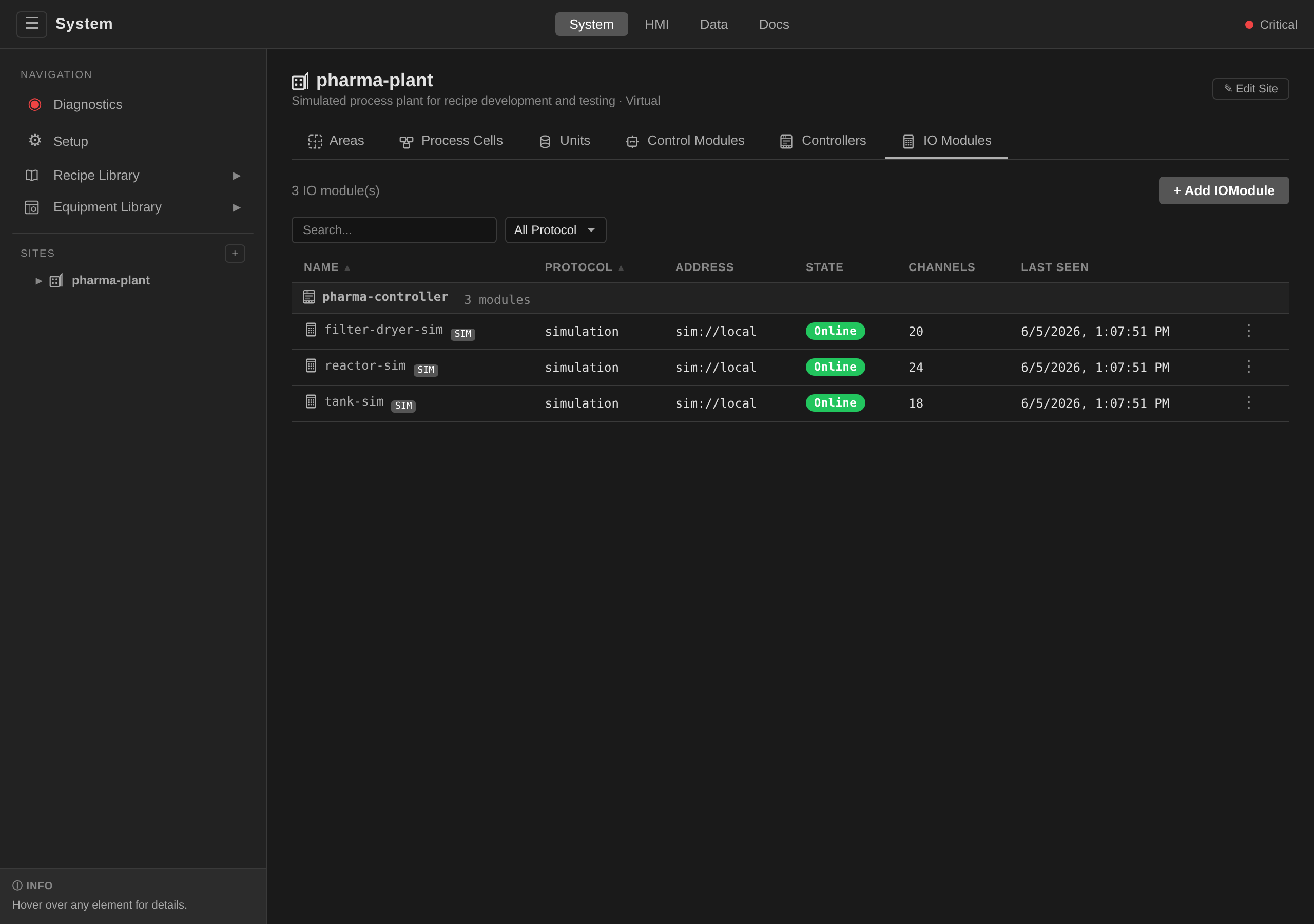
analog.N / discrete.N addressing grammar, the simulation binding, and live channel values ticking. Everything this step checks, on camera.
dcs get iomodule reactor-sim -o yaml
For sim, check spec.simulation.addressMap binds the channel
and the referenced SimulationPreset (or any inline
spec.simulation.behaviors override) drives it. Real hardware
is where you grab a multimeter.
The most common bug in adapted recipes is layer 4, where the Unit's
cmRoles mapping points at a ControlModule whose templateRef
doesn't match what the phase template's role declaration expects.
The error message usually points right at the problem. If not, walk
the chain top-down.
Related Documentation¶
- Adaptation Guide — a worked end-to-end example of cloning a phase, rebinding a role, and running a batch.
- Recipes — the recipe approval and scheduling lifecycle.
- Mental Models — the distinction between recipe parameters (per-batch) and control-module parameters (per-instance configuration).