Control Module: solenoid-valve
A recipe-driven binary on/off valve with dual-limit-switch feedback.
Functionally identical to discrete-valve except
for richer position sensing. Two independent digital inputs (fb_open
and fb_closed) confirm whether the valve has reached either limit or
is stuck somewhere in between. Use this template whenever the valve
body has mechanical proximity switches at both the open and closed
positions: common for large-bore pneumatic valves, automated
butterfly valves, and safety-critical isolation valves.
If your valve only has a single position feedback (or none), use
discrete-valve. Don't fake a second switch.
Where to find it
System endpoint → Equipment Library → Control Modules tab → select solenoid-valve.
What you see on the faceplate
| Element | Meaning |
|---|---|
| STATE | Synthesized valve position — Fault / Open / Closed / Traveling |
| CMD | Current open/close command (writable) |
| OPEN | Open limit switch feedback (read-only) |
| CLOSED | Closed limit switch feedback (read-only) |
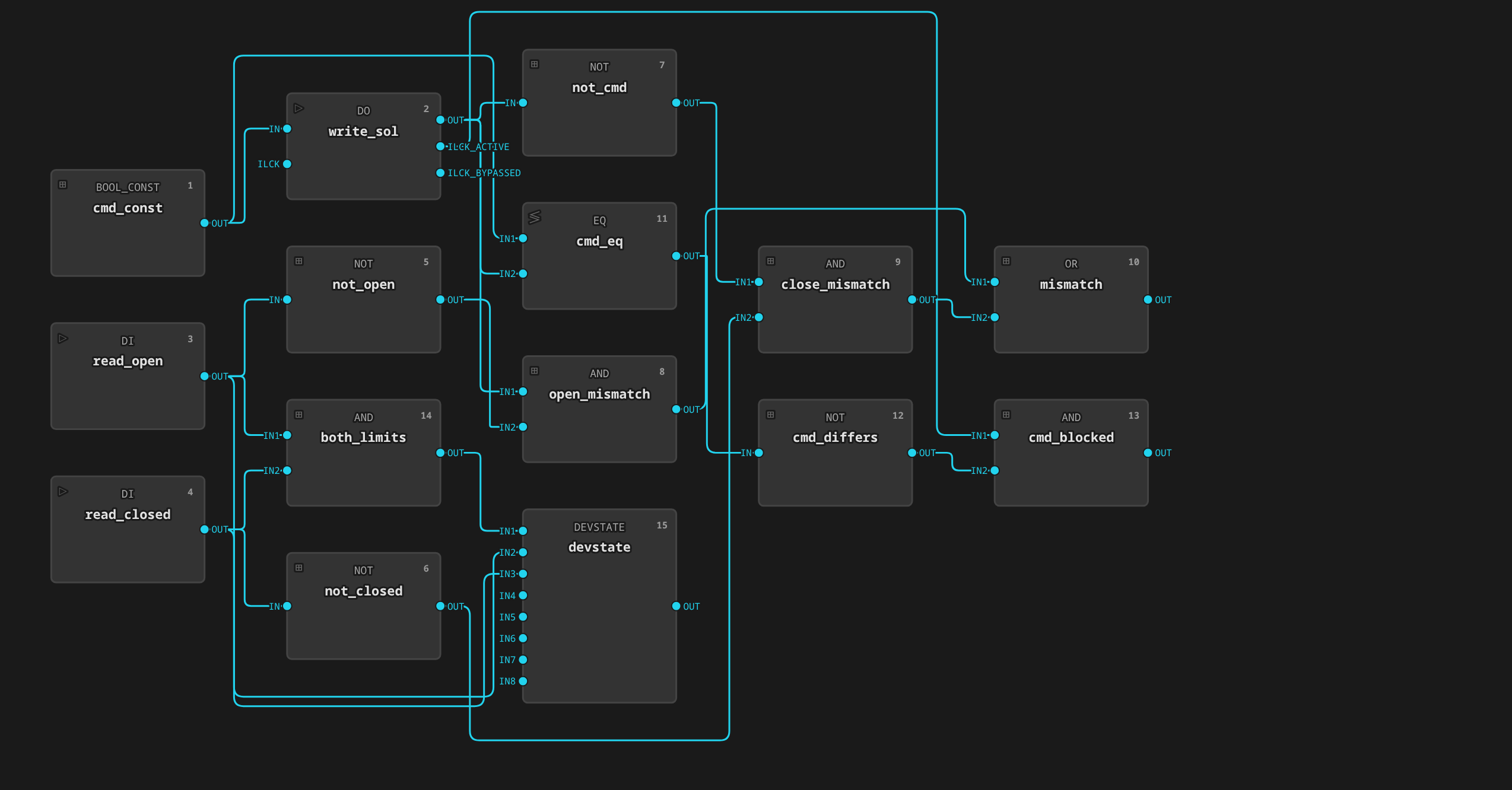
| MISMATCH | Driven position not confirmed by the matching limit switch (device fault) |
| CMD_BLOCKED | The device interlock is defeating a contrary standing command |
STATE = Traveling (neither switch made) is normal while the valve
moves. It is not a mismatch. STATE = Fault (both switches made)
is physically impossible for the valve body and indicates a limit-switch
or wiring fault. Driven-position-vs-feedback disagreement is the separate
MISMATCH alarm tag, debounced by its AlarmDefinition to ride through
travel time.
Tags
The template declares deviceClass: valve and a role on each tag
(ADR 0016). The HMI renders
from these declarations and never infers meaning from moduleType or
tag names. The STATE tag is the derived device state
(ADR 0018): a string tag
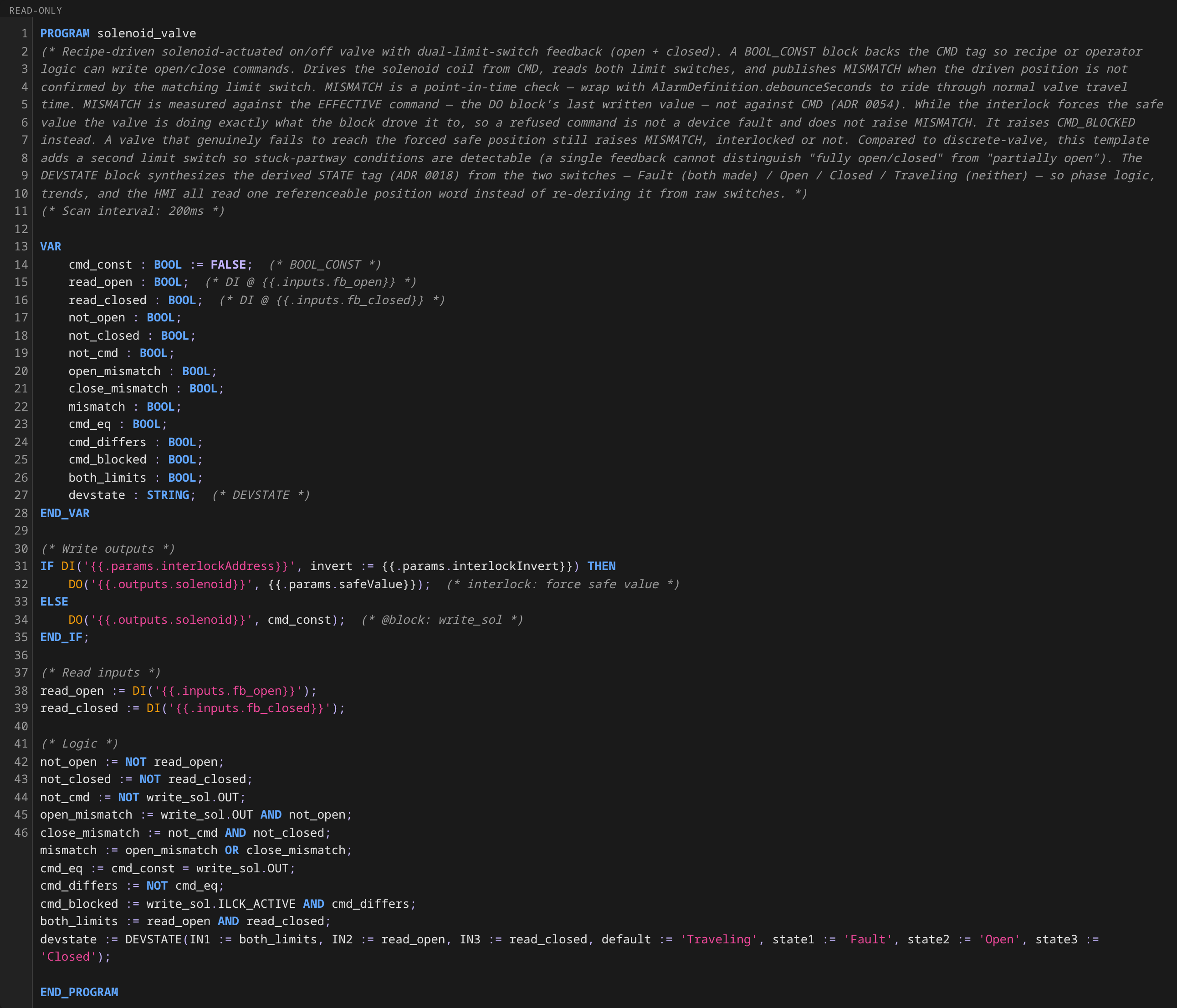
computed by the DEVSTATE block from both limit switches, shown
verbatim as the unit card's prominent status word and the faceplate
STATE row. OPEN and CLOSED are plain switch rows with per-tag
Active/Inactive labels. They say whether each switch is made. The
position word lives on STATE.
| Tag | Type | Access | Role | Description |
|---|---|---|---|---|
STATE |
String | read | state |
Synthesized valve position: Fault (both switches), Open, Closed, or Traveling (neither). Referenceable everywhere a tag is — READ('spray-valve.STATE') = 'Traveling' from phase logic, historized as text, trended as change-of-state records (no numeric curve). |
CMD |
Boolean | read/write | command |
Open (true) or close (false) command. |
OPEN |
Boolean | read | — | Open-position limit switch. Per-tag labels Active/Inactive say whether this switch is made. |
CLOSED |
Boolean | read | — | Closed-position limit switch. Per-tag labels Active/Inactive say whether this switch is made. |
MISMATCH |
Boolean | read | alarm |
true when the position the block drove is not confirmed by the matching limit switch. Measured against the driven value (CMD plays no part), so an interlock refusing a command is not reported as a device fault (ADR 0054). |
CMD_BLOCKED |
Boolean | read | interlock |
true while the device interlock is forcing the safe value and CMD disagrees with it — a command the plant is actively refusing. Alarm it without an exceptionAction (why). Labels: Blocked/Clear. |
ILCK |
Boolean | read | interlock |
true while the device interlock is forcing the output to its safe state. A trip that defeats a command also raises CMD_BLOCKED, which is the rule to alarm. Reserve a TagTrue: ILCK rule for interlocks whose trip is abnormal in itself (why). |
STATE is read-only by construction: the tag declares
accessLevel: read, and the runtime additionally refuses output
overrides on the DEVSTATE block, so no write path can displace the
scan-computed word. Renaming a state word in the template changes what
the tag emits from that point on. Historized values keep the old
spelling verbatim, so historian queries that span a rename must match
both spellings.
Parameters
| Parameter | Default | What it does |
|---|---|---|
true_label |
Open |
CM-level fallback label pair for Boolean tags without per-tag labels. Every tag in this template declares its own labels (or a role with defaults), so the pair is inert unless an instance adds such a tag. |
false_label |
Closed |
See true_label. |
interlockAddress |
(empty — interlock disabled) | Device address of a boolean trip signal, read by the output block every scan; while tripped (or unreadable — fail-safe) the output is forced to the safe value. |
interlockInvert |
false |
Trip while the signal is false (with the invert off, true trips). |
safeValue |
(empty) | Output value forced while interlocked. Empty means de-energize (close the solenoid). |
Setting interlockAddress on an instance enables the device interlock.
See Alarms and Interlocks → Pattern 0.
The former state_tag parameter (and the OPEN tag's interim
role: state designation) is superseded by the derived STATE tag.
Scan interval is fixed at 200 ms, matching discrete-valve.
How it works
Each scan cycle, the runtime:
- Writes the current
CMDvalue to the solenoid digital output — orsafeValuein its place while the device interlock is tripped. Either way, the value written is the driven position. - Reads both limit switches (
fb_open→OPEN,fb_closed→CLOSED). -
Computes
MISMATCHfrom the driven position, andCMDnever enters the comparison (ADR 0054):driven = true AND OPEN = false→ driven open but not yet open, ordriven = false AND CLOSED = false→ driven closed but not yet closed
A refused command is therefore not a mismatch. The valve is where it was driven.
CMD_BLOCKEDcovers that case instead, and a valve that misses its forced safe position still raisesMISMATCH. 4. EncodesSTATEwith theDEVSTATEpriority encoder: -OPEN AND CLOSED→Fault(limit-switch failure — checked first) -OPEN→Open-CLOSED→Closed- neither →Traveling(the default word)
MISMATCH is a point-in-time comparison. It will flicker true
during normal valve travel. Wrap the tag with an AlarmDefinition
using debounceSeconds matching the valve's worst-case travel time
(typically 3–10 s). See
Alarms and Interlocks for the full
pattern.
Failure modes
- Stuck partway —
OPEN = false AND CLOSED = falsepersists past travel time. Detected byMISMATCH+ AlarmDefinition debounce. - Missing open limit switch wire —
OPENstuckfalse,CLOSED = trueat rest. On any open command, MISMATCH fires immediately. Debounce rides through travel but the alarm holds shortly after. - Missing closed limit switch wire — symmetric to above on close commands.
- Both switches active simultaneously — physically impossible,
indicating a sensor or wiring fault.
STATEreadsFaultimmediately (it is the highest-priority word in theDEVSTATEencoder). For an annunciated alarm, wrap a Boolean companion (theboth_limitsAND output) with aTagTrueAlarmDefinition. Alarm conditions evaluate Boolean tags, and the string word is not a valid condition source.
Reference instances
| Deployment | Unit | Instance | Purpose |
|---|---|---|---|
| newark-plant | granulator-1 | spray-valve |
Binder delivery line shutoff |
| newark-plant | granulator-1 | discharge-valve |
Bowl outlet to fluid bed dryer |
Each instance has a matching AlarmDefinition in
20-alarmdefinitions.yaml (e.g. spray-valve-mismatch,
discharge-valve-mismatch) that wraps MISMATCH with a
debounceSeconds window appropriate for the valve type.
The simulated reference plant does not use solenoid-valve. It uses
discrete-valve for every binary valve since its simulation driver
provides instant single-feedback. The instances above live on the
newark-plant deployment, whose physical valves have real travel time
and dual limit switches.
Try it
On newark-plant:
- Process → newark-plant → granulator-1
- Click the spray-valve symbol on the unit detail view
- Toggle
CMD— watchSTATEstepClosed→Traveling→Openas the simulated valve travels, with theOPENandCLOSEDswitch rows flipping underneath it - To see
MISMATCHtrip, force one limit switch offline in the IOModule simulation and watch the alarm fire after the configured debounce window