Taking a Site Out of Production¶
This guide is for the platform administrator or plant engineer running a planned outage: a turnaround, a holiday shutdown, seasonal idling, or the orderly stop a UPS fires when the mains fail.
A planned outage is an ordinary plant activity. Doing it at a breaker is how a plant loses its record of what it was doing, leaves every field output frozen at whatever was last commanded, and keeps whatever history happened to be flushed. This procedure replaces that with a sequence that brings the process to rest, drives the field to its configured safe values, flushes the history, and leaves an audit trail that says who asked and why.
For the reasoning behind every decision here, see ADR 0038.
Before you start¶
Bring the process to rest. The outage refuses to start while any batch is running, while any unit is above Idle other than Held, or while a Held unit is parked on an outstanding answer: an operator prompt, or a measurement a laboratory or other external system has yet to return (ADR 0055). Both count: the unit is mid-sequence at a point its author expected to resume from, and the laboratory does not know the plant is being shut down. Each refusal names what is in the way. Held is accepted: it is a deliberate safe resting state, and a turnaround routinely starts from one.
Know which form your site gets. The Planned outage panel tells you, and so does the pre-flight in the dialog. The panel is on the site's Infrastructure landing, under the Controllers, IO Modules and Servers cards, because the machines it stops are the ones those cards count:
| Form | When you get it | What happens at the end |
|---|---|---|
| Unattended | The deployment's power provider advertises power-on |
The sequence cuts power itself, out of band, and can restore it |
| Attended | No such provider, and the Site sets attendedOutages: true |
The machines are shut down gracefully. They do not come back by themselves: somebody presses the power button at the rack |
| Neither | No provider and no declaration | No outage is offered. Configure a power provider, or declare the site attended |
The attended form is a deliberate carve-out from the rule that shutdown is
offered only by a channel that can also power on. Whether anybody can be at your
rack is a standing fact about the place, so it is declared on the Site:
apiVersion: physical.dcs.io/v1alpha1
kind: Site
metadata:
  name: plant-01
spec:
  enterpriseName: riverbend
  # Somebody can be physically at this site's rack, so the attended form of a
  # planned outage is available here. Each request still carries its own
  # acknowledgement: a site that is normally attended is not attended at 03:00
  # on a public holiday.
  attendedOutages: true
The default is false, and that is the safe default. A deployment that never
opens this file cannot reach a form that assumes a person it never said it had.
Running the outage¶
Open the site, go to its Infrastructure tab, and use Take the site out of production in the Planned outage panel.
The ceremony sits at the top of the ADR 0034 ladder, all rungs at once, because a site leaving production is the largest blast radius the product has. You will be asked for a reason meeting the deployment's reason policy, for the site name typed exactly, for an acknowledgement of the impact check, and on the attended form for an acknowledgement that somebody will remove and restore power.
The impact check is fetched before the dialog opens, and it is what the first acknowledgement is about: the units and machines the sequence would stop, and anything that would refuse it, each written for the person who has to clear it. Clear the blockers and reopen the dialog. Confirming past them buys nothing, because the gateway refuses the request on the same list.
The attended acknowledgement is a second checkbox, separate from the first, because it is an admission about a different thing. The impact check is about your plant. Whether somebody is standing at the rack tonight is about your staffing, and only you know which it is today.
The site:outage action sits at the admin tier. A plant that wants a narrower
grant adds it to a role's allow list.
The sequence then runs in six steps, in this order:
- Preconditions. What is in flight, and whether stopping is safe.
- Recording. The audit record of your request is written and confirmed durable. Nothing is stopped until it is. This runs second, well before the end, because the apiserver is one of the things about to stop, and a record still being written when it goes is a record that never existed.
- Safing. Every unit runtime is armed so that when it stops, it drives its outputs to their configured safe values, with nothing left frozen.
- Controllers. The machines touching the plant stop first.
- Workers. The historian flushes and the audit archiver lands what etcd holds.
- Control plane. Quorum breaks deliberately.
The panel shows the ladder with the running step marked, the audit record reference as soon as step 2 writes it, and whatever the sequence is still waiting on. Abandon is offered from every step.
The progress surface disappears partway through. The gateway showing you the sequence runs on machines the sequence is stopping. Losing the page during step 6 is expected and is not a fault: by then the record is durable and the outage is already marked complete. Losing it earlier is worth investigating.
The panel makes that judgement for you, so a blank page is never the thing you infer from. When contact goes it reads back the last step it saw and the audit reference, and reports one of three things:
| What the panel says | What it saw | What to do |
|---|---|---|
| Contact lost, as planned | Step 6, with the record durable | Nothing. The sequence finished. The record is named on the panel and is readable again when the site comes back |
| A fault, naming the step | Any earlier step | Investigate. The control plane was not due to stop, so something else took the gateway, and the outage may still be running |
| A warning that the act may be unrecorded | Step 6, with no record | Recover the site and check the audit trail for the named outage before treating it as recorded. The sequence should never reach step 6 in this state |
What the product claims, and what it does not¶
The product's responsibility ends at safed and quiesced. It will tell you the field reached its safe values, the history flushed, the record is durable, and the control plane stopped.
On the attended form it never tells you the machines were powered back on. It shut them down gracefully and it says so. Bringing them back is yours. The distinction matters because the sequence reports what it did, and pressing a power button is not something it can observe.
A runtime that restarts mid-sequence is armed again. The arming lives in the
runtime's memory, so a runtime that comes back between step 3 and its node
draining comes back without it. The operator notices the new process and arms it
again. Where it cannot, the unit is named in the sequence's unitsUnarmed and
the field-safed claim is withheld for it, because that runtime stops with its
outputs frozen at their last commanded value.
If it stalls¶
A sequence that cannot finish parks in Quiesced: the process is safed, some machines are stopped, the control plane is untouched and the cluster is healthy. This is a stable state you can sit in indefinitely while you work out what is blocking it. The status names what stopped it and records the step it parked from.
Two situations park it, and both are answers: a node maintenance that refused or failed (a PodDisruptionBudget refusing an eviction is the common one), and a unit runtime that answered the arming request with no. A sequence that is merely waiting (a drain still draining, a unit still coming to rest, a runtime that has not answered yet) stays in its phase and keeps looking, because that is progress.
From Quiesced, two things are reachable:
- Continue it, once you have cleared what stopped it. The sequence re-enters the step it parked from, with no restart from the top: the audit record is already durable and the runtimes were already armed, so those steps do not repeat.
- Abandon it, which returns everything that was stopped to service and leaves the outage as history. Abandon is reachable from every step that can stall, with Quiesced only the most common of them.
Both need a reason and both are recorded.
Coming back¶
Power the machines on (at the rack on the attended form, through the power channel on the unattended one) and they boot, etcd re-forms, the operators reconcile, the controllers reconnect and the units come back to Idle.
Where the deployment has an out-of-band power channel, one machine at a time can
also be started from the product: the Service panel on a server's detail offers
Power on, which is servers:power-on. That is the verb for a chassis that
did not come up with the rest, and it needs the real channel, because a
declaration starts nothing. Somebody at the rack makes a shutdown recoverable,
and only a BMC or an equivalent gives the product a way to start a machine
itself.
The Return to service readout is where you watch that happen. It is the same panel on the site's Infrastructure landing that ran the outage, showing its third face: as soon as the gateway answers again it reports which of the six stages the return has reached, what has not come back, and what is yours to do by hand.
Below is a site part-way back. Two of its three machines have not returned, so every stage that depends on them is still waiting while quorum and the operators are already done. The first stage has its evidence note open, which is where a stage says what it read and what it could not see.
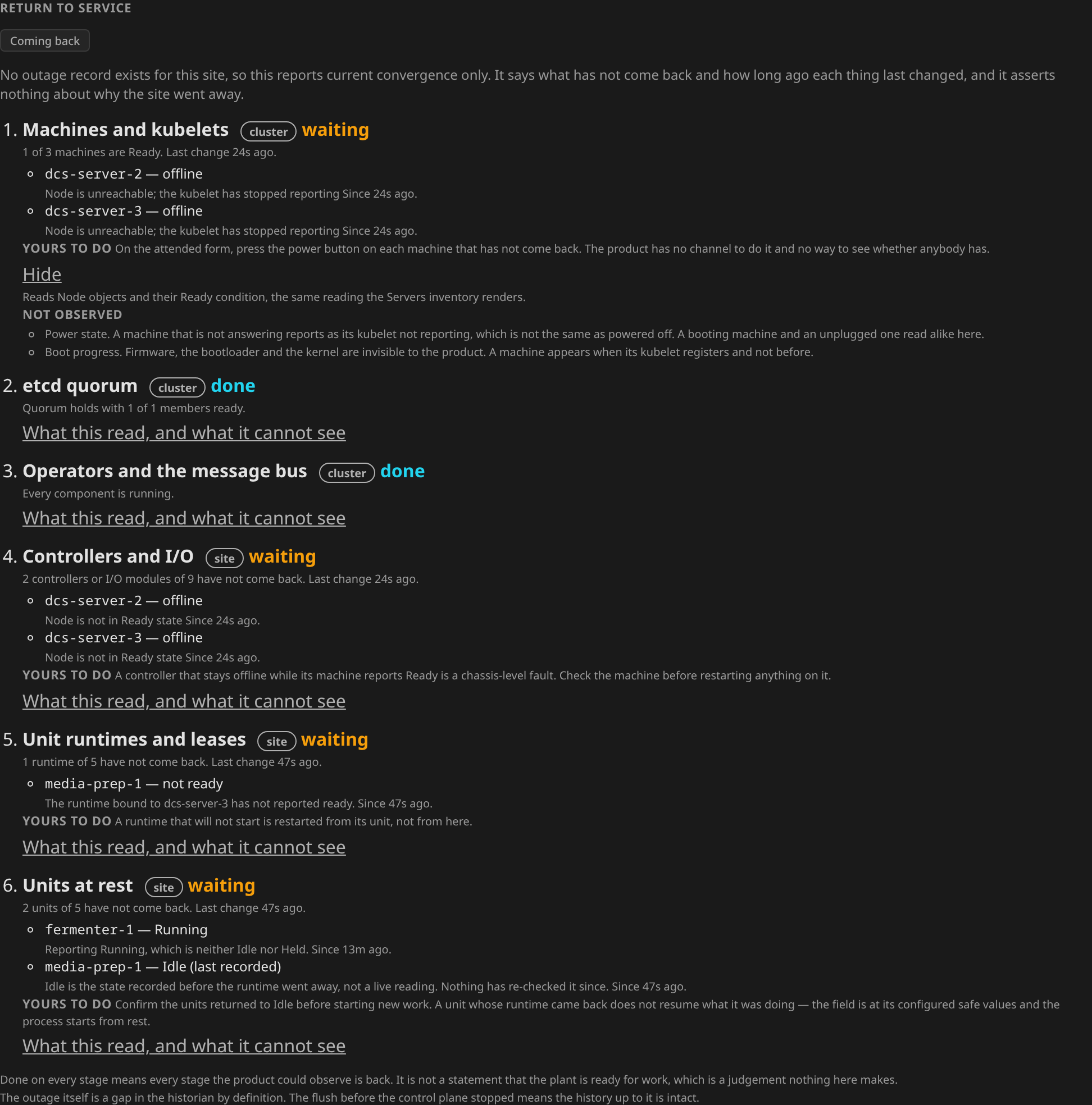
That example carries the cause-free wording of an unplanned return, because no outage record exists for whatever took those machines away. A planned return opens by naming the outage it is the return from and is otherwise identical.
The six stages¶
| Stage | Green means | What it reads |
|---|---|---|
| Machines and kubelets | Every machine is Ready | Node objects and their Ready condition |
| etcd quorum | Quorum holds with every member serving | The API server's own endpoints, which list each control-plane member whose API server is serving, with node readiness standing in where they cannot be read |
| Operators and the message bus | Every component is running | The pods behind each component and their readiness probes |
| Controllers and I/O | Controllers healthy, modules answering | Controller readiness against the live node, the io-probe pods, each module's state |
| Unit runtimes and leases | Runtimes ready, leases held | Each unit's runtime pod, and in Failover mode its lease |
| Units at rest | Every unit reports Idle or Held | Each unit's ISA-88 state, and whether a runtime pod is running behind it |
The first two are cluster facts and the readout labels them as such. The control plane generally carries no site label. Those rows therefore describe the cluster this site runs on, with the site itself covered by the rows below them.
What it will not tell you¶
Every stage names what it could not see, and the list is on the panel itself, because a stage's limits belong beside its verdict. Three are worth knowing before you stand in front of it.
It cannot see power. A machine that is not answering is reported as its kubelet not reporting, which is not the same fact as powered off. A machine mid-boot and a machine nobody switched on read alike, and the product will not guess between them.
It cannot watch quorum re-form. This page is served through the API server, so the window between the machines booting and the cluster coming back is unobservable from here by construction. A page you had open loses contact and says so. A page opened during that window gets nothing at all.
A member can come back Ready with its store dead. A hard power cut can
corrupt one etcd member's database, and after the boot that machine's kubelet
is fine while its etcd cannot start. Node readiness reads it as present. The
quorum stage reads the API server endpoints instead, names that member as
Ready, member not serving, and stays open while quorum holds without it,
because a control plane one loss from stopping every command has not come
back. That repair is made at the control-plane host.
A recorded status outlives the outage. Unit, Controller and IOModule status all live in etcd, and etcd comes back with the cluster. Every unit was driven to Idle before anything stopped. So the moment the API server answers, every unit reports Idle, from a write made before the machines went off. That is a true record of the past. It is also a claim about the present that nothing has re-checked.
The bottom three stages therefore confirm each green against a live object before they count it. Those objects are the unit runtime's own pod, the io-probe's pod, and the Node the controller was adopted as. The kubelet reposts all three when a machine boots. They are also what the operators write their own status from, so the readout reads the same evidence one hop earlier. It defines readiness nowhere. A stage that cannot establish whether its readings are live reports unknown, and unknown is never counted as converged.
One window survives that. A Node's Ready condition is restored from etcd like everything else, so a machine that has not come back reads Ready until node lifecycle marks it Unknown against its expired lease. Every row in the readout is bounded by that window, because the rows below confirm themselves against these same Node objects. The machines stage names it.
For the same reason the readout never says the plant is ready for work. Every stage green means every stage the product could observe is back. Whether the process is fit to start a batch is a judgement it does not make.
What is still yours to do by hand¶
- Press the power button on each machine, on the attended form. The product has no channel to do it and no way to see whether anybody has.
- Confirm the units returned to Idle before starting new work. A unit whose runtime came back does not resume what it was doing. The field is at its safe values and the process starts from rest.
- Check the historian for the gap. The flush at step 5 means the history up to the outage is intact, and the outage itself is a gap by definition.
After an unplanned outage¶
A site that came back from a power cut gets the same readout. There is no outage object to hang it on, so it says so and reports current convergence only: what has not come back, and how long ago each thing last changed. It asserts nothing about why the site went away, because the product did not see that and you did.
When the UPS does it instead¶
The same sequence can be fired by a power event with no person involved. That path differs in exactly one way, and it is deliberate: a machine-initiated outage is not refused by any precondition a human could have cleared. When the mains are gone, refusing achieves nothing except a worse ending, because the alternative to an orderly stop is an untidy one. The preconditions are evaluated and recorded, with enforcement waived. The trail says what was running when the sequence began, and the record names the machine as the initiator so it can never be confused with a person's request.
Two switches, held by two people¶
Nothing stops itself until both are on, and they are separate because the answers belong to different people.
The deployment names a UPS source, which is what lets the product see the mains at all. It is a chart value and the default is empty, which is the whole of the off switch:
upsSource:
  kind: nut                            # Network UPS Tools
  endpoint: upsd.plant.example:3493
  upsName: plant-ups                   # upsd commonly fronts more than one
  pollInterval: 10s
  credentials:
    secretName: ups-reader             # optional: omit for an anonymous upsd
Only the physical operator receives any of this. A machine-initiated outage does not come through a request path, so the gateway never reads a UPS and never holds a credential for one.
The upsd login is read-only by construction. The client sends USERNAME,
PASSWORD, GET VAR and LOGOUT, and has no code path that can issue a UPS
command. The upsd.users entry should therefore carry no actions and no
instcmds.
Omit credentials entirely for a upsd that allows anonymous reads on an
isolated management network.
The product reads NUT, with no direct line to the UPS, because a Linux plant
almost always already runs upsd in front of its UPS and that is where the
vendor protocol has already been dealt with. It reads three variables
(ups.status, battery.runtime, battery.charge) and sends no command: this
client cannot tell a UPS to do anything.
The site says whether it should act on it, and with what patience:
apiVersion: physical.dcs.io/v1alpha1
kind: Site
metadata:
  name: plant-01
spec:
  enterpriseName: riverbend
  outageOnBattery:
    enabled: true
    # The ride-through window. Most power events are a flicker, and a plant
    # that stopped itself on every dip would lose more batches to this feature
    # than to the outages it is for.
    afterSeconds: 120
    # Fires earlier when the UPS says it cannot carry the load much longer.
    # A window is a guess about how long an outage will last; this is the UPS's
    # own answer about how long it can wait, and the sequence needs time to run.
    runtimeRemainingBelowSeconds: 300
The two conditions are ORed, and the record names whichever one fired.
What it will and will not do¶
An unreadable UPS stops nothing. A read failure means the state is
unknown, which is neither "the mains are fine" nor "the mains are gone". It
starts no sequence, and it does not restart the ride-through window either.
A upsd that dies halfway through a real outage therefore cannot leave the
plant riding through until the batteries are flat.
A UPS that does not report a runtime leaves that condition off. Small units do not publish an estimate, and a zero is read as "not reported". The other reading, "no time left", would stop the plant on the first poll.
The window is measured from the UPS's own readings. A poll that is late or
skipped cannot shorten it. It does start when the operator first looks,
though. A plant already on battery when the operator restarts therefore gets
a fresh window, which is why runtimeRemainingBelowSeconds deserves setting:
it is stateless and survives a restart intact.
One power cut is one outage. The mains returning ends the episode, so a second cut later the same day fires again.
It runs on one operator replica, under leader election. Two replicas racing would put two requests in the trail for one power cut.
The form a UPS-fired outage takes¶
Where the deployment has a power channel that can power the machines back on,
the unattended form applies as usual. Where it has not, the automatic path
takes the attended form regardless of attendedOutages. A request from a
person in the same position is refused.
That is the § 7 asymmetry applied consistently: attendedOutages
refuses a human who configured no power channel, and a machine-initiated
outage is not refused by a precondition a human could have cleared. Refusing
here would leave the plant with no orderly stop at all while its batteries ran
out.
What the attended form then claims stays true. It says the machines were shut down gracefully and that restoring power is a manual act. It asserts nothing about who removed power, which on this path was the mains. The request carries no attended acknowledgement, because nobody was asked.
Related Documentation¶
- ADR 0038: A site outage is one sequenced act on its own object
- ADR 0034: Infrastructure actions are operator-executed requests
- ADR 0009: Fail-safe output behavior on program halt
- HA and failure modes — the halt-path table, including the difference between a redeploy and a terminal stop.
- Web UI — the Service panel, and the per-node verbs an outage drives underneath.