Security Operations¶
Cloud-Native DCS implements authentication, authorization, and electronic signatures for pharmaceutical and regulated manufacturing environments.
Authentication¶
OIDC Authentication (Production)¶
The gateway supports OpenID Connect (OIDC) for production authentication. Any OIDC-compliant identity provider works (Keycloak, Auth0, Azure AD, Okta, Dex).
dcs login completing the device-code flow against the same provider.Configuration:
| Parameter | Description |
|---|---|
Mode |
oidc for production, none for development |
IssuerURL |
OIDC provider discovery URL |
ClientID |
OAuth2 client ID |
Audience |
Expected JWT audience (defaults to ClientID) |
AllowedOrigins |
CORS origins (empty = same-origin only) |
Authentication flow:
- Client sends request with
Authorization: Bearer <token>header - Gateway middleware extracts and verifies the JWT token
- Token is validated against the OIDC provider's public keys
- Claims are extracted:
sub,email,name,groups UserIdentityis stored in the request context
LDAP Authentication¶
For plants whose directory cannot expose an OIDC endpoint, the gateway
supports direct LDAP / Active Directory bind (gateway.auth.mode: ldap).
The gateway verifies the username and password against the directory,
resolves the user's groups, and issues its own session JWT
(gateway.auth.sessionDuration, default 8h). The login page and
dcs login both support this flow.
Helm value (gateway.auth.ldap.*) |
Purpose |
|---|---|
url |
LDAP server URL — use ldaps://host:636, or ldap://host:389 with startTLS: true |
bindDN |
Service account DN for user/group searches (empty = anonymous bind) |
bindPasswordSecret |
Name of a Kubernetes Secret holding the bind password under the key password |
userSearchBase / userSearchFilter |
Where and how to find users; the filter takes a {{.Username}} placeholder (default matches AD sAMAccountName) |
groupSearchBase / groupSearchFilter |
Where and how to find a user's groups; when groupSearchBase is empty, groups are read from the user's memberOf attribute instead |
groupMappings |
Maps LDAP group CNs or DNs to the DCS role groups below (e.g. CN=DCS-Admins,OU=Groups,DC=example,DC=com: dcs-admin) |
startTLS / tlsCA |
Upgrade a plain connection with STARTTLS; CA certificate for verifying the LDAP server |
Never use plain ldap:// without startTLS in production. The bind
sends the user's password to the directory. Rotation of the bind password
is covered in the rotation runbook.
Group-to-role authorization after login is identical to OIDC: the mapped DCS groups feed the same RBAC model.
Login lockout (IEC 62443 SR 1.11)¶
The LDAP path enforces consecutive-failed-attempt lockout
(#974):
after gateway.auth.lockout.maxFailures failures (default 5) within
window (default 15 min), the account is locked for duration (default
15 min) or until an administrator clears it. dcs auth lockouts lists
the current lockout state and dcs auth unlock <username> clears one
early with the administrator's identity written to the trail (the
underlying endpoints are GET /api/v1/auth/lockouts and
DELETE /api/v1/auth/lockouts/{username}). Lockout responses are indistinguishable
from bad-password responses to the caller. The audit trail (category
access-control) records the truth, including the attempt that tripped
the lock and every administrator unlock. In OIDC mode, attempt limiting
belongs to the IdP (delegation D3 in the
4-2 register).
Only credential rejections count. A wrong password or an unknown
username advances the counter. Directory faults (unreachable server,
STARTTLS or service-account bind failure, search failure) do not, and
they return 503 authentication backend unavailable where a credential
rejection draws 401.
Otherwise an LDAP outage would lock out every operator retrying through
it, converting backend flakiness into a plant-wide account DoS. Those
attempts are still audited, marked as not counted toward lockout.
dcs auth lockouts and the audit trail carry the truth, and the administrator's audited dcs auth unlock clears it early.Usernames are matched case- and whitespace-insensitively. Directories
resolve alice, Alice and ALICE to one account. Lockout therefore
keys them to one counter. An attacker would otherwise get maxFailures guesses per
capitalization. The same canonicalization applies to exemptUsers and to
the administrator unlock path, so a station configured as panel-operator
stays exempt when it authenticates as Panel-Operator.
Essential-function carve-out (62443-3-3 Clause 4.2): accounts used
for essential functions must never be locked out, even temporarily. List
those accounts in gateway.auth.lockout.exemptUsers and compensate with
physical/network access control. Machine identities (ServiceAccounts,
mTLS, MQTT credentials, API keys) never traverse the login path and
cannot be locked out by it.
System use notification (IEC 62443 SR 1.12)¶
gateway.auth.systemUseNotification configures a pre-authentication
banner displayed by the login page and printed by dcs login before
credentials are entered. Empty (the default) shows none. The text is
deployment policy (e.g. authorized-use wording mandated by site legal).
Development Mode¶
When Mode is set to none, authentication is disabled and all requests
are attributed to a synthetic principal, by default dev-user
("Development User") with admin privileges. This mode is not suitable for
production.
The synthetic identity is configurable via gateway.auth.devIdentity
(subject, name, groups, with empty fields keeping the defaults). It is stamped
on server-side artifacts such as the approval-queue e-signature author, so a
plausible name (e.g. Priya Nair (Process Engineer)) is useful for
development and fixture screenshots. The override is ignored in oidc/ldap
modes, where the identity always comes from the authenticated token.
One exception to the blanket attribution: a request that carries a valid
gateway-issued session JWT (signed with the gateway's dcs-signing-key) is
attributed to that token's identity in place of the synthetic principal.
This is identity attribution only. Access control stays disabled, and an
absent, malformed, or expired token silently falls back to the synthetic
principal with no rejection. It lets multi-persona development stacks
attribute individual actions (for example, a distinct proposer and approver
on a ChangeRequest's e-signatures) without standing up an identity provider.
Setup Token (retired)¶
Until June 2026 the gateway accepted a pre-shared bootstrap token
(gateway.auth.setupToken) for the /api/v1/setup* cluster-setup
endpoints, with auto-invalidation on the first real login (threat-model
row GW-E-02). Those endpoints were removed together with the in-product
k3s join brokering (see ADR 0004), and the token mechanism was retired
with them. No pre-auth configuration step is left in the gateway, and
OIDC/LDAP settings arrive via flags or Helm values.
Historical InvalidateSetupToken AuditRecords from clusters bootstrapped
before the retirement remain schema-valid and readable. The action enum
value is kept for that reason but is never emitted by current gateways.
Exempt Routes¶
The following routes bypass authentication:
OPTIONS(CORS preflight)/healthz,/readyz(health probes)/(dashboard index)/css/*,/js/*(static assets)/api/v1/auth/configGET (auth config for login flow)/api/v1/wsGET (WebSocket, auth handled inside the handler)/api/v1/terminalGET (terminal WebSocket, same)/api/v1/sites/{site}/events/sseGET (SSE stream, same)
The last three are exempt because a browser WebSocket cannot set an
Authorization header. They accept a ?token= query parameter as well as
the header, and the check happens inside the handler. The header remains the
recommended form for any client that can send one, because a query string is
written to the access log of every proxy in front of the gateway (see
Presenting the token on a live transport).
The exemption takes the rest of the
middleware chain with it, including site scoping. Each handler therefore
has to re-apply what the chain would have enforced. The terminal requires the
engineer permission. The two real-time feeds apply the MES zone fence
at connect, the caller's site scope on every message, and an action check
per subscribed channel (see
SCADA Integration).
A gate added to the chain needs a decision about these routes, taken in
the handler.
CLI Access Through an Authenticating Proxy¶
Some deployments place an authenticating proxy (a zero-trust access layer
or SSO gateway) in front of the gateway, in addition to the gateway's own
OIDC/LDAP authentication. A browser passes such a proxy with a session
cookie. The dcs CLI has no cookie, so without configuration the proxy
redirects every CLI request to its sign-in page and dcs login fails
before it can even start:
Error: failed to fetch auth config: request to <gateway-host> was redirected
to <proxy-host> — the gateway appears to be behind an authenticating proxy ...
Teach the CLI to present the credential headers the proxy expects with
dcs config set-header. Values may reference environment variables with
${VAR} syntax. Expansion happens when the CLI runs, so secrets stay out
of ~/.dcs/config.yaml:
dcs config set-header <Header-Name> '${MY_PROXY_CREDENTIAL}'
For example, a deployment fronted by Cloudflare Access with a service token would configure:
dcs config set-header CF-Access-Client-Id '${CF_ACCESS_CLIENT_ID}'
dcs config set-header CF-Access-Client-Secret '${CF_ACCESS_CLIENT_SECRET}'
The configured headers are sent with every gateway request, ahead of the gateway's own login flow. They are sent only to the configured gateway host: the CLI refuses to follow any redirect that leaves that host, so proxy credentials and bearer tokens are never transmitted to another host. Which headers a proxy expects, and how their values are issued and rotated, is a property of the deployment. The product does not define them. Consult whoever operates the proxy in front of your gateway.
dcs config show lists configured header names but redacts literal
values. ${VAR} references are shown as-is.
Authorization (RBAC)¶
Authorization is group-based. Groups are extracted from the OIDC token's
groups claim (or mapped from LDAP groups). Each group that matches a
role definition grants that role's permission set. The roles below are
the shipped defaults, a product convention modeled on typical
pharmaceutical plant staffing (ISA-88 itself defines no personnel role
hierarchy). Deployments can replace them with their own role definitions.
See Custom roles. The seven-permission
vocabulary itself is a fixed product contract (ADR 0005).
The authoritative authorization mechanism is the route-level permission
gate: every /api/v1 route registered in the gateway's routes.go is
wrapped in withPermission(<permission>), which checks the user's resolved
permissions against the active role table and returns 403 Forbidden on
failure. The only exceptions are the exempt routes above
and the WebSocket, SSE, and terminal endpoints. Those authenticate and
authorize inside their handlers. Product code checks permissions, and
only permissions. Handlers that need a tighter tier than their route
gate add an in-handler RequirePermission check (e.g. the recipe-revision revert
route is gated engineer but the handler requires supervise).
| Group | Role | Typical permissions |
|---|---|---|
dcs-admin |
Administrator | Full administrative access — setup, gateway/auth configuration, MES API keys. Holds every permission in the hierarchy, so an admin can perform any operation. |
dcs-supervisor |
Supervisor | Recipe lifecycle approvals — approve, release, activate, and withdraw recipes; finalize batch records; manage the library. Recipe state changes require an electronic signature. Everything an engineer can do. |
dcs-engineer |
Process engineer | Engineering surface (/system): plant structure, recipe authoring (create / edit Draft), control-logic, equipment, and alarm-definition configuration. Cannot approve or release recipes. Everything a lead operator can do. |
dcs-lead-operator |
Lead operator | Everything a plant operator can do, plus launching equipment-oriented ad-hoc Operations (CIP, sampling, calibration). Gated separately from dcs-engineer so execution privilege does not imply engineering authoring privilege. See Ad-hoc Execution. |
dcs-operator |
Plant operator | Batch execution on the HMI: start batches against an Effective recipe, issue ISA-88 state commands, write tags, acknowledge alarms. |
dcs-viewer |
Read-only observer | Production records, trends, alarm history and the audit trail, and nothing else. Every GET the other roles can make, no state change of any kind. This is the grant for an identity that only observes: a SIEM collector polling the audit API, a reporting job, a read-only auditor login. |
A user who opens a page their role does not cover is redirected to the highest-privilege page they can access, and told why on arrival:
System requires the "engineer" permission — you're signed in as Rosa Delgado · Operator
The nav links are deliberately visible even when refused. A visible, refused link surfaces a permission misconfiguration that a silently smaller app would hide, and on a shared operator station the real answer is often that someone else is still signed in.
The gateway header names the signed-in user and their role (for example
"Priya Nair · Engineer"), resolved server-side from the active role
table and served as roles on GET /api/v1/auth/session, most-privileged
first when an identity holds several. It is display only. The UI still
gates every page and control on permissions, and the role name gates
nothing. Groups that
name no configured role (the dcs-site-* site assignments, dcs-mes-integration)
never appear there.
The clip below shows the roles as enforcement. Four directory personas sign in
through the product's own login page and climb the permission ladder. Each one
completes the work their own lane covers, and each one below admin is stopped
at the next rung. The operator acknowledges a fermenter temperature alarm on
the HMI, which is an operate-gated write accepted on her own authority. She
then opens the parked operator prompt and finds that the Respond button is
not rendered for her at all, because the decision it carries belongs to the
rung above her. The supervisor answers that same prompt through the
e-signature ceremony. He then opens the draft recipe the engineer will fix a
moment later, and the Actions panel offers him Approve and Reject and no Edit,
Delete or New Version, because he decides a recipe's lifecycle and does not
author it. The engineer opens that same recipe to the exact complement, Edit
and Delete and New Version with no Approve or Reject. She makes the edit. She
is then refused in turn on the fermenter's I/O module record, which belongs to
the platform admin. The admin makes the I/O module update, and the audit trail
closes on every success under the name that made it.
Segregation of duties on change approval is a separate arc, and it is not in this clip. Change Control documents how the product refuses self-approval.
Route-level permission gates¶
Route gates use a permission tier. Literal group names appear only in the
role table. In the
shipped default role table, each role grants its own tier plus every tier
below it, so the hierarchy is cumulative:
admin > supervisor > engineer > lead-operator > operator > viewer. The gate passes
when any of the user's groups grants the required permission. The one
exception to cumulativeness is interlock:bypass, a discrete, sensitive
capability held by engineer and admin only. supervisor does not
hold it, because bypassing a device interlock takes engineering knowledge
of the protection being disabled (ADR 0010).
| Permission | Gates (examples from routes.go) |
Default roles granting it |
|---|---|---|
read |
All GET/list endpoints — production records, trends, audit trail. The tier is confined to reads, so a role holding read alone changes nothing: see The read tier is read-only |
Every DCS group, plus MES API keys (within /api/v1/mes/ only — see below) |
operate |
Batch create/update and ISA-88 commands, alarm acknowledge/shelve/unshelve, tag and I/O writes, ad-hoc Phase execution | dcs-operator and above, plus MES API keys (within /api/v1/mes/ only) |
operate-lead |
Ad-hoc Operation and Unit Procedure execution, unit failover, batch prompt response (answering a parked PROMPT() is a batch-execution decision — delegable to lead operators without a supervisor) |
dcs-lead-operator and above |
engineer |
Equipment-model, recipe, template, control-logic, and procedural-element CRUD; runtime diagnostics detail (service events/logs/restart; the terminal WebSocket applies the same permission inside its handler). The system-health summary is read-tier — every sub-app's header shows it to every role |
dcs-engineer, dcs-supervisor, dcs-admin |
supervise |
Recipe approve/reject/release/activate/withdraw, batch-record finalize/review, change-request approval | dcs-supervisor, dcs-admin |
admin |
Controller and I/O-module configuration (the device/wiring layer: physical connectivity, protocol addressing, channel maps — including the same kinds via /api/v1/apply), bulk export (/api/v1/backup/*), MES API key management, session/lockout administration |
dcs-admin |
interlock:bypass |
Set/clear a time-boxed device-interlock bypass on a ControlModule output (ADR 0010) | dcs-engineer, dcs-admin (not cumulative — supervisor does not hold it) |
Because permissions derive only from group membership, an authenticated
user who belongs to no DCS group holds no permissions at all. Even
read-only GET requests are rejected with 403. Every user needs at least
one DCS group. Production records, trends, and the audit trail (/data)
are then readable by any of them, since every role includes read.
Examples:
- Batch start, ISA-88 commands, alarm acknowledge, tag writes — route
gate
operate. Operators, lead operators, engineers, supervisors, and admins all qualify through the cumulative hierarchy. No additional group membership is required. - Procedural-element CRUD (Procedure, Unit Procedure, Operation,
Phase) and alarm deletion: route gate
engineer. Engineers, supervisors, and admins qualify. Operators do not. - Recipe approval and release — route gate
supervise: supervisors and admins only. - Controller and I/O-module configuration — route gate
admin. The device/wiring layer belongs to the OT platform administrator. Engineers keep the equipment model (units, control modules, templates), and they cannot change the physical connectivity beneath it (protocol addresses, channel maps). - MES API key management — route gate
admin.
The read tier is read-only¶
The read tier gates every GET, and a small number of POST routes sit
there as well. A POST at read is a read whose request needs a body.
Four of them ship:
| Route | Why it stays a read |
|---|---|
POST /api/v1/sites/{site}/batches/preflight |
A dry run against a master recipe. It resolves the allocator preview and returns it, and it persists nothing. |
POST /api/v1/demo/provision |
Answers 403 unless the deployment enables demo auto-provisioning, which a production deployment leaves off. |
POST /api/v1/signatures |
Route-gated at read deliberately, so the handler's own supervisor check runs and its refusal is audited (§11.10). A read-only identity reaches the handler, and the handler refuses it. |
POST /api/v1/admin/sites/{site}/heal |
The same shape. The route gate is a baseline and the handler enforces admin-or-self. |
The OPC UA discovery routes sat here too until #1551,
on the reasoning that they mutate no CR. Mutating no CR is not the same as
reading. The endpoint arrives in the request body, so the gateway opens an
outbound OPC UA session to whatever host and port the caller names. The
browse, search, and read verbs then pull an address space and live values
back over it. They carry engineer now, which is the tier their sibling
discovery:write always held. It is also the tier of the Device Discovery
wizard, their only caller in the product. That wizard lives in the /system
app, and the page gate there is display only. Before the move, every
authenticated identity could reach the routes underneath it.
This is what makes dcs-viewer a read-only grant in fact and not only in
name. A role holding read alone can call every route in the tier and change
nothing. make lint-read-tier holds that property: a non-GET route
registered at the read tier fails the build unless
scripts/.read-tier-writes.tsv carries its verdict and the evidence behind it.
The reasoning is recorded in
ADR 0062.
MES integration fence¶
MES API-key identities hold read and operate permissions, but they
are structurally confined to /api/v1/mes/: withAction rejects an
MES-only identity (one holding dcs-mes-integration and no human role
group) on every other route with 403, before the action check runs.
Plant endpoints (tag and I/O writes, batch commands, alarm actions) are
therefore never reachable with an integration credential, preserving
IEC 62443 zone separation between the MES integration surface (ISA-95
Level 3/4) and plant control. Site scoping for MES keys is enforced
inside the MES handlers (mesAuthGuard / mesReadGuard).
The confinement is enforced a second time inside action resolution: an
MES-only identity resolves only actions carried by routes under the
prefix, so the fence holds for consumers that never pass through the
route gate: the WebSocket feeds, and the inspection surfaces that report
an identity's effective action set. The two keys (route path, action
name) are kept in agreement by make lint-docs-action-catalog. It
fails if a route under /api/v1/mes/ carries an action the resolver does
not treat as reachable.
In-handler permission checks¶
Some handlers carry a second RequirePermission check in addition to
their route gate, either restating the gate's tier as defense in depth
(recipe approval, batch-record review) or requiring a higher tier than
the route's (recipe-revision revert). Like the route gates, these checks
key on permissions alone. They work unchanged with
custom roles.
// Supervise-tier action (e.g. approve a recipe, finalize a batch record).
if err := auth.RequirePermission(ctx, auth.PermSupervise); err != nil {
    http.Error(w, err.Error(), http.StatusForbidden)
    return
}
The AuditUser(ctx) function extracts user identity for audit logging,
returning (userID, userName, sessionID).
Custom roles (deployment-defined)¶
Role definitions are deployment configuration (ADR 0005): a deployment may add roles, remove shipped ones, and tune the permission set each role grants, without code changes. Role names are free-form and matched against the user's IdP groups exactly like the shipped names.
The gateway loads role definitions from a YAML file given by
--authz-roles-file (env: AUTHZ_ROLES_FILE). When the flag is absent,
the built-in default table above applies and behavior is identical to
previous releases. The file schema is a single roles map of role name →
list of permissions. In a Helm deployment, set gateway.auth.roles.
The chart renders it into a ConfigMap, mounts it, wires the flag, and a
checksum annotation rolls the gateway pod whenever the roles change:
gateway:
  auth:
    roles:
      # A custom role: QA reviewers may read everything and approve/release,
      # but cannot operate equipment or author recipes.
      qa-reviewer: [read, supervise]
      # Non-empty roles REPLACE the shipped defaults — re-declare the
      # shipped roles you want to keep; omit the ones you want gone.
      dcs-admin: [read, operate, operate-lead, engineer, supervise, admin, interlock:bypass]
      dcs-operator: [read, operate]
Validation happens at startup and fails fast. The gateway refuses to
start on an unknown permission name, a role that grants nothing, or an
attempt to define dcs-mes-integration or a dcs-site-* name. It logs a
warning when no configured role grants admin, since system setup, MES
API key management, and bulk export would then be unreachable.
Action-level policies (ADR 0024)¶
The permission tiers are deliberately coarse: six values a quality unit
can review and sign. When a deployment needs finer grain ("operators may
acknowledge alarms but not shelve them"), a role in the roles file may
take the object form and refine its tiers with action-level allow and
deny lists over the action catalog:
dcs auth policy rendering the shipped tiers plus this plant's deny refinements, and a signed-in non-admin account resolving exactly the actions it is entitled to with dcs auth entitlements.gateway:
auth:
roles:
dcs-admin: [read, operate, operate-lead, engineer, supervise, admin, interlock:bypass]
# The object form: tiers plus action-level refinements.
dcs-operator:
permissions: [read, operate]
allow: [prompt:respond] # granted beyond the tiers
deny: [alarm:shelve] # stripped from the tiers
A role's effective action set is (actions pinned to its tiers ∪ allow) −
deny. A user holding several roles gets the union of the roles'
effective sets. A deny on one role never strips an action another of
the user's roles grants, so each role document stays independently
reviewable. Keep that in mind for users in multiple IdP groups: to truly
fence an action off from a person, no role they hold may grant it.
Allow/deny entries reference exact catalog names. Wildcards are rejected, and an unknown name fails startup exactly like an unknown permission. The gateway also warns on suspicious-but-valid shapes: allow∩deny overlaps (deny wins), allows already covered by the role's tiers, and denies of actions the role never granted.
Guidance for the validation story:
- Plain tiers stay the recommended default. A policy is a small, reviewed delta on the shipped tiers. If a role's lists grow past a handful of entries, define a different tier composition instead. A 150-line allow list is not auditable.
- Policies are change-controlled quality-system items, exactly like the roles file they live in: the reviewed document equals the enforced set, which is the point of exact names.
- Product releases can add new actions. A new action lands pinned to its tier, so only that tier's members gain it. But a deny list written against a family ("no recipe approvals") does not automatically cover a newly added sibling action. Review the release notes' new-action list against your deny lists on every upgrade.
- Read the enforced policy from the running system. The values file
is only the input.
dcs auth policy(orGET /api/v1/auth/policy, supervise tier) renders each role's configured tiers, refinements, and resolved effective action set, anddcs auth entitlementsshows the calling identity's own set. Authorization denials are logged with the deciding layer (tier:<permission>,allow,deny,mes-fence,no-grant). A policy-stripped action is therefore distinguishable from one never granted, and both from one the MES fence confines. - Both surfaces resolve the MES fence on top of the tiers. An
integration identity's effective set lists only the actions its
/api/v1/mes/confinement can reach, so the audit view never claims a plant-write or command capability the running system refuses. A policyallowentry cannot buy an integration identity past the fence.
Two group conventions stay product-defined and are not configurable
roles: the dcs-site-* prefix (a group like dcs-site-plant-a assigns
the user to site plant-a, and users with the admin permission or no
site group are unrestricted) and dcs-mes-integration (the MES integration
identity shape, whose read+operate grant and
MES fence are fixed by the product).
There is deliberately no in-product role administration surface. No UI, API, or CRD mutates role definitions. Changes flow through the deployment's own GitOps/change-management process (values file → ConfigMap → rollout). For GxP deployments, treat the roles file as a change-controlled configuration item in the site quality system: a change to who may approve recipes is a change to your electronic-records controls (21 CFR Part 11) and should ride the same change-control process as any other.
Electronic Signatures¶
Electronic signatures implement 21 CFR Part 11 requirements for authenticity and integrity verification.
Algorithm¶
- HMAC-SHA256 over a canonical JSON payload
- Digest format: lowercase hexadecimal (64 characters)
Signature Payload¶
The signature binds four elements into a canonical JSON document:
{
  "content": <signed data>,
  "signerID": "user-subject-id",
  "timestamp": "2026-02-25T14:30:45Z",
  "meaning": "approved"
}
21 CFR Part 11 Compliance¶
| Requirement | Implementation |
|---|---|
| 11.70(a): Signer identification | signerID in signature payload |
| 11.70(b)(1): Meaning of signature | meaning parameter (e.g., "approved", "created") |
| 11.70(b)(2): Timestamp | RFC3339 timestamp in payload |
| Integrity | HMAC prevents modification without key |
| Non-repudiation | Constant-time verification prevents timing attacks |
Usage¶
// Sign an action
digest, err := esig.Sign(key, contentJSON, user.Subject, time.Now(), "approved")

// Verify a signature
valid := esig.Verify(key, contentJSON, user.Subject, timestamp, "approved", storedDigest)
Archive integrity verification¶
The audit-archiver uses the same key store to sign one manifest per archival
batch (audit_archive_manifest table). Each archived record carries a
manifest_id link to its manifest. Operators re-verify archives with:
# Verify all archived batches in the requested window.
dcs audit verify --archived [--since RFC3339] [--until RFC3339]
Non-zero exit on any failure. The specific reason per manifest
(digest_mismatch, signature_invalid, unknown_key, count_mismatch,
missing_records) distinguishes retention trims, key-store drift, and
content tampering. See pkg/audit/archive for the primitive and
docs/backup-recovery.md for operational guidance.
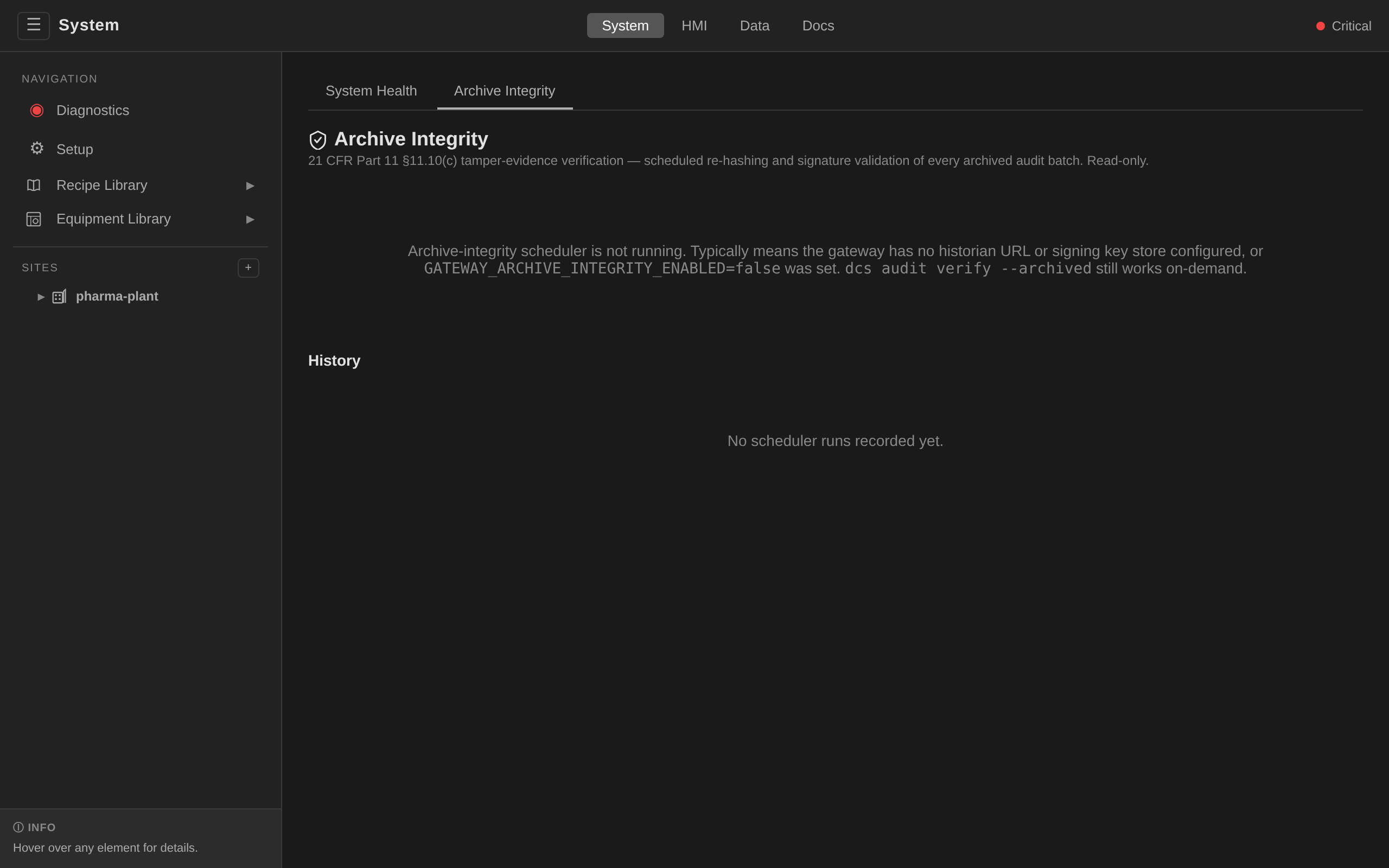
The gateway also runs the same verify pipeline on a schedule
(gateway.archiveIntegrity.interval, default 6h, floor 15m) and emits
one AuditRecord per run with Target.Kind=ArchiveIntegrityCheck. Latest
and historical outcomes are served at /api/v1/audit/archive-integrity/latest
and /api/v1/audit/archive-integrity/history, and surfaced as a
read-only panel at System → Archive Integrity. SIEMs should alert on
any scheduler AuditRecord whose result=Failure. Each failure is a
compliance deviation per 21 CFR Part 11 §11.10(c).
The scheduler's first run fires one interval after the gateway boots, and a restart clears the in-memory state. A gateway that has just come up therefore has no verdict for at least 15 minutes. When you need the answer now (after restoring an archive, or before signing off a recovery), trigger a run:
dcs audit archive-integrity run       # runs now, prints the verdict
dcs audit archive-integrity status    # the last run, without starting one
The run is synchronous and exits non-zero when any manifest fails. It
writes the same AuditRecord a scheduled run writes, so an on-demand check
is as auditable as a scheduled one. An already-running sweep is refused
outright, with no duplicate started. The archive-integrity:run action is
admin by default (ADR 0034). Grant it to another role through that
role's allow list (ADR 0024).
Verification proves the archive has not changed. It does not, on its own, prove that a copy survives someone who wants it gone. That is what the immutable mirror is for, and the two are meant to be read together: the manifest IDs the verification names are the object names in the bucket.
dcs audit verify --archived names, stamped
with a Compliance-mode retention date, and refusing a delete issued by the
store's own root identity.Audit Event Categories (IEC 62443 SR 2.8)¶
Every AuditRecord carries the SR/CR 2.8 record fields (timestamp, source
actor, category, type, event ID via record name + correlation ID, event
result). The category label (dcs.io/audit-category) maps to the
standard's category list (#974):
| SR/CR 2.8 category | Where it appears |
|---|---|
| Access control | Login success/failure/lockout and administrator unlocks (access-control); session logout/termination records; refused mutating actions (authorization-denied) and MES zone crossings (zone-violation) — see Authorization Denials |
| Request errors | Records with result: Failure or Rejected (validation rejections, webhook denials) |
| Control system events | State transitions, commands, holds, interlock bypasses (edge-hold-lifecycle, interlock-bypass, ad-hoc execution categories) |
| Backup and restore events | Bulk backup exports (backup-restore); restores appear as the per-resource apply records |
| Configuration changes | Create/Update/Delete/DriftCorrected records; change control (changerequest, flux-reconcile) |
| Audit log events | Archive-integrity verification runs (audit-log), audit-record archival |
| Operating system events | Platform scope — Kubernetes audit logging + node logs shipped to the SIEM (delegation D12) |
Authorization Denials¶
Every authorized API route admits through one gate (the action check of
ADR 0024), and that gate is
what refuses a caller with a 403. Which refusals leave a durable
record is a deliberate, bounded choice
(#1296),
and a SIEM rule written against this trail should be written against
exactly what follows:
An action name is <domain>:<verb>, and the verb decides. An action
is read-shaped when any hyphen-separated segment of its verb is read,
list, browse or poll. So site:read, controlmodule:read-tag
and site:outage-read are all read-shaped, while
controlmodule:write-tag and backup:export-audit are not.
| Refusal | Recorded? | Category |
|---|---|---|
A mutating action — no segment of its verb is read-shaped (create, update, delete, write, command, execute, withdraw, record, verify, validate, write-tag, export-audit, delete-work-order, …) |
Yes — Rejected AuditRecord |
authorization-denied |
A read-shaped action — any verb segment is read / list / browse / poll (read, list, browse, poll, read-tag, outage-read) |
No — gateway log only | — |
An MES integration identity outside /api/v1/mes/, whatever the verb |
Yes — Rejected AuditRecord |
zone-violation |
Read-shaped denials are log-only for volume: 130 of the 286 registered routes are reads, several of them polled by the UI on a timer, so recording their denials would mint a record per tick, per user, for as long as a role stayed misconfigured.
The rule reads verb segments, and controlmodule:read-tag is why. It
is a GET at the read tier that the
HMI dashboard fetches once per equipment card on a three-second poll
(_updateEquipCard in static/js/hmi/hmi-display.js), the
highest-volume read route in the product. A rule that enumerated whole
verbs classified it as a mutation and would have recorded every tick of
it. Segment matching does not, and it will not miss the next action
spelled <x>-read or read-<x> either. Segment membership is exact, so
a verb like readonly or listener is not read-shaped.
The split still fails closed: a verb with no read-shaped segment is
recorded, so a new action lands on the safe side by default. It is
defined in exactly one place, pkg/auth.Action.IsReadShaped.
The MES fence records regardless of verb because it is a different event: an integration credential reaching a plant endpoint is an IEC 62443 zone crossing, either a misconfigured integrator or a stolen key in use, and its volume is self-limiting. Query it apart from an ordinary tier miss with the category label:
kubectl get auditrecords -A -l dcs.io/audit-category=zone-violation
Each record carries the action name in spec.target.name and, in
spec.message, the deciding policy layer: deny when a role's deny
list stripped an action that was otherwise granted, no-grant when
nothing granted it, mes-fence for a zone crossing. That distinction is
the difference between a policy working as written and a role that was
never provisioned, so it is worth alerting on differently.
The record is always written before the 403 reaches the client, on
both branches and on the WebSocket transport
(#1251).
A caller told "forbidden" can never read the trail and fail to find its
own refusal.
Audit Processing Failures¶
Behavior when an AuditRecord cannot be persisted (IEC 62443 SR 2.10, #974), per action class:
- Essential/control actions (fail-open): control loops, operator
commands, reconcilers, and the gateway API never block on audit
persistence. A failed create is retried with bounded backoff
(~350 ms worst case), then logged and counted
(
dcs_audit_record_failures_total), and the action proceeds. This is the Clause 4.2-compliant direction: audit must not take down essential functions. - 21 CFR Part 11 change-control transitions (fail-closed): the
approval/apply path uses
RecordResult. When the AuditRecord (the compliance artifact itself) cannot be persisted, the transition is withheld (#642). - Alerting: the chart ships the
DCSAuditProcessingFailurePrometheusRule (severity critical, fires on any failure increase in 10 min) so personnel are notified while essential services continue.
Audit Storage Capacity (IEC 62443 SR 2.9)¶
Audit storage is bounded by design: the etcd tier holds a rolling active
window (default 90 days) and the archiver moves records to
PostgreSQL/TimescaleDB (default 3-year retention), so unbounded growth
cannot exhaust the store. As capacity is approached or the store becomes
unavailable, components keep operating (the fail-open policy above) and
the failure alert fires. Creation rate is observable via
dcs_audit_records_created_total. Capacity planning guidance lives in
capacity-planning.md.
SIEM Integration¶
Security-relevant events from Cloud-Native DCS can be streamed into an external SIEM (Splunk, Microsoft Sentinel, Elastic Security, Chronicle, QRadar, Sumo Logic) for centralized monitoring, correlation, and long-term retention beyond the gateway's own audit archive.
What to ingest¶
Three streams together cover the full security-relevant surface:
| Source | Transport | Format | Contents |
|---|---|---|---|
| Gateway access log | stdout → container runtime → log collector (Fluent Bit, Vector, Promtail, Loki) | Console by default, JSON on request (see below) | Every /api/ request with method, path, status, duration, authenticated subject, client IP, user-agent and request ID |
| AuditRecord CRs | Gateway API poll (GET /api/v1/sites/{site}/audit) or Kubernetes audit webhook |
JSON | Every state-changing action: recipe approve/reject, batch command, equipment allocation, control-program deploy, prompt acknowledge, qualification run |
| Kubernetes control-plane audit | kube-apiserver audit log | JSON | CR mutations, RBAC decisions, ServiceAccount token use, admission-webhook results |
The gateway access log and the AuditRecord stream are the two that matter most for a SIEM correlation graph. They together capture "who asked for what, did it succeed, and what changed in the control plane."
Log format¶
Every Cloud-Native DCS component logs in the same format, and that format is
the console encoder (ADR 0063). The default serves the product's own log
readers, which are the Diagnose panel's Logs tab and dcs health --logs. Both
render a pod's stdout as text and neither parses it.
A deployment shipping logs to a collector sets one value for the whole release, and every component moves together:
logging:
  encoder: json
Two more keys sit beside it. logging.level accepts debug, info, error
or panic and defaults to info. Setting it to debug turns on every V(1)
line the product carries, and that includes one entry per page and per static
asset the gateway serves. Treat it as a triage setting.
logging.stacktraceLevel accepts info, error or panic. The default emits
a stack trace only when the process is going down, because an error already
carries its cause in a structured field.
The access log itself records requests to /api/. Page and static-asset
requests are logged at V(1), so a collector that wants them needs
logging.level: debug.
Access-log fields¶
Every entry carries the same eight fields, under the message request.
| Field | Value |
|---|---|
method |
HTTP method as received |
path |
Request path. The query string is deliberately absent — the WebSocket and SSE routes authenticate from a ?token= parameter, and a session token does not belong in a stream a SIEM retains for years |
status |
Response status code |
duration |
Wall-clock time the request took. On the WebSocket, SSE and terminal routes this is the lifetime of the connection, and the entry is written when it closes |
subject |
The authenticated identity's subject: the OIDC or LDAP sub, or apikey:<name> for an API key. - when the request carried no identity the gateway could establish, which is what a refused request and an auth-exempt route both look like |
clientIP |
The caller's address, resolved by the same rule the audit trail uses: CF-Connecting-IP first (the Cloudflare tunnel overwrites it, so it cannot be spoofed), then the leftmost X-Forwarded-For entry, then X-Real-IP, then the socket peer |
userAgent |
The User-Agent header, capped at 256 characters with … marking a cut. - when the header is absent |
requestID |
The OpenTelemetry trace ID of the request when tracing is configured (--otlp-endpoint), which joins the entry to its span. A freshly minted 128-bit value otherwise. Both are 32 hex characters |
An entry is written for a request the gateway refuses, which is the point of
recording the identity fields at all: the 401 from a bad token, the 403 from
the authorization model, and the 429 from the rate limiter all carry the client
IP and the user-agent, and a 403 carries the subject it refused.
Three of these fields are personal data when the caller is a person. Those are the subject, the client IP and the user-agent. They are the fields a SIEM correlation rule needs, and they are also the fields a retention policy has to account for. None of them can carry a credential: a token arrives in a header or a query parameter and neither is recorded. See § Retention alignment.
Event catalogue¶
The most useful events to alert on:
| Event | Signal |
|---|---|
auth.login.failed (repeated) |
Credential stuffing or brute-force |
auth.group.denied |
Privilege-escalation attempt |
recipe.approve / recipe.reject |
Change-control activity outside normal hours |
batch.command.Abort |
Emergency stops — correlate with alarm history |
controlprogram.hotswap.override |
Hot-swap bypass annotation used (dcs.io/allow-hot-swap=true) — always review |
prompt.acknowledge |
Operator e-signature during a batch — confirm the signer vs schedule |
qualification.run |
IQ/OQ/PQ execution — confirm expected cadence and success |
cert.expiry.imminent |
Within 4 h of any cert-manager-issued Certificate expiring |
mqtt.auth.denied |
Unauthorized MQTT client attempt |
Minimal collector config¶
A Fluent Bit sidecar pattern for shipping gateway stdout to Loki or an S3-compatible bucket, plus a CronJob that polls the audit API and emits one JSON event per new record, is the recommended starting point. The exact YAML depends on your collector and SIEM. The key requirement is that the collector is read-only against the gateway API.
Give the collector a dedicated OIDC identity whose only DCS group is
dcs-viewer. That role holds read and nothing else. The audit API is
therefore reachable (GET /api/v1/sites/{site}/audit carries the action
audit:read at the read tier), and every state-changing route answers
403. The refusal comes
from the authorization model, so it holds for any route the collector
reaches by any means. Confining the credential to GET at an egress proxy
is still worth doing as defence in depth, and it is no longer what the
read-only property rests on.
A deployment that supplies its own roles file needs to re-declare this
role, because a non-empty gateway.auth.roles replaces the shipped table
outright:
gateway:
  auth:
    roles:
      # …the roles this plant defines…
      siem-collector: [read]
Two properties of the grant are worth checking against your own threat
model before you use it. A viewer reads everything readable: batch
records, recipes, trends, alarm history, and the audit trail itself, across
every site the identity's dcs-site-* groups admit it to. Least privilege
here is about what the credential can do, and site scoping is what bounds
what it can see. An identity that only observes writes no AuditRecord, because
it changes nothing. The access log is therefore the only trail it leaves, and
that log names the subject and the client IP on every entry. That is what lets
you alert on a collector credential used from anywhere except the collector: the
subject field is the collector's own, and the clientIP and userAgent
fields are what a replay from elsewhere changes. Write the rule against the
access log. A read makes no record in the audit trail by design, so a rule
written there sees nothing.
Retention alignment¶
Pharma customers typically need 7–15 years of retention on security events to align with batch-record retention (21 CFR Part 211). The gateway's archive tier defaults to 3 years. SIEM or cold-storage offloading covers the remainder. Ensure SIEM retention matches or exceeds the longest regulatory retention that applies to records the SIEM receives.
Identity Providers¶
Cloud-Native DCS authenticates users via any OIDC-compliant identity provider, or against an LDAP directory directly. Getting a specific provider to emit a group claim, and getting the values in that claim to match the role names this deployment defines, is covered on its own page: Identity Providers. That page is the one home for the per-provider mapping (Keycloak, Microsoft Entra ID, Okta, PingOne, PingFederate, Google Workspace and Auth0), for the diagnosis of a user who authenticates and then holds no permissions, and for the effect provider token lifetime has on electronic signatures.
Enforce MFA at the identity provider. 21 CFR Part 11 §11.200(a)(1) is satisfied through the IdP's MFA policy, and the DCS gateway plays no part in it.
TLS¶
MQTT TLS and Authentication¶
The MQTT broker runs a production security profile by default
(mqtt.securityProfile: production), which enables:
- TLS encryption on port 8883 (MQTTS): plaintext port 1883 is disabled
- Per-role authentication: anonymous connections are rejected
- Topic-level ACLs: each client role has scoped access
- Connection and auth logging: for audit trail (IEC 62443 FR 6)
Certificates are provisioned automatically via cert-manager, reusing the
mTLS CA issuer when mtls.enabled is true.
Client roles and topic access:
| Role | Username | Topic Access |
|---|---|---|
| Gateway | dcs-gateway |
readwrite dcs/# (full access) |
| Operators | dcs-operator |
readwrite dcs/# (full access) |
| Runtimes | dcs-runtime |
readwrite dcs/+/runtime/#, write dcs/+/equipment/controlmodule/+/health, write dcs/+/unit/+/telemetry, read dcs/+/equipment/+/+/command |
| Historian | dcs-historian |
read dcs/# (read-only) |
| OMF egress | dcs-omf-egress |
read dcs/# (read-only, a separate identity from the historian so revoking one does not take the other's feed) |
Every role has a second account name available, its base name with a -b
suffix and identical rules. Those are the two credential slots a password
rotation moves between, and the second one exists only while a rotation is
running. See ADR 0061 and the
rotation runbook.
Development mode: Set mqtt.securityProfile: dev to disable TLS and
authentication for local development.
See MQTT Telemetry for topic structure and client configuration details.
Gateway TLS¶
The gateway can be placed behind a TLS-terminating ingress or load balancer. In production, all traffic should be encrypted.
IEC 62443 Alignment¶
Cloud-Native DCS maps to the IEC 62443 zone/conduit model:
| Zone | Components | Security Level |
|---|---|---|
| Control network | Operators (k8s control plane) | SL 2+ |
| Field network | Runtimes, I/O modules | SL 1-2 |
| Enterprise network | Gateway, dashboards | SL 2+ |
| DMZ | MQTT broker (if federated) | SL 2 |
Conduits (communication paths):
| From | To | Protocol | Protection |
|---|---|---|---|
| Operator → Runtime | HTTP | mTLS (cert-manager) | |
| Runtime → I/O Module | EtherNet/IP, Modbus TCP, OPC UA | Protocol-native | |
| Controller → MQTT Broker | MQTT v5 | TLS + username/password | |
| Gateway → API | HTTPS | TLS + OIDC |
Compliance: See IEC 62443 traceability and 21 CFR Part 11 traceability for requirements mapping.
Related Documentation¶
- Security Hardening Guide -- Step-by-step production hardening
- Threat Model -- STRIDE analysis and risk assessment
- Architecture -- System overview
- MQTT Telemetry -- MQTT TLS configuration
- Alarm Management -- Alarm acknowledgment flow
- Monitoring and Metrics -- Audit metrics