SCADA/HMI Integration API
The gateway is an API, and the HMI it ships with is one client of that API. A plant that already has a frontend its operators know can keep that frontend and run Cloud-Native DCS as the control system behind it. Everything an operator's window needs is reachable from outside: live values, tag writes, ISA-88 mode changes, ISA-88 commands, alarms with acknowledgement, and the audit trail that records all of it.
This page documents those surfaces for an external SCADA (Ignition, WinCC, AVEVA), for a custom HMI, and for anything else that speaks REST, WebSocket or SSE. They are the only northbound integration surfaces. The gateway does not expose an OPC UA server. OPC UA in Cloud-Native DCS is southbound only: the unit runtime acts as an OPC UA client toward field devices (see I/O and Device Drivers).
The built-in HMI runs at /hmi, with real-time process displays, equipment
faceplates, alarm management, and batch execution. Trending lives in the Data
endpoint (/data), one click from any faceplate (see
Web UI Guide for details). It is a browser client of the routes
documented below and holds no private channel to the plant.
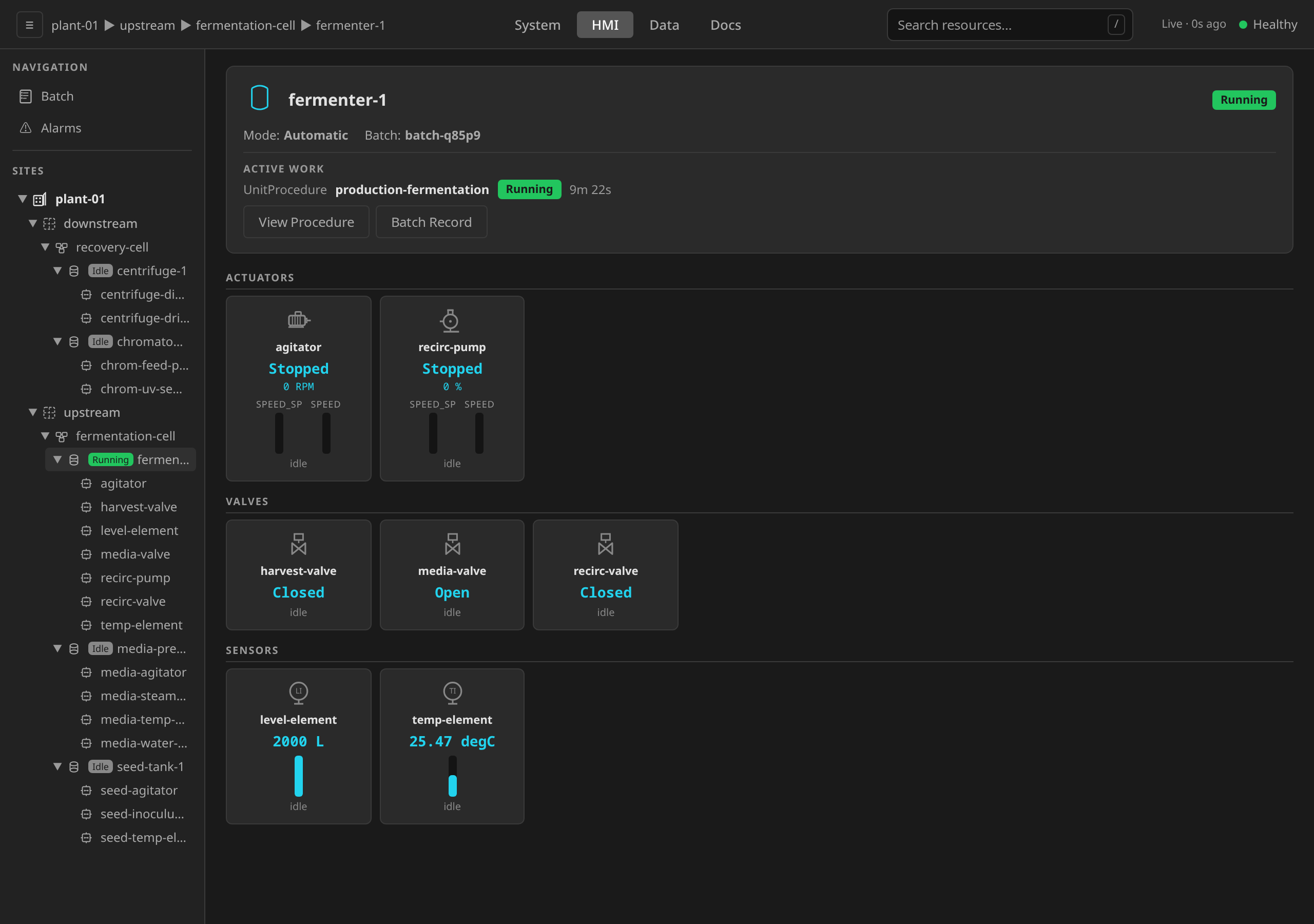
Browser-based users authenticate via the login page at /login. API
integrations use Bearer tokens directly.
Bring your own frontend
A frontend that speaks these surfaces can be the operator's window. Each row below is something that window has to do, and the route or channel it does it through.
| What an operator's window needs | Where it comes from |
|---|---|
| The tag list for a site | Tag discovery, and browse with live values for a cold start |
| Live values | The WebSocket tags channel, or SSE |
| Tag writes | REST, or the WebSocket write frame |
| ISA-88 mode changes | POST .../mode |
| ISA-88 commands | REST, or the WebSocket command frame |
| Alarms and acknowledgement | Alarm integration, live on the alarms channel |
| Equipment health | The cmhealth channel |
| The audit trail | GET /api/v1/sites/{site}/audit (API Reference) |
The clip below is somebody else's frontend running our plant. The SCADA is FUXA, which is open source and therefore reproducible by any reader. Its screen is a mimic drawn in FUXA's own process-engineering symbol library and bound to our tags. Every ceremony in the recording is performed on that screen: the ISA-88 mode change, the setpoint write, the command that starts a machine, the batch hold with its typed reason, the restart, and the alarm acknowledgement. Our own HMI is on the left throughout, doing what any other client of the API does, and the recording ends on the audit trail those actions left behind.
The gateway process stays
Declining the built-in HMI is a decision about the UI. The gateway carries the API, authentication and the role model, the ISA-88 mode barrier that refuses a write to a control module in Automatic, and the audit trail that records every write and every command. The unit runtime's HTTP API is an internal interface between the gateway and the runtime, and a frontend addressing it directly would bypass the enforcement the 21 CFR Part 11 and ISA-88 claims rest on. That topology is unsupported.
What a replacement frontend has to accept today
One limit is worth knowing before an integrator sizes the work, because it is not configurable in a deployment. Neither transport recovers the frames a client missed. An SSE stream that resumes from its last event id is replayed what changed while it was away. That replay is where the plant stands, and what happened in between is gone. The WebSocket holds no backlog at all. Anything a slow consumer shed is gone from both, and that question is answered by the alarm history and the audit trail. See What a reconnecting client gets.
A second limit is worth sizing, since a deployment controls it. Streaming connections are capped per source IP, counted across WebSocket and SSE together, at ten by default. A redundant SCADA pair usually reaches the gateway through one egress address, so both halves draw on that one budget. The number is a deployment setting (see Connection Limits).
Authentication
All API requests require authentication. The gateway supports two auth modes:
- OIDC (
--auth-mode=oidc): Bearer token from your identity provider (Keycloak, Auth0, Dex, etc.) - None (
--auth-mode=none): Development/testing only. All requests get admin privileges
Roles and permissions
Authorization is permission-based (ADR 0005), with groups one step
removed: every API route is gated on a permission (read, operate, operate-lead,
engineer, supervise, admin, …), and the caller's IdP groups resolve
to permissions through the deployment's role table. The shipped defaults
map dcs-operator → read, operate. dcs-lead-operator,
dcs-engineer, and dcs-supervisor add operate-lead, engineer, and
supervise respectively. dcs-admin holds every permission, and
dcs-viewer holds read alone. Deployments
can redefine this table without code changes (see
Security Operations
for the full role model).
Tag read endpoints require the read permission (any shipped role). Tag
write and ISA-88 command endpoints require operate (shipped:
dcs-operator and above). The OPC UA discovery endpoints require
engineer: they mutate nothing, and they still make the gateway open an
outbound session to an endpoint the caller names, which is a capability of
the Device Discovery wizard and not of a frontend.
dcs-viewer is the shipped grant for a frontend commissioned to render
the plant without commanding it, which is the posture the clip below
films. It is a real deployment posture in its own right, since an
integration is usually trusted with reads before it is trusted with
writes.
That difference is what decides whether a replacement frontend can command
the plant, and the gateway decides it for every frontend alike. The
clip below issues one command twice from the same SCADA screen, seconds
apart, against the same tag and with the same value. The only thing that
changes between the two is which of the plant's SCADA accounts the request
carries. The account holding read alone is refused by name, the account
holding operate is accepted, the pump moves only for the second, and the
audit trail carries a row for each against the account that made it.
Each operation also carries a stable action name, and a deployment can
grant or strip one action without moving a role between permission tiers
(ADR 0024, catalog in Action Catalog). An
operation reachable over more than one transport shares one action name
across them, so a deny entry for tag:write refuses the REST route and
the WebSocket frame alike. Reading works the same way. A subscription
admits through the action a client would use to poll the same data over
REST, so a deny entry for tag:read refuses the REST route and the
tags subscription together.
Site scoping
A token whose groups include dcs-site-{name} is confined to that site.
Every REST route names its site in the path and answers 403 Forbidden
outside it. The live transports answer the same way, in the two shapes a
stream can ask the question:
- A subscription that names a site the caller cannot see is refused
with an
errorframe, so the caller hears the refusal. - A subscription that names no site resolves to the caller's own
site alone. A token carrying no
dcs-site-*group, and an administrator, are unrestricted and still receive the whole plant.
The SSE route carries its site in the path, so it answers 403 directly.
MES integration API keys are confined to /api/v1/mes/ for IEC 62443
zone separation, and that fence covers the live transports: an
integration key is refused at connect on both WebSocket and SSE.
Example: Bearer Token
curl -H "Authorization: Bearer $TOKEN" \
  https://gateway.example.com/api/v1/sites/newark/tags
Every write carries an anti-replay nonce
Anti-replay protection is on by default (IEC 62443-3-3 SR 3.8). It covers
every mutating request on this page: the tag write, the ISA-88 mode change, the
ISA-88 command, and the alarm acknowledge, shelve and unshelve. Each of them
needs an X-DCS-Nonce header whose value the gateway has not seen before.
The GET and HEAD verbs are exempt. Discovery, tag reads, the alarm
list and the SSE connect need nothing.
Send any value that is unique per request. A UUID v4 is the usual choice, and a client generating a fresh one per request never collides. The gateway remembers each nonce for ten minutes by default.
curl -X POST \
  -H "Authorization: Bearer $TOKEN" \
  -H "X-DCS-Nonce: $(uuidgen)" \
  -H "Content-Type: application/json" \
  -d '{"value": 42.5}' \
  "https://gateway.example.com/api/v1/sites/newark/units/reactor-1/tags/ns=2;s=Setpoint"
Two failures are worth recognising in a client:
| Status | Body | Meaning |
|---|---|---|
400 Bad Request |
missing required X-DCS-Nonce header |
The header was absent. The request was authenticated and site-checked, then refused here — it never reached the route's own permission, equipment-mode or access-level barriers. |
409 Conflict |
duplicate request nonce |
The gateway has already admitted a request carrying this nonce within the last ten minutes. |
The order matters when a client is working out what went wrong, because the
first barrier to refuse answers and the rest are never evaluated: rate limit
(429), then authentication (401), then site scope (403), then the nonce
(400 / 409), and only then the route's own checks (403 for a missing
action, for Automatic mode, or for a read-only tag).
A 409 says only that the nonce was already spent. The nonce is
recorded when the request is admitted, and that request may still have been
refused at a later barrier or by the unit runtime. So a client
whose write timed out cannot conclude anything from a 409 on the retry.
Retrying with a new nonce attempts the write a second time, which is safe
for an idempotent setpoint write and is a second discrete action in the audit
trail. Where that distinction matters, read the tag back or read the audit trail.
The status cannot carry the outcome.
The nonce belongs to the REST surface only. The WebSocket write and command
frames carry none, because the connection authenticates once at the upgrade
(which is a GET), and the frames that follow are not HTTP requests. The
requestId on those frames correlates the reply and is not a nonce. It need not
be unique and is never checked for replay.
Tag Discovery
Discover all tags configured in ControlModule CRDs for a site:
GET /api/v1/sites/{site}/tags
Optional query parameters:
- unit — filter to tags belonging to a specific unit
- moduleType — filter by control module type (e.g., sensor, valve, motor)
Response
[
  {
    "name": "Temperature",
    "address": "ns=2;s=Temp",
    "dataType": "Float",
    "accessLevel": "read",
    "controlModule": "temp-sensor-1",
    "moduleType": "sensor",
    "unit": "reactor-1",
    "equipmentModule": ""
  },
  {
    "name": "RUN_CMD",
    "address": "agitator.RUN_CMD",
    "dataType": "Boolean",
    "accessLevel": "readwrite",
    "controlModule": "agitator",
    "moduleType": "motor",
    "unit": "reactor-1",
    "equipmentModule": ""
  }
]
The address field is the handle every read and write route below takes in its
path, and discovery always returns one. A tag configured against a device
carries that device's own protocol address, prefixed with the IOModule it reads
through when it names one (di-card-1:discrete.3). A tag with no device address
is one bound to a function block output or a control program variable, which
is how most command and computed tags are built. It is served by its unit
runtime under the control-module-scoped path controlModule.tagName, and
that is what discovery reports for it. The second entry above is one.
Browse with Live Values
GET /api/v1/sites/{site}/tags/browse
Same filters as /tags, but additionally queries online unit runtimes to merge live values
(value, quality, timestamp) into the discovery results. Tags from offline runtimes will have
empty value fields.
Tag Read/Write (REST)
List All Tags from a Unit
GET /api/v1/sites/{site}/units/{unit}/tags
Proxies to the unit runtime's tag endpoint. Returns all live tag values.
Read a Single Tag
GET /api/v1/sites/{site}/units/{unit}/tags/{address}
The {address} is a wildcard path segment, so OPC UA addresses with slashes work:
GET /api/v1/sites/newark/units/reactor-1/tags/ns=2;s=Weight
Write a Tag
POST /api/v1/sites/{site}/units/{unit}/tags/{address}
Requires the tag:write action, which the shipped roles grant at the operate
permission (dcs-operator and above). Creates an audit trail entry.
{ "value": 42.5 }
Response:
{ "ok": true, "address": "ns=2;s=Weight", "message": "tag written" }
The gateway answers 403 Forbidden when it bars the write itself: the caller's
role does not hold the action, the addressed control module is in Automatic
mode, or the tag declares accessLevel: read. A write that reached the unit
runtime and came back non-2xx is passed through with its own status and reason.
This request needs an anti-replay nonce
Like every POST on this page, the tag write requires a unique
X-DCS-Nonce header (see
Every write carries an anti-replay nonce
for the worked call). Without it the gateway answers 400 Bad Request
before any of the barriers above are reached.
Real-Time Subscriptions
Presenting the token on a live transport
Both live transports accept the bearer token in an Authorization: Bearer
<token> header or in a ?token=<token> query parameter. The header is the
recommended form. Reach for the query parameter only when the client cannot
set a header on the dial.
A browser is that client. Neither the WebSocket constructor nor
EventSource accepts request headers. A page therefore has no way to
present a token except in the URL, and our own HMI and terminal use the
query form for that reason. A server-side integration has no such limit. A
SCADA gateway, a historian bridge or a curl probe should send the header.
The preference is about where the value comes to rest. A header is read by the gateway and goes no further. A query string is part of the request line. Every reverse proxy, ingress controller and TLS-terminating load balancer in front of the gateway writes that line to an access log, and those logs are normally shipped to an aggregator that does not treat them as secret material. The same value lands in any HAR capture or network trace a client exports for a support ticket. The gateway's own log records the request path without the query string. The exposure therefore sits in the hops in front of the gateway.
The gateway accepts both forms and does not try to tell them apart. Nothing in a request separates a client that could have sent a header from one that could not. A rule refusing the query parameter whenever the header "was available" would be guessing at that difference, and it would refuse the browser case it had no way to identify.
The query parameter carries a gateway session token or an OIDC access token,
never an API key. An API key is presented under the ApiKey scheme in the
Authorization header, which ?token= has no way to express. MES
integration keys are refused on these transports in any case (see
Site scoping).
Treat a token that has travelled in a URL as known to every hop that carried it. The remedy is to end the session, which also closes the streams that session opened (see A stream ends when the identity behind it does). A short configured session duration limits how long such a token is worth anything.
WebSocket
Connect to the WebSocket endpoint with the token in a header:
wss://gateway.example.com/api/v1/ws
Authorization: Bearer
<token>
A browser client cannot set that header. It presents the token in the URL instead:
wss://gateway.example.com/api/v1/ws?token=<bearer-token>
Presenting the token on a live transport covers which form to use.
Subscribe to Tag Updates
{
  "type": "subscribe",
  "id": "my-sub-1",
  "channel": "tags",
  "filter": {
    "site": "newark",
    "unit": "reactor-1",
    "addressPattern": "ns=2;s=*"
  }
}
The addressPattern field is a glob over the whole address: * matches any
run of characters, ? matches any single character, and [abc] is a
character class, which also accepts ranges ([0-9]) and negation ([^0-9]
or [!0-9]). There is no separator character and no escape character. A
slash is an ordinary character, so * spans one and ns=2;s=* covers
ns=2;s=Skid1/Line2/Temp the same way it covers ns=2;s=Weight.
A pattern the gateway cannot parse (an unterminated [ class, or a range
written backwards) comes back as an error frame and registers no
subscription:
{"type":"error","message":"invalid addressPattern \"ns=2;s=[Temp\": unterminated '[' character class"}
Channels and what each one requires
Every channel admits through the action a client would use to poll the
same data over REST. All four are read-tier, so every shipped role
holds them. A deployment that strips one in its roles file bars that
role from the channel and the REST route together.
| Channel | Action | REST equivalent |
|---|---|---|
tags |
tag:read |
GET /api/v1/sites/{site}/units/{unit}/tags/{address} |
alarms |
alarm:list |
GET /api/v1/sites/{site}/alarms |
states |
overview:read |
GET /api/v1/sites/{site}/overview |
cmhealth |
controlmodule:list |
GET /api/v1/sites/{site}/controlmodules |
A subscribe frame the caller cannot have comes back as an error frame
naming the missing action, and no subscription is registered:
{"type":"error","message":"forbidden: action \"tag:read\" (default tier \"read\") denied for user \"Operator\""}
The refusal is explicit because the alternative is not: a subscription that is accepted and then delivers nothing is indistinguishable from a plant with nothing to report.
Sequence numbers and gap frames
Every frame the gateway sends carries seq, a counter that starts at 1 on the
connect and rises by one per frame. It counts the frames the gateway sent to
this connection. Delivery is a different matter, and a jump in the numbers
you receive is exactly the number of frames you did not get.
Each connection holds a buffer of 256 frames. A consumer that reads more
slowly than the plant publishes fills it. The gateway then sheds the live
frames that find no room, so every other consumer stays ahead of the slow one.
The connect-time snapshot is the exception: it waits for room, because
nothing restates it. See
What a reconnecting client gets.
When room appears again it sends a gap frame ahead of the next message:
{"type":"gap","seq":4211,"dropped":17}
The 17 lost frames are sequence numbers 4194 through 4210 (the dropped
numbers immediately below the gap frame's own). Treat a gap as an instruction
to re-snapshot. An event log entry alone leaves the display wrong. What you
lost is unknown, and the stream cannot return it. The gateway holds no
per-connection backlog.
The two channels this matters on are alarms and states. A tag value is
republished every 200 milliseconds whatever the process is doing. A lost one
corrects itself within a tick, and a display is wrong for a fifth of a second.
Alarms and states publish on transition only. A lost alarm frame is an alarm
nothing later restates, and a standing alarm may not transition again for
hours. A consumer that trusts what it holds annunciates nothing. Re-read
GET /api/v1/sites/{site}/alarms and GET /api/v1/sites/{site}/overview on a
gap, and reconcile what you hold against them.
A consumer that ignores gap frames still has the sequence, which is why the
count and the numbering are both there: the gap frame is the announcement, and
the jump is the arithmetic that survives losing the announcement too.
Operators see the same fact from the other side, in the
dcs_gateway_stream_frames_dropped_total counter
(monitoring-metrics.md).
seq and eventId are different numbers
A frame that reports something that happened in the plant also carries
eventId. Where seq counts what one connection was sent, eventId numbers
the event across every connection the gateway serves, so two consumers watching
the same site see the same eventId on the same frame and their seq values
have nothing to do with each other.
Frames that describe the connection and nothing in the plant carry no
eventId:
the subscribe acknowledgement, an error, a gap, the broker-status push, and
the SSE session-ended event.
The number is the resume point an SSE stream is
resumed from. On the WebSocket it is informational.
This transport has no resume. A client that reconnects sends its
subscribe frames again, and that asks for the channel afresh. The
difference is never replayed.
Tag quality values
Tag messages carry a quality field that external SCADA systems should respect:
| Quality | Meaning |
|---|---|
Good |
Live engineering-scaled value from the Control Module's FB network |
Bad |
Driver reported a hardware fault (wire break, communication failure) |
Raw |
Driver-direct read because the CM's FB network is not running; value is unscaled and should not be treated as a current PV |
Uncertain |
Quality could not be determined |
A Raw quality means the runtime is falling back to direct I/O reads. The ISA-88 continuous-observability safety net keeps the CM value visible, but operators must know the value is not engineering-scaled.
CM FB-network health channel
The cmhealth channel reports per-Control-Module FB-network health independent of procedural state. Subscribe on connect to catch the retained current state for every CM:
{
  "type": "subscribe",
  "id": "h1",
  "channel": "cmhealth",
  "filter": { "site": "newark" }
}
Messages:
{"type":"cmhealth","site":"newark","kind":"ControlModule","name":"reactor-temp","state":"Running","ts":"..."}
{"type":"cmhealth","site":"newark","kind":"ControlModule","name":"reactor-temp","state":"Down","message":"removed","ts":"..."}
States: Running, Down, CompileError, Unknown. The message field carries a free-text reason when present.
The channel is on the SSE transport too, where the channel query
parameter names it (SSE has no subscribe frame). It sits outside that
transport's default set (see Server-Sent Events).
Write a Tag via WebSocket
Requires the tag:write action, the same one the REST tag write above
admits through. A deployment that refines that action in its roles file
binds both transports with one line. The shipped roles grant it at the operate
permission (dcs-operator and above).
{
  "type": "write",
  "requestId": "w1",
  "site": "newark",
  "unit": "reactor-1",
  "address": "ns=2;s=Setpoint",
  "value": 75.0
}
The unit field names an ISA-88 Unit, and the gateway resolves that unit's
runtime to deliver the write. A ControlModule name in this field does not
resolve and the write fails. To address a tag by its control module, use the
module-scoped REST route
(POST /api/v1/sites/{site}/controlmodules/{cm}/tags/{tag}), which builds the
module.tag address on the server. The built-in HMI writes exclusively
through that REST route, because its faceplates are keyed by control module.
The write carries the same barriers as its REST twin. A caller without the
action, a control module in Automatic mode, and a tag declaring
accessLevel: read each get an error frame naming the reason, and the write
never reaches the runtime:
{"type":"error","requestId":"w1","message":"equipment is in Automatic mode: agitator.SPEED_SP is in Automatic mode, so it is manipulated by its control algorithm. Switch it to Manual first (ISA-88 Table 1)."}
A write that did reach the runtime and was refused there comes back as a
result frame reporting the failure, carrying the runtime's reason:
{"type":"result","requestId":"w1","ok":false,"message":"tag agitator.SPEED_SP: access denied"}
Check ok on every result frame. Before the 2026-08-05 fix this frame
reported ok: true whatever the runtime answered, so a client written against
the older behaviour may be treating the frame's arrival as success.
Send ISA-88 Command via WebSocket
Requires the command:send action, the same one the REST command endpoint
admits through. The shipped roles grant it at the operate permission
(dcs-operator and above).
{
  "type": "command",
  "requestId": "c1",
  "site": "newark",
  "kind": "Batch",
  "name": "batch-001",
  "command": "Start"
}
Supported kinds are Batch, and Phase / Operation / UnitProcedure
when the named resource is the root of an
ad-hoc execution. ISA-88 commands flow through the
Batch resource, which propagates them down its procedural tree. An ad-hoc
run has no Batch, so its root is addressed by name. Anything else is
rejected with an error naming what to command instead. This frame and the
REST command endpoint apply the identical rule, so
a client cannot get a different answer by changing transport. Valid
commands: Start, Stop, Hold, Restart, Abort, Reset, Pause, Resume.
A stream ends when the identity behind it does
Authentication happens once, at the connect. A connection held for months
outlives the credential that opened it, so the gateway keeps checking: it
closes the connection when the session behind it is revoked (logout or an
administrator terminating it), when the bearer token passes its own exp, or
when the session's inactivity window elapses. A revocation reaches an open
connection immediately. The other two are noticed within 50 seconds.
The close carries code 4001 and a reason naming which of the four it was.
Treat 4001 as terminal: reconnecting with the same credential answers 401, so
a client that reconnects on its normal backoff spends the rest of the shift
proving it. Acquire a new token, then reconnect.
close 4001 "session ended: terminated by administrator"
close 4001 "access token expired"
close 4001 "auth: session terminated after inactivity"
An open connection is not activity for the purpose of the inactivity window. The window measures what the user does. A stream held by an idle session ends with the session, and holding the stream open extends nothing.
The audit record precedes the frame
For both mutation frames, the gateway writes the audit record before it sends the frame that answers the request, and that holds for a refusal as well as for a success. A client that reads the audit trail as soon as its frame arrives sees its own write or command already there. The REST tag-write and command endpoints order the two the same way, so an integrator cannot tell the transports apart by querying the trail.
Server-Sent Events (SSE)
SSE provides a simpler alternative to WebSocket, with built-in browser reconnection:
GET /api/v1/sites/{site}/events/sse?unit=reactor-1&channel=tags,alarms
Query parameters:
- unit — filter tag events to a specific unit
- channel — comma-separated list of tags, alarms, states and cmhealth
(default: the first three). A name this route does not recognise is refused
with a 400 (#1446)
Authentication uses the Authorization: Bearer <token> header. A browser
EventSource cannot set that header and presents the token as a
?token=<token> query parameter instead. See
Presenting the token on a live transport
for why the header is preferred wherever a client can send one.
Every channel in the table above can be named here, cmhealth included. The
default is the three channels above, and it does not grow. Adding a channel
to this transport therefore never demands a new action of a stream that
names none. A consumer that wants control-module health asks for it:
channel=tags,alarms,states,cmhealth. A channel name the gateway does not know
is a 400, because the alternative was a stream that opened with no
subscriptions and then said nothing for as long as you held it.
The site in the path is checked against the caller's site scope, and every
channel the connection opens is checked against its action from the table
above. Either refusal is a 403 Forbidden on the connect, naming what was
missing. A caller barred from one channel is refused the connection whole. A stream
quietly missing a class of event is what that refusal prevents.
An idle stream is kept open by a comment frame every 25 seconds:
: keepalive
Every SSE parser ignores it, so it reaches the proxies in between and no
further. It is what stops an idle-timeout proxy from closing a stream that has
nothing to report. Because it arrives on a schedule, it is also how a
consumer tells a healthy quiet plant from a stream that died. It carries no
seq: it is not a frame, and numbering it would put a hole in the sequence
every idle tick.
Events are sent in standard SSE format:
id: 8f2c41ab90d3e517-4211
event: tag
data: {"seq":41,"eventId":4211,"type":"tag","site":"newark","unit":"reactor-1","address":"ns=2;s=Temp","value":75.2,"quality":"Good","ts":"2026-01-01T00:00:00Z"}

id: 8f2c41ab90d3e517-4212
event: alarm
data: {"seq":42,"eventId":4212,"type":"alarm","site":"newark","name":"alarm-Unit-reactor-1","severity":"High","state":"ActiveUnacknowledged","message":"Overtemp"}
The id line is the resume point.
Sequence numbers and gap frames work here exactly as they do on the WebSocket, and a gap arrives as its own event:
event: gap
data: {"seq":43,"type":"gap","dropped":17}
A gap frame carries no id, so it does not move the resume point.
A new stream opens with a snapshot: every channel the stream opened replays the gateway's last-known state before the first live frame arrives. See What a reconnecting client gets for what each channel holds and what it does not.
Resuming an SSE stream
Frames carry an SSE event id, and the gateway honours Last-Event-ID on the
reconnect:
id: 8f2c41ab90d3e517-4211
event: tag
data: {"seq":41,"eventId":4211,"type":"tag","site":"newark","unit":"reactor-1","address":"ns=2;s=Temp","value":75.2,"quality":"Good","ts":"2026-01-01T00:00:00Z"}
A browser's EventSource sends the last id back automatically. Any other
client sets the header itself. A stream that resumes is replayed only what
changed while it was away. That economy is what makes the protocol's own
reconnection cheap on a site with a couple of thousand tags behind a proxy
that closes an idle stream.
The id has two parts: the gateway's numbering and the frame's place in it. The first half is minted when the process starts. A token issued by a gateway that has since restarted, or by another replica behind the same address, is recognised as belonging to nobody and answered with the full snapshot. That is a slower reconnect and never a missing one. A token the gateway cannot read is answered the same way.
Two things deliberately do not move the resume point. Frames with no eventId
leave it where it was, as the protocol specifies. And the frames of the opening
snapshot publish no id until the last of them is written. A connection that
dies in the middle of a snapshot resumes from where it stood before, with no
resume point on a frame it never received.
What resuming does not do is recover frames dropped by a slow consumer. A
gap frame means here what it means on the WebSocket: what you lost is unknown,
and the gateway holds no per-connection backlog. Reconnect without
Last-Event-ID to force the full snapshot, and reconcile against the REST reads
as above.
The same session rules apply here as on the WebSocket, and they matter more:
SSE reconnection is built into the protocol, so a client that treats every
disconnection alike will reconnect into a 401 forever. SSE has no close code,
so the gateway names the reason in a final event and then closes the stream:
event: session-ended
data: {"type":"session-ended","seq":118,"reason":"session ended: terminated by administrator"}
Anything reading only message events ignores it, which is why it is the last
thing written. The stream ends whether or not the consumer understood it.
Handle session-ended and stop reconnecting until you hold a new token.
What a reconnecting client gets
A connection drops. The client reconnects. What does it know?
Every channel replays the gateway's last-known state when a subscription
mounts: on each WebSocket subscribe frame, and at the SSE connect for each
channel that stream opened. Replayed frames are ordinary frames of their channel's type
with "replay":true added, so a client can tell a snapshot from a transition
without holding two code paths:
{"seq":3,"subscriptionId":"a1","replay":true,"type":"alarm","site":"newark","name":"alarm-Unit-reactor-1","severity":"High","state":"ActiveUnacknowledged","message":"Overtemp"}
The snapshot obeys the same site scope and the same subscription filter as live delivery, and it consumes sequence numbers like any other frame. It is delivered whole. A full send buffer parks the snapshot until you read, and sheds none of it. How long the snapshot takes depends on how fast you read, and how much of it arrives does not. A live frame published while it is still arriving can still be shed, and that gap is announced the usual way.
What each channel holds:
| Channel | The snapshot is | Retention |
|---|---|---|
tags |
The last value of every tag the gateway has seen, per site/unit/address | Held indefinitely. Each frame carries the value's own ts and quality, so a value that stopped updating is identifiable as old |
states |
The last ISA-88 state of every equipment object | Held indefinitely |
cmhealth |
The last FB-network health state of every control module | Held indefinitely. On SSE the channel has to be named, since it sits outside that route's default set |
alarms |
The last frame of every alarm the gateway is holding | A resolved alarm (cleared and acknowledged) is replayed for fifteen minutes and then forgotten. A deleted alarm is forgotten at once |
The fifteen-minute window is worth designing against. A consumer that reconnects inside it is told the alarm ended and can clear what it was holding. One that reconnects later is not told about that alarm at all. An annunciator that was holding it active must therefore reconcile against the REST list. The frame it would wait for will not come.
The snapshot is the gateway's memory. It is not the plant's history. It holds what this gateway process has seen since it connected to the broker, so a gateway restarted two minutes ago knows two minutes of plant. Treat the REST reads as the authority whenever the two could disagree (on reconnect, and on any gap):
| Channel | Read this on reconnect |
|---|---|
tags |
GET /api/v1/sites/{site}/units/{unit}/tags |
alarms |
GET /api/v1/sites/{site}/alarms |
states |
GET /api/v1/sites/{site}/overview |
cmhealth |
GET /api/v1/sites/{site}/controlmodules |
Neither transport recovers the frames a client missed while it was gone. An SSE
stream that presents its Last-Event-ID is replayed the part of the snapshot
that changed since, and that is still the snapshot (see
Resuming an SSE stream). The WebSocket holds no
per-connection backlog either. The snapshot tells a client where the plant is
now, which is a different question from what happened while it was away. For
that second question the answer is the alarm history and the audit trail.
The stream cannot answer it.
Not every disconnection is one to reconnect after. A close carrying code 4001,
or an SSE session-ended event, means the identity behind the stream ended, and
reconnecting on the same credential answers 401 forever. See
A stream ends when the identity behind it does.
Nor is every disconnection one a client notices. The WebSocket is ping-driven and fails a dead peer within the pong deadline. SSE has the comment frame every 25 seconds described under Server-Sent Events, which is the same guarantee from the other direction: a consumer that has seen nothing at all for a minute is looking at a stream that is gone. A quiet plant still ticks.
What ts means, and why some frames never arrive
Every frame carries a ts, and it is the instant the observation was made.
It is not the instant the gateway received the message and it is not the instant
the frame was sent. For a tag value it is
driver.TagValue.Timestamp,
which is when the value was last confirmed to reflect its source. For an alarm
or a state it is when the transition happened. For control-module health it is
when the module entered the state it reports.
Subtracting ts from your own clock therefore answers "how long ago did anyone
last know this to be true", which is the question a freshness cue on an operator
screen has to answer. Until #1817 the gateway substituted its own receive time,
so the answer was really "how old is this frame", and a tag whose runtime had
stopped observing it read as current for as long as anything kept republishing.
Two consequences for a consumer.
A ts can be older than the frame's arrival, sometimes by hours. A unit
runtime holds a store-and-forward queue on its own disk and drains it on the
next connect, so a runtime that has been partitioned publishes its backlog when
it comes back. Do not assume the stream is ordered by arrival, and do not assume
ts is close to now.
The stream holds the newest observation of each subject, so a replayed frame
older than one already sent is dropped
(ADR 0084). This
applies to the tags and cmhealth channels, which are the two a runtime can
replay. It means the value your display holds never moves backwards, and it also
means this stream is not a complete record of what the plant published. For the
complete record, read the historian. A dropped frame is counted on
dcs_gateway_stream_superseded_total.
The snapshot a reconnecting client gets obeys the same rule, because it is built from the frames the gateway broadcast.
ISA-88 Commands (REST)
POST /api/v1/sites/{site}/command
{
  "kind": "Batch",
  "name": "batch-001",
  "command": "Start"
}
Being a POST, this needs an
anti-replay nonce like every other
write on this page.
Supported kinds are Batch, and Phase / Operation / UnitProcedure
when the named resource is the root of an
ad-hoc execution (a run launched against a unit
with no Batch to command through). Anything else returns 400 with a
message naming what to command instead: for a batch-owned procedural
element that is the owning Batch, and for a child of a larger ad-hoc run
it is that run's root. The
WebSocket command frame applies
the identical rule.
ISA-88 Mode (REST)
POST /api/v1/sites/{site}/mode
Requires the mode:set action, which the shipped roles grant at the operate
permission (dcs-operator and above).
{ "kind": "ControlModule", "name": "agitator", "mode": "Manual" }
Equipment kinds are Unit and ControlModule, and they take Automatic or
Manual. Procedural kinds are Procedure, UnitProcedure, Operation and
Phase, and they take Automatic, Semi-Automatic or Manual.
This is how an external frontend clears the Automatic-mode barrier that refuses
a tag write, and in the clip above the SCADA performs that ceremony on its own
screen: the write is refused, the module is put into Manual from a button in
FUXA's faceplate, and the write is then accepted. The
gateway answers 409 Conflict while the target sits in a transitional state
(Pausing, Holding, Restarting, Stopping, Aborting, Resetting), and
404 Not Found for a name that does not exist. See
API Reference for what each mode does once it is set.
Being a POST, this needs an
anti-replay nonce. The 409 above
is the transitional-state refusal, a different 409 from the duplicate-nonce
one. The two carry different messages, and a client that distinguishes them
by status alone will read a replayed request as a busy unit.
Alarm Integration
Each POST below needs an
anti-replay nonce.
List Active Alarms
GET /api/v1/sites/{site}/alarms
Acknowledge an Alarm
POST /api/v1/sites/{site}/alarms/{name}/acknowledge
Shelve an Alarm
POST /api/v1/sites/{site}/alarms/{name}/shelve
{ "duration": "30m" }
Unshelve an Alarm
POST /api/v1/sites/{site}/alarms/{name}/unshelve
Telling one kind of alarm from another
Two declared fields say what an alarm is about, and they ride the REST list, the WS/SSE alarm frame and the MQTT payload alike:
| Field | Meaning |
|---|---|
conditionType |
The AlarmDefinition condition that raised it — StateEquals, TagHigh, TagLow, TagHighHigh, TagLowLow, TagDeviation, TagTrue, TagFalse or DeviceHealth |
value |
What the condition matched on: a tag reading for a threshold condition, a NAMUR NE 107 word for a device-health one |
Both are absent for an alarm that no AlarmDefinition created. The state generator and the server-condition sweep raise alarms against conditions the definition vocabulary does not express, and a blank is not a condition type.
type does not answer this question. It is Equipment or System, which is
the ISA-18.2 category. The condition is a different axis. Neither does the
alarm's name or its message answer it: those are operator-facing text with no
contract behind them, and deriving
meaning from either is what ADR-0016
forbids.
The case this exists for is a maintenance system subscribing for instrument
health. Matching conditionType: DeviceHealth and reading the NE 107 state out
of value picks device health out of the alarm stream without touching a name.
The full convention, including where to read the current health of the
instruments that are not alarming, is in
Device health for a maintenance system.
Shelving is a consumer contract
ISA-18.2 shelving is a temporary, operator-authorized, audited suppression of a nuisance alarm, and its defining effect is that the alarm stops raising the operator's attention anywhere, in our HMI and in every other annunciator alike. We cannot enforce that in a third-party annunciator. We publish the fact and document the obligation (ADR 0014):
A consumer that performs annunciation — a horn, a flashing banner, a push notification, an escalation, a SCADA alarm raise — MUST NOT annunciate an alarm while it is shelved. The alarm MUST still appear in any alarm-summary or list surface, marked as shelved with its remaining time. Shelving suppresses annunciation, not existence.
Two fields carry it, and they answer different questions:
| Field | Where | Meaning |
|---|---|---|
shelved |
WS/SSE alarm frame, REST alarm list, MQTT alarm payload | Whether annunciation is suppressed right now. This is the field to key on |
shelvedUntil |
The same three | RFC3339 deadline the shelf lapses at. Informational — for a countdown or a display |
Never derive suppression from shelvedUntil. A shelf that has lapsed leaves
the deadline populated until the alarm controller's next reconcile clears it, so
a consumer reading a non-empty deadline as suppression silences an alarm that is
annunciating. A deadline in the past is not a shelf. Every surface computes
shelved against the deadline for you: the alarm controller when it builds the
retained MQTT payload the stream frames carry through, and the gateway when it
serves the REST list. That computation is exactly why the field is there.
The two transports spell absence differently. On the WS and SSE frame shelved
is omitted when false, so an absent field means not shelved. The REST list
serves it either way, true or false, because false is the answer a
reconnecting client needs most and an omitted field is the one it is most likely
to misread.
A shelve publishes once on the transition, and the alarm event is retained. A consumer that reconnects during a shelf is told about it: over the stream by the snapshot, and over MQTT by the retained message. The shelf is never something a client has to have been connected to learn.
Rate Limits
The gateway enforces per-IP rate limiting, with a separate bucket per tier:
| Tier | Requests per second | Burst |
|---|---|---|
Read (GET/HEAD on the API) |
100 | 200 |
Write (POST/PUT/DELETE) |
20 | 40 |
| Static UI assets | 500 | 1000 |
SCADA clients only ever touch the read and write tiers. The static tier covers the browser UI bundle and is sized in page loads. The buckets are independent, so a burst of writes never costs a client its read allowance. WebSocket and SSE connections are not rate-limited after the initial handshake. What bounds them is the connection ceiling instead.
Which access pattern fits
The limits are generous for every shape but one, and that one is the shape a
client tends to reach for first. A per-tag GET reads a single address per
HTTP call. A client polling 500 tags at 1 Hz issues 500 requests per second
against a sustained 100, which drains the 200-request burst in under half a
second and then sits at 429 indefinitely. Discovery and browse calls are never
the problem. Those are one request each, however large the plant.
Four shapes are available, and the right one depends on what the client needs:
| Access pattern | Use it for | Cost |
|---|---|---|
| Subscription (WebSocket or SSE) | Continuous values for a whole plant | One connection. Not rate-limited after the handshake |
Bulk unit read — GET /api/v1/sites/{site}/units/{unit}/tags |
Polling a unit on an interval | One request per unit per poll |
Site browse — GET /api/v1/sites/{site}/tags/browse |
A periodic whole-site sweep, or discovery with values | One request, but the gateway fans out to every unit runtime behind it — not a 1 Hz shape |
Per-tag read — GET …/units/{unit}/tags/{address} |
Spot reads: a diagnostic, an operator's single value, a one-off check | One request per tag. Never the basis of a poll loop |
A whole plant belongs on the subscription. Polling belongs on the bulk unit read, which collapses a unit's tags into one call. The per-tag route exists for the spot read, and using it as a scan is what exhausts the tier.
Reading a 429
Every API response carries the current state of the caller's bucket, so a client can pace itself before it is refused:
| Header | Meaning |
|---|---|
X-RateLimit-Limit |
Sustained requests per second for the tier this request was charged to |
X-RateLimit-Remaining |
Tokens left in the bucket after this request |
X-RateLimit-Reset |
Seconds until a token frees up. 0 while the bucket has room |
A refusal is 429 Too Many Requests with {"error":"rate limit exceeded"},
and it carries Retry-After: 1. That value is a fixed one-second floor.
X-RateLimit-Reset on the same response carries the real
figure, and a client over the limit by a wide margin will find a second is not
long enough. Back off on Retry-After at minimum, and prefer an exponential
backoff that starts there.
A 429 is refused ahead of everything else, including the nonce check. A
throttled write never reached the handler, and its nonce was never recorded. The
retry can carry the same one.
See Security Hardening for tuning guidance.
Connection Limits
One source address may hold at most 10 concurrent live streams by default. WebSocket and SSE count against the same ceiling, because both register with the same fan-out hub and cost it the same.
Ten was chosen for browsers, and a redundant SCADA pair outgrows it sooner than
it looks. Both halves subscribe, a plant usually NATs them to one egress
address, and a SCADA that opens one connection per area or per screen reaches
ten quickly, as does a control room whose stations sit behind one address. The
ceiling is a deployment setting. Raise it with
gateway.streamLimits.maxConnectionsPerIP in the Helm chart
(--max-stream-conns-per-ip on the gateway, MAX_STREAM_CONNS_PER_IP in the
environment). There is no unbounded setting, and a value below 1 is read as
the default. "No ceiling" cannot be configured. If something in front of the
gateway already governs connections, set a number high enough to defer to it.
A connect over the ceiling is refused identically on both transports:
| Refusal | |
|---|---|
GET /api/v1/ws |
429 Too Many Requests — the WebSocket handshake never completes, so no socket opens |
GET /api/v1/sites/{site}/events/sse |
429 Too Many Requests |
Both carry Retry-After: 5 and the body {"error":"connection limit
exceeded","status":429}.
Honour the Retry-After. A slot frees when some other consumer
disconnects, and your client cannot observe that event. An immediate
retry is a guess that will usually be wrong. Reconnecting at once from every
refused connection is how a pool that is merely full becomes a reconnect storm.
The 429 is also why the WebSocket refusal is a failed handshake, with no
socket that opens and then closes. Earlier releases upgraded the connection and
sent a ClosePolicyViolation (1008) close frame. Most client libraries
surface that as a protocol error, indistinguishable from a network drop and
answered by reconnecting immediately. A handshake that never completes cannot be
read that way.
Refusals are counted server-side as
dcs_gateway_stream_connections_refused_total, labelled by transport. The
plant can see a redundant half that never connected without reading the SCADA's
own logs. See Monitoring &
Metrics.
Redundant SCADA Pairs
An A/B SCADA pair needs nothing configured on this side. Each half is an ordinary client: it authenticates, subscribes or polls, and writes through the same routes. There is no leader election, no pair registration, and no state on the gateway that distinguishes a hot half from a standby. A standby that holds its own subscription open is told the plant's state on its own connect (see What a reconnecting client gets) and stays current from then on, so a failover costs nothing but the switchover itself.
Two things about the pair are worth deciding deliberately.
Give each half its own identity. The Part 11 audit trail attributes a write to the subject that made it, taking the user id, the display name and the session id from the token the request carried. Two halves sharing one token are one subject in the record, and the only field that could tell them apart is the source IP, and that collapses too the moment they share an egress address. Issue a token per half and the trail names which one acted.
The per-IP limits are shared when the egress address is. Both the rate-limit
buckets above and the stream connection ceiling key on the
client address, so two halves behind one NAT or one load balancer draw from one
allowance. That doubles the arithmetic in the section above: an access pattern
each half can sustain alone may exceed the tier when both run it. The stream
ceiling is counted across WebSocket and SSE together, so a pair opening
several streams per half reaches it sooner than the number suggests. Size it
for the pair before trusting the default of ten, and watch
dcs_gateway_stream_connections_refused_total, because a standby refused
at connect is a half that looks idle and is broken.
The gateway reads the client address from CF-Connecting-IP, then
X-Forwarded-For, then X-Real-IP, then the socket. A proxy that preserves the
real client address therefore gives each half its own buckets. One that does not
merges them.
Integration Examples
Ignition (Scripting)
import system
from java.util import UUID

BASE = "https://gateway.example.com/api/v1/sites/newark"
auth = {"Authorization": "Bearer " + token}
client = system.net.httpClient()

# Tag discovery — one request, however large the plant.
tags = client.get(BASE + "/tags", headers=auth).json

# Poll a unit: one request returns every live value it holds. Do NOT poll
# tag-by-tag — see Rate Limits above for why that pattern exhausts the tier.
values = client.get(BASE + "/units/reactor-1/tags", headers=auth).json

# Spot read of a single tag.
one = client.get(BASE + "/units/reactor-1/tags/ns=2;s=Temp", headers=auth).json

# Write. Every mutating request carries a fresh nonce.
write_headers = dict(auth)
write_headers["X-DCS-Nonce"] = str(UUID.randomUUID())
result = client.post(
    BASE + "/units/reactor-1/tags/ns=2;s=Setpoint",
    data={"value": 75.0},
    headers=write_headers,
)
Grafana (JSON API Data Source)
Point the JSON API data source at:
- Tag values: GET /api/v1/sites/{site}/units/{unit}/tags
- Alarms: GET /api/v1/sites/{site}/alarms
Python Client
import json
import uuid

import requests
import sseclient

BASE = "https://gateway.example.com/api/v1/sites/newark"
headers = {"Authorization": f"Bearer {token}"}

# SSE streaming. Frames carrying "replay": true are the snapshot the gateway
# sends as the stream opens, not new transitions — apply them to your cache
# without annunciating.
url = f"{BASE}/events/sse?channel=tags,alarms"
response = requests.get(url, stream=True, headers=headers)

last_id = None
for event in sseclient.SSEClient(response).events():
    frame = json.loads(event.data)
    if event.id:
        last_id = event.id         # Send back as Last-Event-ID to resume here.
    if event.event == "session-ended":
        break                      # Terminal: acquire a new token before reconnecting.
    if event.event == "gap":
        last_id = None             # Frames were shed; reconnect without a resume point.
        resnapshot()               # …and re-read the REST snapshot.
    elif event.event == "alarm":
        annunciate = not frame.get("shelved", False)
# A write: bearer token, a fresh nonce, and check the status.
resp = requests.post(
    f"{BASE}/units/reactor-1/tags/ns=2;s=Setpoint",
    headers={**headers, "X-DCS-Nonce": str(uuid.uuid4())},
    json={"value": 75.0},
)