Promote a Recipe¶
When you finish editing a MasterRecipe in your dev namespace, the Promote
button creates a ChangeRequest that will apply the same edit to your prod
namespace once a supervisor approves it. The request carries a semantic-diff
preview, a free-text reason, and your electronic signature, and the
configured backend (direct-apply, git-pr, or the experimental
in-cluster-queue seam) realises the change after approval.
This task is the user-facing half of the GitOps-enforcement workflow described in GitOps for automation engineers. The protocol contract lives in the GitOps-enforcement RFC.
Prerequisites¶
- A
MasterRecipeyou have permission to edit in a dev-tier site namespace - The
changerequest:createaction, which the shipped role table gives the Engineer and Supervisor roles. Promote is not drawn for a session whose resolved action set does not carry it - A recent OIDC sign-in — the gateway returns
reauthentication_requiredif your token was issued more than five minutes ago (21 CFR Part 11 §11.200)
Submit a Promote request¶
- In the system app, open Master Recipes for your dev site and click Edit on the recipe you want to promote.
- Adjust whatever fields you need (hold time, version, formula, parameters, ...). The form is identical to the one you use to create a recipe. See the recipe authoring reference if you need help with a specific field.
- Optionally expand View YAML to peek at the resulting CR YAML so you know exactly what will be committed.
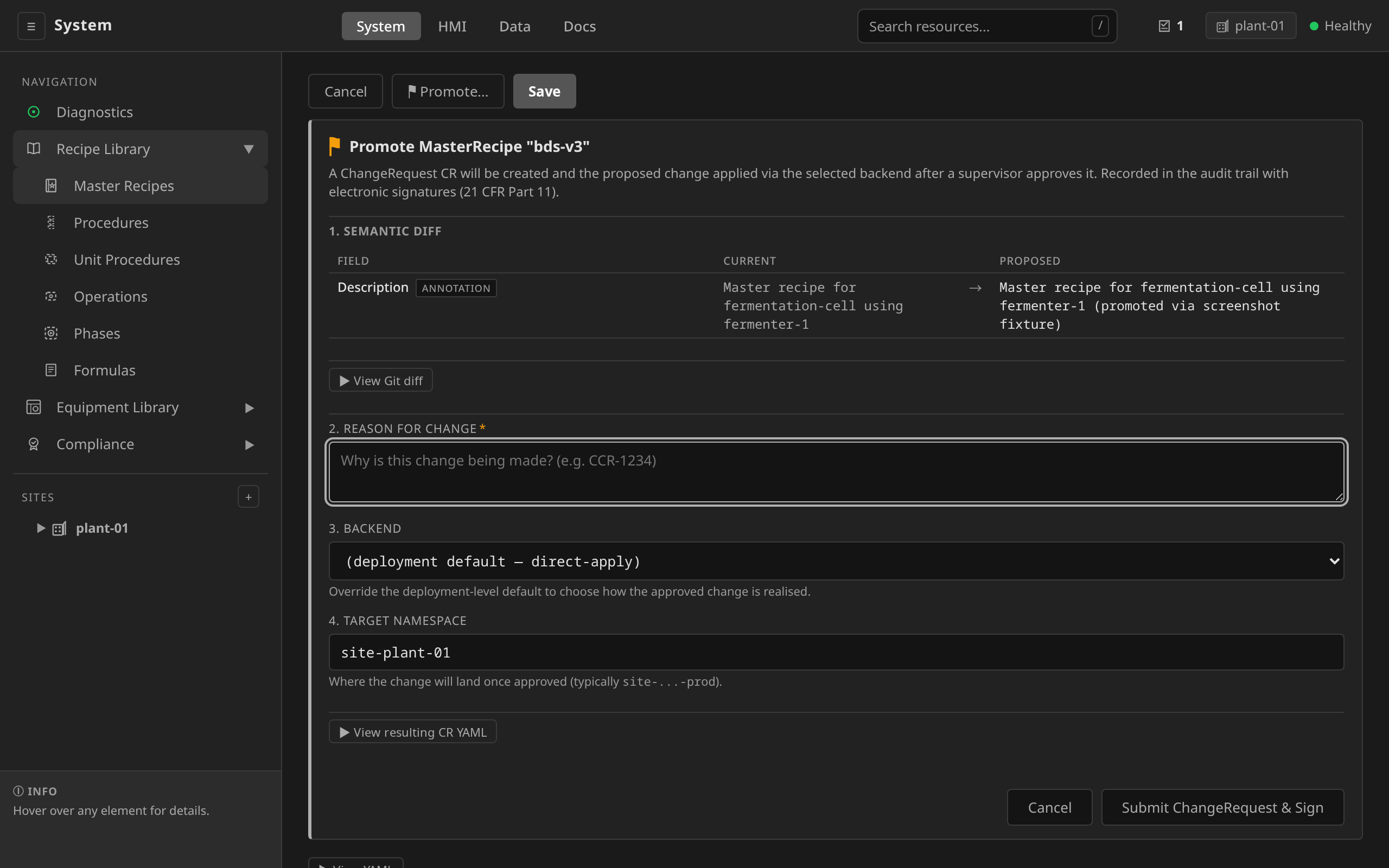
- Click Promote... at the bottom of the form.
- In the review panel that expands under the form:
- Read the Semantic diff. Each entry is rendered in engineer-friendly language ("Mash Hold: hold time 30 min → 45 min"), with no raw YAML lines.
- Optionally expand View Git diff for the line-level YAML comparison.
- Fill in Reason for change (mandatory, and it ends up in the audit record).
- Pick a Backend — leave at (deployment default) unless
you have a specific reason to override. The option names the
deployment's default where the gateway knows it, so
(deployment default — git-pr)tells you what you are accepting. - If the backend is git-pr, read the note under the semantic diff. The diff above it is computed against the live cluster object, so it is exactly the edit you are signing. The git-pr backend diffs the file that declares the recipe on the base branch. The pull request therefore also carries anything the cluster already has and Git does not (an earlier direct-apply change, most often). The two are correct answers to different questions, and the pull request is the wider one.
- Confirm the Target namespace (defaults to the same site
namespace. Change this to your prod namespace, e.g.
site-acme-prod). - Click Submit ChangeRequest & Sign.
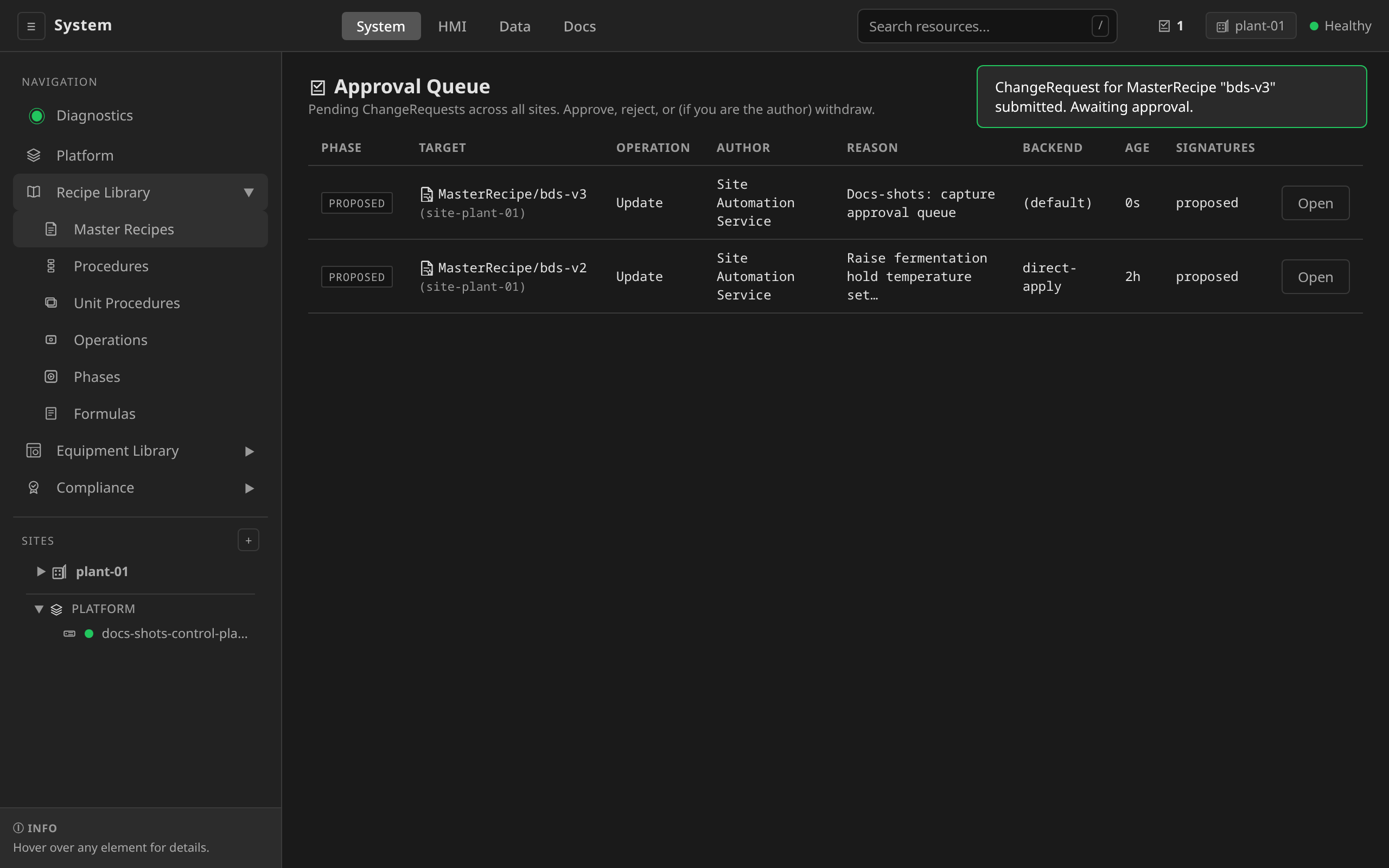
- The page hops to the Approval Queue so you can see your proposal alongside any other pending requests.
The headline path runs below: the same edit aimed at the prod namespace, with both panel expands opened on the way, a second request withdrawn by its author, the two-persona handover, and the recipe verified in the prod site afterwards:
Scripted promotion submits a ChangeRequest manifest through
dcs apply -f. The gateway stamps the "proposed" e-signature from
your authenticated session, exactly as the UI path does (Engineer
or Admin role required):
# changerequest-mash-v2.yaml
apiVersion: changecontrol.dcs.io/v1alpha1
kind: ChangeRequest
metadata:
  name: masterrecipe-mash-v2-ccr-1234
  namespace: site-acme-dev   # authored in dev; targets prod below
spec:
  target:
    apiVersion: recipe.dcs.io/v1alpha1
    kind: MasterRecipe
    namespace: site-acme-prod
    name: mash-v2
  operation: Update
  reason: "Bump hold time per CCR-1234"
  backend: direct-apply
  desiredObject:
    # Full proposed MasterRecipe (apiVersion, kind, metadata, spec).
    apiVersion: recipe.dcs.io/v1alpha1
    kind: MasterRecipe
    metadata:
      name: mash-v2
      namespace: site-acme-prod
    spec: { }
dcs apply -f changerequest-mash-v2.yaml
Leave spec.signatures empty. The gateway stamps the proposed
signature server-side so the reconciler can HMAC-verify it, and it
rejects manifests that supply their own. Applying a ChangeRequest
is create-only: once submitted, act on it via the Approval Queue
(or the approve/reject/withdraw endpoints). Do not re-apply it.
The ChangeRequest then sits in Proposed until a supervisor
submits an approval signature via the Approval Queue.
Approve a promotion¶
A different user must approve
Segregation of duties: the user who proposed a ChangeRequest cannot
approve it, even with supervisor or admin rights. The gateway rejects
a self-approval with 403. Have a second supervisor (or an admin)
review and sign.
- Click the approval badge in the system app top bar (it appears whenever there are pending ChangeRequests and is hidden when the queue is empty). After submitting from the previous step the page is already on the Approval Queue.
- The pending requests are listed with their target, author, reason, age, and current signatures. Click Open on the row you want to review.
- The detail page shows the same semantic-diff preview the author saw, the conditions, and the resolution (once it lands).
- Click Approve & Sign to stamp the canonical "approved"
e-signature. The reconciler picks it up on the next pass and
transitions the ChangeRequest from
ProposedtoApproved. The configured backend then realises the mutation.
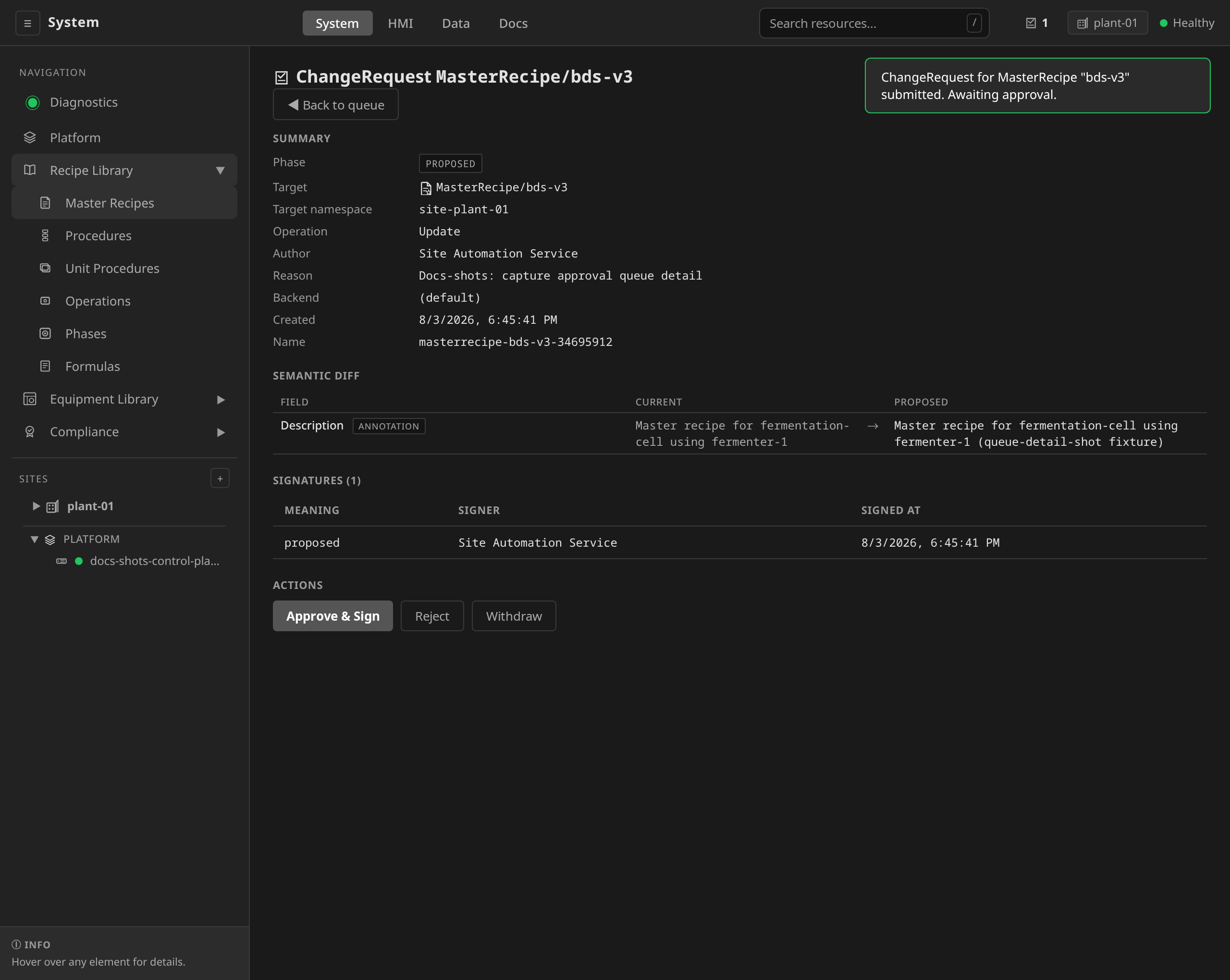
The ACTIONS panel tracks the signed-in session as well as the
ChangeRequest's phase. A control is rendered only when the
deployment's role table admits the action behind it. Approve &
Sign and Reject are supervise actions and Withdraw is an
engineer action, so a deployment that keeps approval apart from
authoring shows each person the half of the panel that is theirs.
The gateway refuses the request either way, and the panel is what
keeps a signing ceremony from opening in front of a session that
cannot finish it.
Approving via kubectl is intentionally not supported, because the
HMAC-bound signature payload is computed server-side. Use the
UI or the gateway HTTP API:
curl -X POST "$GATEWAY/api/v1/changerequests/site-acme-dev/<cr-name>/approve" \
  -H "Authorization: Bearer $TOKEN" \
  -H "Content-Type: application/json" \
  -d '{"reason":"Reviewed and signed"}'
Withdraw a promotion¶
If you submitted a promotion in error, click Withdraw on the detail
page. The button appears when the session holds changerequest:withdraw,
which is an engineer action.
Holding the action is not enough on its own. Only the original author, or an admin, can withdraw a ChangeRequest. On someone else's proposal the button is drawn dimmed, and the hint beside it names the rule:
- Proposed by someone else — only the author or an Admin may withdraw
Ask the author to withdraw it instead. The gateway refuses the request either way.
Once it has reached Applied it is too late to withdraw, and the remedy
is a follow-up ChangeRequest that reverts it.
Backend resolution and audit anchors¶
Every approved ChangeRequest carries a status.resolution block linking
back to the source-of-truth artefact:
- direct-apply populates
auditRecordRef. The mutation also writes the standarddcs.io/esig-approvedannotation onto the target. - git-pr populates
gitCommitSHAandgitPullRequestURLonce the PR merges. The detail page renders both as clickable links. - webhook populates
externalRecordID,externalRecordURLandexternalRecordStatefor the record it opened in the external quality system, alongside whatever its delegate backend resolves once that record is approved. - in-cluster-queue (experimental — no reference integration)
populates
auditRecordRefonce the deployer-supplied controller advances the phase.
See ChangeRequest backends for operator-side configuration.
Troubleshooting¶
- Promote button is missing. Your session's resolved action set does not
carry
changerequest:create. A role that does not reach the action is the usual cause, and a deployment policy that denies the action on its own is the other. Ask your platform admin for the Engineer or Supervisor role, and read/api/v1/auth/entitlementsif you hold one of those already. - "reauthentication_required" error. Your session token is more than five minutes old. The panel closes and offers Re-authenticate, which takes you to the login page and returns you to the page you were on. Repeat the promotion from there.
- Semantic diff is empty ("No semantic differences detected"). The renderer compared the proposed object against the current cluster state and found no meaningful changes. Your edit is effectively a no-op. This only applies while the ChangeRequest is under review: from Applied onward the detail view renders the diff against the target state recorded at proposal (captioned below the diff), so the approved change stays reconstructable from the record. A ChangeRequest that predates base recording falls back to the live target and says so in the caption.
- Diff shows "No semantic renderer for kind …; see raw diff." The target kind has no registered semantic-diff renderer, so the panel falls back to a raw structural diff. This is rare, because every engineering kind ships a renderer fed with current state. If you hit it for a first-class kind, it's a bug worth filing.
- No backend resolves. Either the deployment default backend
(
gitopsEnforcement.changeRequest.defaultBackend) is misconfigured or yourspec.backendoverride does not match a registered backend. See the operator docs for the registered names.
Related Documentation¶
- Recipe authoring reference — full field list for
MasterRecipeedits - GitOps for automation engineers — why this workflow exists
- GitOps enforcement RFC — the protocol contract
- ChangeRequest backends — operator-side configuration