Device Discovery Wizard
A guided flow in the gateway UI that browses an OPC UA server's address
space, classifies each node onto its control plane, and emits the
ISA-88-correct instance, a ControlModule (with its I/O) or a Unit,
without hand-writing YAML. See ADR-0020
for the classification model.
Use this when you need to model a packaged smart device (a CMC analyzer,
a Coriolis flow meter, a vendor skid PLC, a PA-DIM-conformant smart
instrument) and the device's OPC UA model already carries the typing
the DCS needs. The wizard is the fastest path from "endpoint URL" to
"Unit applied to the cluster". Everything it does is also reachable
through kubectl apply if you prefer hand-authoring.
When to use the wizard vs. each alternative
| Scenario | Use |
|---|---|
| Fieldbus I/O (Modbus; EtherNet/IP is an experimental, gated driver) — raw registers, no type info | I/O authoring (IOModule + ControlModule) |
| Field device / instrument on an OPC UA server — exposes variables, no callable methods | Discovery Wizard → emits a ControlModule instance (+ shared IOModule) |
| Module / skid exposes services (an MTP ServiceControl interface, or OPC UA Methods), DCS will orchestrate | Discovery Wizard → emits Unit with serviceBinding |
| Skid ships a VDI/VDE/NAMUR 2658 MTP file | MTP import — the same emitted resources, read out of the file with no live server needed |
| You already know the exact NodeIds and want full control | Hand-author the CR (ADR-0001 (asset dissolution)) |
What the wizard emits
The wizard never emits an Asset resource. It classifies each selected
node onto one of two control planes and emits the matching instance shape
(ADR-0020):
- Data plane — a
ControlModuleinstance for a field device / instrument (a node exposing Variables, no callable Methods). The DCS owns the control loop, so the device is modelled as a control module: the CM is template-free (templateRef: ""), bound under a parent Unit you choose, and each discovered variable becomes a tag carrying the variable's node ID,dataType, andaccessLevel. All the CMs from one scan share oneIOModule(protocol: opcua, the endpoint's address) that the tags route through. ThatIOModuleis controller-less, sincecontrollerRefis optional for network protocols (ADR-0021). The wizard emits it with no Controller, and the namespace-sharednetwork-io-probemonitors the endpoint's reachability. The module also carriesspec.security: the security policy, mode and auth mode the wizard connected with, the Credentials Secret by name, and the server certificate the session observed (#1913). It is the same block aUnit'sserviceBinding.securitycarries, and the runtime drives the tags through it. AnIOModulewith no security block is still a valid resource. The runtime reads it as aNone/Noneanonymous session, so the tuple is written down rather than left to a default. For a generic OPC UA device, tags are emitted without arole: discovery cannot know what a variable means (ADR 0016), so declare roles afterward if you templatize the module. A device recognized as PA-DIM is the exception. Its model declares the meaning, and the wizard reads it (see PA-DIM ingestion below). - Service plane — a
UnitwithserviceBindingfor a module / skid that exposes services. The device runs its own control and the DCS orchestrates it. Two service forms exist (ADR-0045). A module recognized as an MTP PEA by its ServiceControl variable interface emits declaredmtpservices carrying the resolved state/command/procedure addresses. A Methods-style device emits one entry per picked OPC UA Method, whose input and output arguments are introspected from the server and mapped to IEC 61131-3 types (Bool→BOOL, Int→DINT, Double→LREAL, Float→REAL, String→STRING). Unknown types fall back toSTRINGand surface for you to correct.
A Unit with no services picked is rejected by the wizard (the schema
requires services to be non-empty). If a candidate has neither an MTP
interface nor callable Methods it is a data-plane device. Leave it as a
ControlModule, or pick a different candidate.
The four-step flow
Open the wizard from the Device Discovery row in a site's Infrastructure section of the System app's sidebar, or from the Discover Devices button on the site's Infrastructure landing page. Discovery lives beside the controllers, servers, and I/O it commissions.
What the boiler skid actually is
The endpoint in the recording above, and in the secured one below, is
Microsoft's opc-plc reference simulator
(mcr.microsoft.com/iotedge/opc-plc, pinned by digest because the node ids
the wizard walks are compiled into the image) running as an in-cluster Pod. It is
built on the OPC Foundation's .NET implementation, which shares no code
with the Go stack this product's OPC UA client is written against.
Endpoint discovery, the secured channel, browsing, and live method
introspection are therefore shown working across an independent OPC UA
implementation, and none of it runs against a server of our own.
Step 1 — Connect
Enter the OPC UA endpoint URL (opc.tcp://host:port), select a security
policy and mode, and pick anonymous, username/password, or certificate
auth. Discover endpoints is optional. It queries the server's
discovery service and lists the security configurations it actually
advertises, so you can pick the one your client trust list already
supports.
Pharma deployments default-reject SecurityPolicy=None with
SecurityMode=None. The Helm value gateway.opcua.allowInsecure
(environment variable GATEWAY_OPCUA_ALLOW_INSECURE on the gateway)
relaxes this for development. Production should always run
signed-and-encrypted sessions against pinned server certificates. See
Security Hardening for the certificate-pinning
workflow.
The secured path runs below: endpoint discovery lists the server's advertised security profiles, the scan connects with Basic256Sha256/SignAndEncrypt and certificate auth, and the gateway's own client identity carries the secured session.
The gateway discovery identity (default)
Any non-None security mode needs a client certificate at the
secure-channel layer. So that Sign / SignAndEncrypt discovery
works out-of-the-box under the default gateway.opcua.allowInsecure:
false posture, the gateway provisions its own discovery client
identity on first boot: a self-signed cert + key persisted to the
dcs-opcua-client Secret in the gateway namespace, with a stable
ApplicationURI (urn:cndcs:gateway:opcua-discovery). When a secured
connect supplies no explicit credentials, the gateway uses this identity
as the channel-layer cert automatically. Nothing to configure.
The only one-time step is on the server: it must trust the gateway's certificate. Fetch the public cert (never the private key) and add it to the server's trusted-peers directory:
curl -s "$GATEWAY/api/v1/discovery/opcua/client-identity" | jq -r .certPem \
  > dcs-discovery-client.pem
The response also carries the applicationUri, sha256Fingerprint
(matching what the server logs on rejection), and validity window. Once
the server trusts this cert, every DCS gateway secured discovery works
without a per-endpoint Secret. The identity is long-lived and stable
across restarts and upgrades. To rotate it, delete the dcs-opcua-client
Secret, let the gateway re-provision on the next boot, and re-trust the
new cert on your servers.
Secured endpoints — a site-specific Credentials Secret
To present a site-specific identity in place of the gateway's (or to
use Certificate user-token auth, or Username/Password over a
secured channel), supply an explicit Kubernetes Secret in the gateway's
namespace, referenced by name. An explicit Secret always wins over the
gateway identity. Choosing Sign or SignAndEncrypt (or the
Certificate auth chip) surfaces the optional Credentials Secret
field. Create the Secret with PEM-encoded clientCert / clientKey
keys (the same key convention the Unit serviceBinding path uses):
kubectl -n dcs-system create secret generic opcua-client-cert \
  --from-file=clientCert=client.crt.pem \
  --from-file=clientKey=client.key.pem
When a Credentials Secret is set together with Username/Password
auth, the username and password are read from the Secret's username /
password keys, and the inline fields are ignored. Add them to the same
Secret:
kubectl -n dcs-system create secret generic opcua-client-cert \
  --from-file=clientCert=client.crt.pem \
  --from-file=clientKey=client.key.pem \
  --from-literal=username=opc-browse \
  --from-literal=password='…'
The Secret name is also copied, as credentialsRef, into the
security block of every emitted IOModule and Unit. Both resolve it
in their own namespace (site-<name>): the CALL_SERVICE resolver
looks a namespace-less reference up there, and the unit runtime can mount
a Secret from its own namespace and no other, so the reference carries
no namespace. The gateway's namespace is where the wizard read the
Secret. Copy it into the site namespace after apply.
Step 2 — Scan
Pick a starting NodeId (defaults to i=85, the Objects folder) and an
optional BrowseName substring filter, then Scan. Leaving the filter
empty scans the whole subtree. The wizard runs a bounded recursive
search and lists every Object node it finds.
Every candidate the scan finds arrives already ticked and already on the ControlModule default (a field device), so the common case needs no gesture here at all. Untick the ones you do not want to model. The checkbox reflects what carries into the next step, where you classify the candidates that expose Methods as Unit per row.
When a candidate's OPC UA type-definition resolves into a recognized
device-model companion namespace, PA-DIM
(http://opcfoundation.org/UA/PADIM/) or OPC UA for Devices
(http://opcfoundation.org/UA/DI/), the wizard tags it with a
PA-DIM device / OPC UA device chip. That is a positive
classification as a data-plane field device, and it is stronger than
the structural default described below
(ADR-0022,
#934).
Candidates with no recognized type-definition fall back to the structural
signal (Variables vs Methods) and the ControlModule default, which you
override per row. A PA-DIM candidate additionally gets its declared
signal model ingested in step 3 (see below,
#935).
The service plane has no type-definition to recognize, because there is
no public PEAType companion namespace. An MTP module is therefore
recognized by its interface
(ADR-0045,
#936).
When a candidate's variables load in step 3 reveals child services
carrying the full VDI 2658-4 ServiceControl signature (StateCur,
CommandEn, the three command channels, ProcedureCur), the wizard
flips that row's default to Unit and tags it with an MTP provenance
line. The flip never overrides a kind you picked by hand.
Step 3 — Review
For each selected candidate, choose the Emit as kind and edit the generated Resource name. Resource names are derived from the device display name, lowercased and sanitised to valid Kubernetes name form.
When the kind is ControlModule, a variables panel opens beneath the
row. Click Browse for variables to fetch the node's Variable
children. For each, the wizard reads the DataType and AccessLevel
attributes (which the scan does not capture but a tag requires) and
lists them read-only. A DataType outside namespace 0 is resolved to the
built-in it descends from: a CODESYS controller declares WORD as the
PLCopen companion's own type, a subtype of UInt16, and the tag is typed
UInt16 even when the variable holds no value yet. Only a declared type
that descends from no built-in is typed from the sampled value. A
variable whose DataType descends from Structure, a vendor record such
as the boiler simulator's BoilerDataType, is typed Structure and its
row says that the runtime reads no value from it
(#1943).
The tag is still emitted, because the address is real, and the runtime
publishes it as no value at Bad quality with that reason beside it.
Every variable shown becomes a tag on the emitted CM. A CM whose
variables have not loaded, or that has none, blocks Generate. A
tagless control module is exactly the empty stub this flow replaces.
Deselect it or switch it to Unit.
PA-DIM ingestion
For a candidate carrying the PA-DIM device chip, the variables panel
becomes a declared-signals panel: the gateway walks the device's own
information model (OPC 30081), and no flat Variable scan runs.
Each SignalSet member arrives named by the device's SignalTag, with
its role, engineering units, range, and (for two-state signals) its
true/false state labels, all read from the model:
| Declared signal family | Emitted tag(s) | Role |
|---|---|---|
| Analog measurement (Temperature, Flow, Pressure, Level, analytical…) | one tag | state |
| Control signal (final-control-element readback) | readback tag + <name>_SP setpoint tag |
feedback + setpoint |
| Two-state / multi-state / discrete | one tag (with true/false labels where declared) | state |
The signal family comes from each signal's TypeDefinition resolved
against the PA-DIM namespace (exact match, the same rule as the chip,
ADR-0022). No tag
name is ever interpreted. When the signals declare exactly one measured
quantity, the emitted CM also carries spec.measuredVariable. Direct
Variable children the SignalSet does not cover still ride along as
plain undeclared tags. Because the emitted roles are declarations
persisted on the CR, the HMI faceplate renders these devices with its
role-matched widgets (setpoint/feedback bars, prominent state value) with
no templatizing pass.
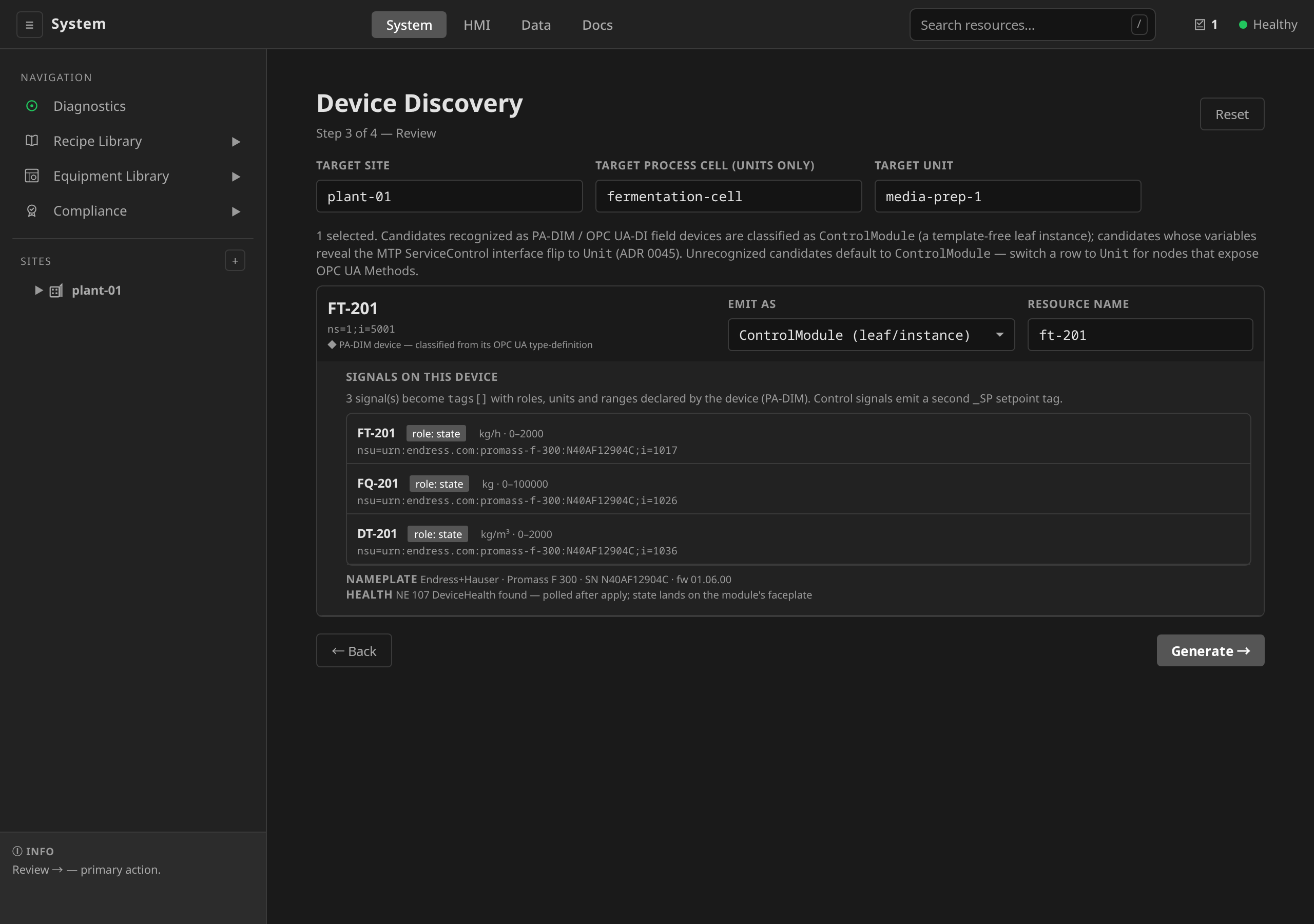
The whole flow (the scan-time chip, the declared-signals panel, the emitted declarations, and the device health that follows the module onto its faceplate and into a declared alarm) runs below against a live PA-DIM flow transmitter:
What the PA-DIM instrument actually is
No off-the-shelf OPC UA simulator serves PA-DIM. The instrument in the
recording above is therefore a fixture in this repository,
hack/docs-shots/padim-fixture. It runs on
node-opcua, an independent
TypeScript implementation that shares no code with the Go stack this
product's OPC UA client is written against, and its address space is
instantiated from the published PA-DIM companion NodeSet (1.02.0), with
nothing hand-built. The type hierarchy, the DI-namespace nameplate, and each
measurement variable's engineering units, range and data type therefore
come from the specification file. The nameplate values on camera are
representative, and they name no particular vendor's device.
pkg/opcuaclient's walk of that model is asserted against this fixture on
every full CI run (make test-interop), alongside the endpoint discovery,
browse, secured-channel and subscription suites driven against open62541
and opc-plc by the same target. The PA-DIM leg is thus demonstrated
across an independent implementation on the same terms as the core OPC UA
path above.
The MTP PEA is a fixture in this repository
The same is not yet true of MTP. No off-the-shelf simulator serves an MTP
ServiceControl interface either, and the PEA in the section below is
served by hack/docs-shots/mtp-fixture. That fixture is built on the same
Go stack as the client reading it. Its type definitions are pinned to the
published companion NodeSet, so the information model on the wire is the
one VDI 2658-4 defines. The server answering the browse is still our own.
Unlike PA-DIM there is no MTP companion NodeSet to load. VDI 2658-4
defines a variable shape and no OPC UA namespace, which is why the service
plane recognizes a service by that shape alone
(ADR-0045). A rebuilt fixture would
therefore still be hand-built. What to do about that is tracked in
#1463.
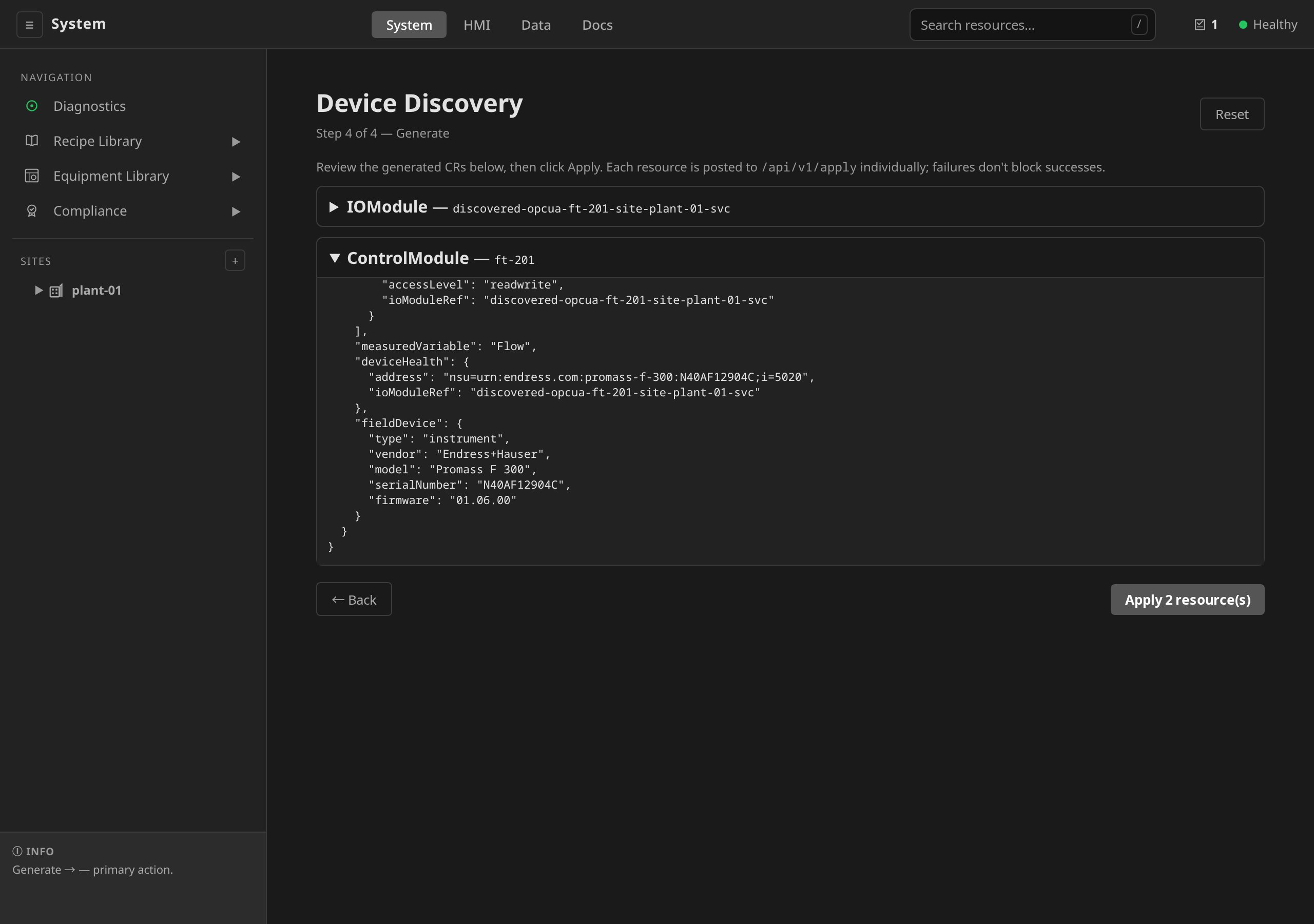
The panel also shows the device's IEC 61987 nameplate (manufacturer,
model, serial number, firmware). It lands on the emitted
ControlModule as its spec.fieldDevice asset record (type:
instrument), and when the endpoint hosts exactly one PA-DIM device the
shared IOModule's own record is stamped too
(ADR-0043).
The IOModule's copy carries the vendor and model but not the serial
number: vendor and model classify the box at the endpoint, while a
serial identifies one physical unit, and that identity lives on the
instrument's own ControlModule so two objects cannot drift apart
claiming to be the same device. After apply, the record reads back on
the module's Device section and through the control-module API, and
it is editable there. An instrument swap is a new serial on the module
that is already in the tree.
The device's NE 107 DeviceHealth variable is declared on the
ControlModule as spec.deviceHealth at emit time. After apply, the
control operator polls it through the namespace io-probe (30 s cadence)
and mirrors the state into status.deviceHealth. The module's HMI
faceplate renders it as a
DEVICE HEALTH row, and a
deployment annunciates chosen states with a DeviceHealth
AlarmDefinition condition (see
Annunciate instrument health
and ADR 0043).
When the kind is Unit, a services panel opens beneath the row with
two sections. MTP module services shows the result of the
ServiceControl probe: each recognized service with the state the PEA
reported at probe time and the commands its CommandEn word currently
accepts, ticked by default. A ticked MTP service becomes a declared
mtp entry in serviceBinding.services[], carrying the resolved
control-attribute addresses. Procedure IDs and the
self-completing/continuous split come from the vendor's engineering
data (the MTP manifest), so you declare procedures on the Unit after
apply. Methods on this Unit works as before: click Browse for
Methods to fetch the candidate's Method nodes, both Methods parented
directly on the device Object and Methods grouped one level below it in
a component such as the OPC UA DI MethodSet (how DI-conformant smart
devices normatively organise their callable surface). Tick each Method
you want the DCS to call. The wizard introspects InputArguments and
OutputArguments and shows the parameter list inline, and each ticked
Method becomes one UnitService entry. Generate stays disabled
until every Unit row has at least one MTP service or Method ticked.
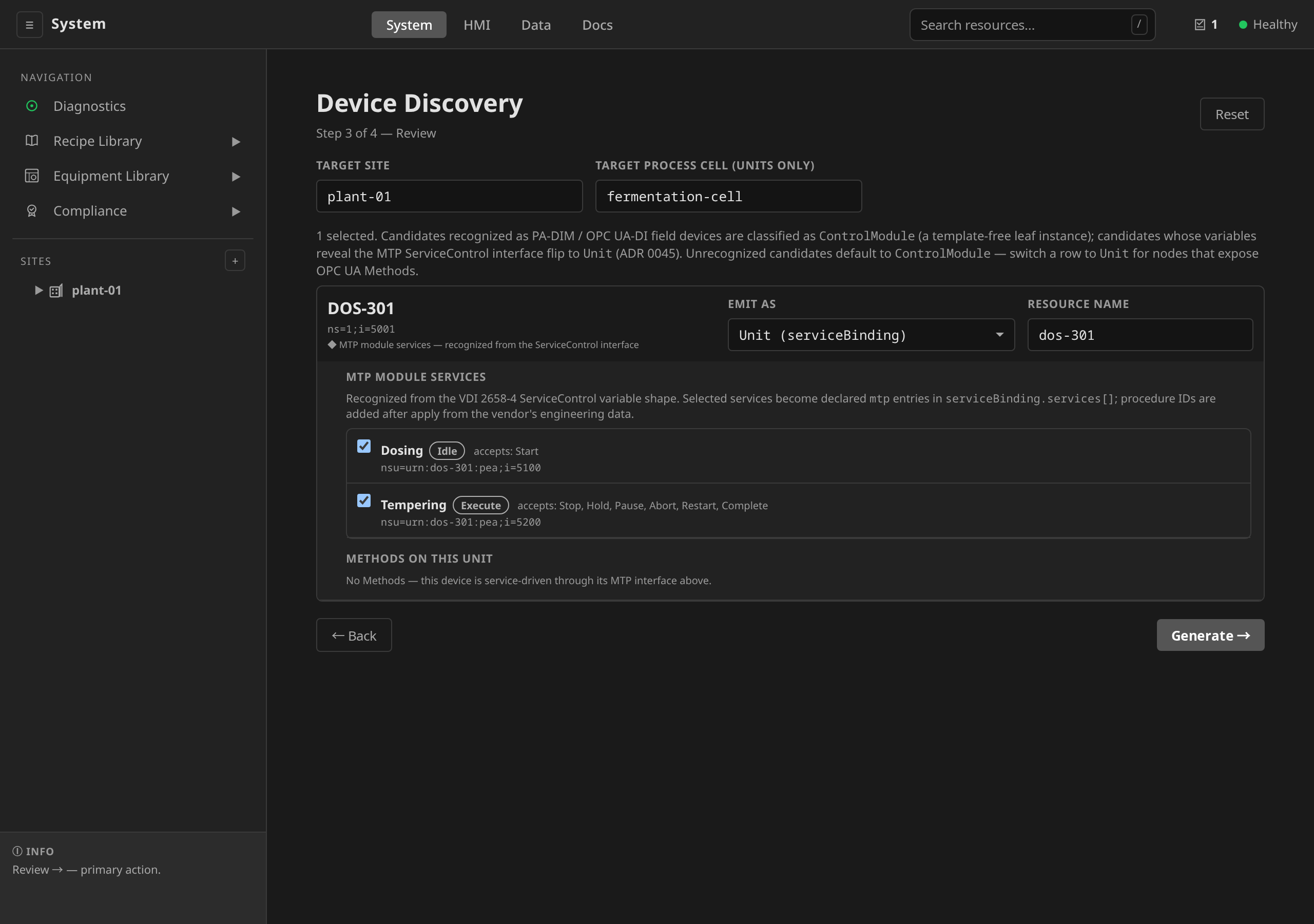
The row above reached Unit by itself. A PEA carries no type-definition the scan can classify, so the candidate arrives on the ControlModule default. Loading its variables is what fires the ServiceControl probe, and recognizing the interface is what flips the kind.
The two state chips differ because the module is in two different states.
A batch dosing service waits in Idle, where the transition table
defines Start alone. A continuous tempering service runs in Execute,
which accepts the six commands defined from there.
All emissions need a target site (resources are namespaced under
site-<name>). A Unit additionally needs a process cell. A
ControlModule additionally needs a parent Unit to bind under.
controllerRef is optional for network protocols like OPC UA
(ADR-0021), so
the shared IOModule is controller-less and the wizard no longer asks
for a Controller.
Step 4 — Generate
Review the JSON envelopes that will be POSTed to /api/v1/apply. They
are ordered by dependency (the shared IOModule first, then the
ControlModules that route through it, then any Units) and applied
individually. Failures in one don't block successes in the next. Apply
results render alongside each row: a checkmark for success, the error
message for failure.
Above the envelopes, a panel reads back the security the shared
IOModule is about to be applied with
(#1913):
the policy and mode, the auth mode, the Secret the credentials come from
and the namespace it resolves in, and the server-certificate fingerprint
that will be pinned. The tuple is the one the wizard connected with on
step 1 and used for every call since. Three things on that panel are
warnings, worded so the runtime's later refusal is not the first time
you hear of them:
securityPolicy=None + securityMode=None. The connect step accepted this tuple only becausegateway.opcua.allowInsecureis set, and the runtime will drive the device over an unsigned, unencrypted session. Go back to step 1 and pick a profile the server advertises.- No Credentials Secret named over a
SignorSignAndEncryptchannel, or with username or certificate auth. The apiserver refuses that envelope, and the panel says so in the CRD's own sentence:spec.security.credentialsRefis required whenever the auth mode is not anonymous or the security mode is notNone. The gateway's own discovery identity carried the scan, and it does not carry the runtime. A username and password typed inline are written into no resource either. Go back to step 1 and name a Secret. - The server presented more than one certificate during the session. No pin is written, because the wizard cannot say which one the device is.
After Apply, the resources land in the cluster and surface in the usual
places: ControlModules under their parent Unit, Units under their
site's equipment view.
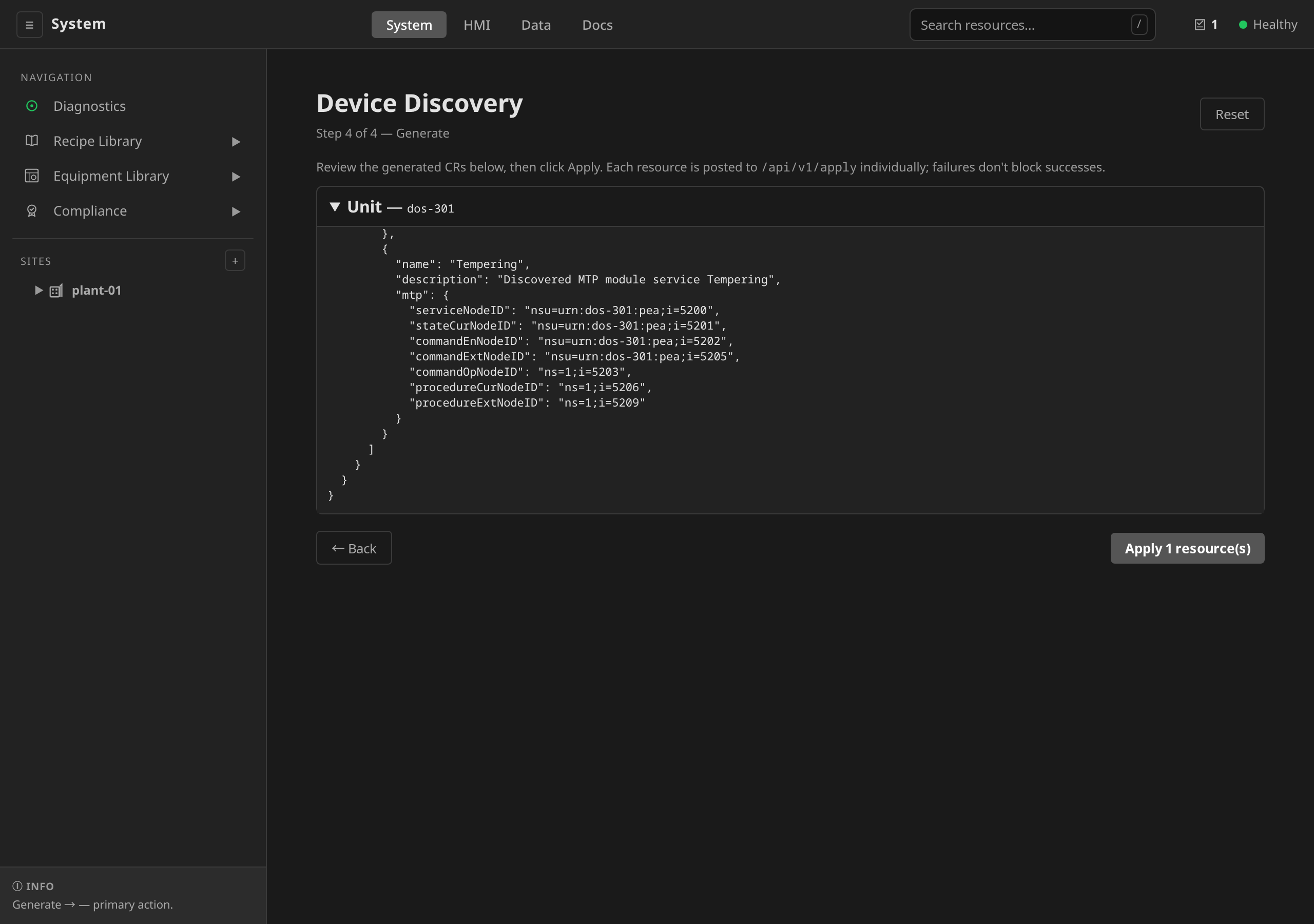
A ticked MTP service emits the envelope above. It carries every
ServiceControl address the probe resolved, and the runtime reads those
declarations with no second browse. The service node and
the three channels the runtime drives it through (stateCur,
commandEn and commandExt) are written in the namespace-URI form.
That form survives a server renumbering its namespace table
(#303).
What the envelope does not carry is procedures. Procedure identity and
the self-completing/continuous split are vendor engineering data from the
MTP manifest, and no live server serves them.
What the wizard does not do
- Multi-Method services on a single Unit: Each ticked Method emits
one
UnitService. You can pick many Methods on one Unit, but if a service needs multi-Method orchestration, edit the Unit afterwards. - Phase wiring: The wizard emits Units with
serviceBinding(orchestrate mode) only. It does not generatePhaseTemplates or their state charts. Author phases separately once the Unit lands (see Phases). - Driving MTP services:
CALL_SERVICEinvokes Method services only and refuses anmtpservice with a typed error, because an MTP service has no Method to call. Phase logic drives one by writing Table 14 command words to its ServiceControl channels, through theMTP_COMMAND/MTP_STATE/MTP_COMMAND_ENABLEDbuiltins (ADR-0045, and Drive an MTP module service). Emitted MTP declarations carry noprocedures, because a running server does not serve procedure identity or the self-completing split. Declare them on the Unit from the vendor's engineering data before orchestrating, or take them from the vendor's MTP file with MTP import. The file is the one place they are written down. - Templatizing a fleet: The wizard emits one
ControlModuleinstance per device. Deriving a reusableControlModuleTemplatefrom a group of identical discovered devices (then stamping instances from it) is a separate workflow. Author the template afterward and set tag roles on it. - Reading a generic variable's meaning: For a device without a
recognized PA-DIM model, emitted tags carry an address,
dataType, andaccessLevel, but norole. Discovery cannot tell a setpoint from a feedback from an alarm (ADR 0016). Roleless tags render generically until you declare roles. Only a PA-DIM device's declared model changes this (see PA-DIM ingestion). - Server-certificate trust management: The wizard browses in
trust-on-first-use mode. It accepts whatever certificate the server
presents, and the fingerprint the session observed is what it writes as
serverCertSha256Pinon the emittedIOModuleandUnit, shown on step 4 before Apply. Check that fingerprint against the certificate the device itself reports before you apply. The pin holds the runtime to the certificate the wizard saw, and the wizard cannot tell a substituted certificate from the device's own. OverNone/Noneno pin is written, because nothing on that channel verifies it. There is no standalone trust-list view (removed with the Asset CRD, see ADR-0001). The pinning workflow is in Security Hardening.
Permissions
Every wizard endpoint is registered at PermEngineer, under the catalog action
discovery:browse. Applying what the wizard generated is a second action,
resource:apply, and it is engineer too. Both are listed in
the action catalog.
The UI gates on the session's resolved action set
(ADR-0024). A role name is
not what it reads. A session whose
set does not carry discovery:browse is not offered the wizard at all. The
Device Discovery row is absent from the sidebar, and the site's Infrastructure
tab draws no Discover Devices button. A deep link to the view says which
action is missing. It does not show four steps that cannot run. A session that
browses but does not carry resource:apply walks the whole wizard and reads the
resources it would create, and step 4 offers no Apply. The gateway is the
enforcement point in both cases.
MTP import is import:mtp, also engineer, and it is gated the same way.
Reading a manifest is that endpoint, so a session without the action gets
neither the MTP Import card on step 1 nor the import view behind it.
The wizard does not invoke OPC UA Method calls itself. Introspection reads
InputArguments / OutputArguments and the DataType / AccessLevel
attributes, which are read-only.
Troubleshooting
| Symptom | Likely cause | Fix |
|---|---|---|
| Scan returns 0 candidates | Filter too narrow, or fromNode is a leaf | Clear the filter, or start from i=85 |
Scan fails with "the server does not know node …" (BadNodeIdUnknown) |
The Root NodeId names nothing on the server. On a CODESYS controller the \|var\| prefix every variable carries is the natural mistake; the folder is \|appo\|…Application.GlobalVars |
Re-type the Root NodeId, or browse to the folder in the OPC UA Explorer and copy its id. A refused root is a scan error and is no longer reported as an empty subtree (#1934) |
| Unit row stays gated even with Method ticked | Method args still loading or returned an error | Wait for the "N in / M out" summary; if an error appears, retry |
| Apply returns 400 with "services[0].name pattern mismatch" | Method or argument names contained characters that survived sanitisation as empty strings | Edit the resource name before Apply, or hand-edit the Unit afterwards |
| Apply returns 401 / 403 | Operator role lacks PermEngineer |
Ask an admin to grant the role — see RBAC |
| Device Discovery is missing from the sidebar and from the site's Infrastructure tab | The session's resolved action set does not carry discovery:browse |
Ask an admin to grant PermEngineer — see RBAC |
| Step 4 previews the generated resources but shows no Apply | The set does not carry resource:apply |
As above. Browsing and applying are separate actions, so a policy can deny either one |
| The MTP Import card is missing from step 1 | The set does not carry import:mtp |
As above |
| The IOModule detail page shows no Discover Channels | iomodule:discover and the iomodule:update that saves what it finds are both admin, and this session is not |
Ask an admin to run the scan, or to grant the role |
| Secured connect fails because the server rejected the client cert | The OPC UA server does not trust the gateway's discovery identity | Trust-list the gateway cert on the server — fetch it from GET /api/v1/discovery/opcua/client-identity, see The gateway discovery identity |
| Scan fails with "Client certificate material is missing" | Sign/SignAndEncrypt (or Certificate auth) chosen, an explicit Credentials Secret was referenced, and it lacks clientCert / clientKey keys |
Recreate the Secret with both PEM keys, or drop the Secret to fall back to the gateway identity — see Secured endpoints |
| Scan returns 404 "credentials Secret … not found" | Secret name typo, or Secret created outside the gateway's namespace | Create the Secret in the gateway namespace (dcs-system by default) and re-check the name on the Connect step |
Unit works in the wizard but CALL_SERVICE fails with "credentials secret not found" |
The emitted credentialsRef resolves in the Unit's namespace, while the Secret sits in the gateway's |
Copy the Secret into site-<name>, or set credentialsRef.namespace on the Unit |
The emitted IOModule's detail page reports its credentials Secret unresolved |
The module's security.credentialsRef resolves in site-<name>, while the Secret sits in the gateway's namespace |
Copy the Secret into site-<name>; the reference carries no namespace because the runtime can mount only its own |
Apply of the emitted IOModule is refused with "credentialsRef is required" |
A Sign / SignAndEncrypt channel, or username / certificate auth, with no Credentials Secret named on step 1; the gateway identity carried the scan and does not carry the runtime |
Go back to step 1 and name a Secret — step 4 warns about this before Apply |
Step 4 warns securityPolicy=None + securityMode=None |
The connect step ran under gateway.opcua.allowInsecure, and the module would drive the device over an unsigned, unencrypted session |
Go back to step 1 and pick a profile Discover endpoints lists — see Step 1 |