Ad-Hoc Execution¶
Operators can launch a procedural element (Phase, Operation, UnitProcedure) against an idle Unit without creating a Batch. This is the right path for equipment-oriented work (CIP/SIP cycles, calibration, sampling, equipment commissioning) where a full batch record would not apply.
Scope¶
Ad-hoc execution is supported at three levels:
| Level | Use case | Permission | Production-mode signature |
|---|---|---|---|
| Phase | Single equipment action (open valve, take sample, run pump) | operate |
not required |
| Operation | Coordinated phase sequence (e.g. CIP cycle: pre-rinse + caustic + acid + final rinse) | operate-lead |
not required |
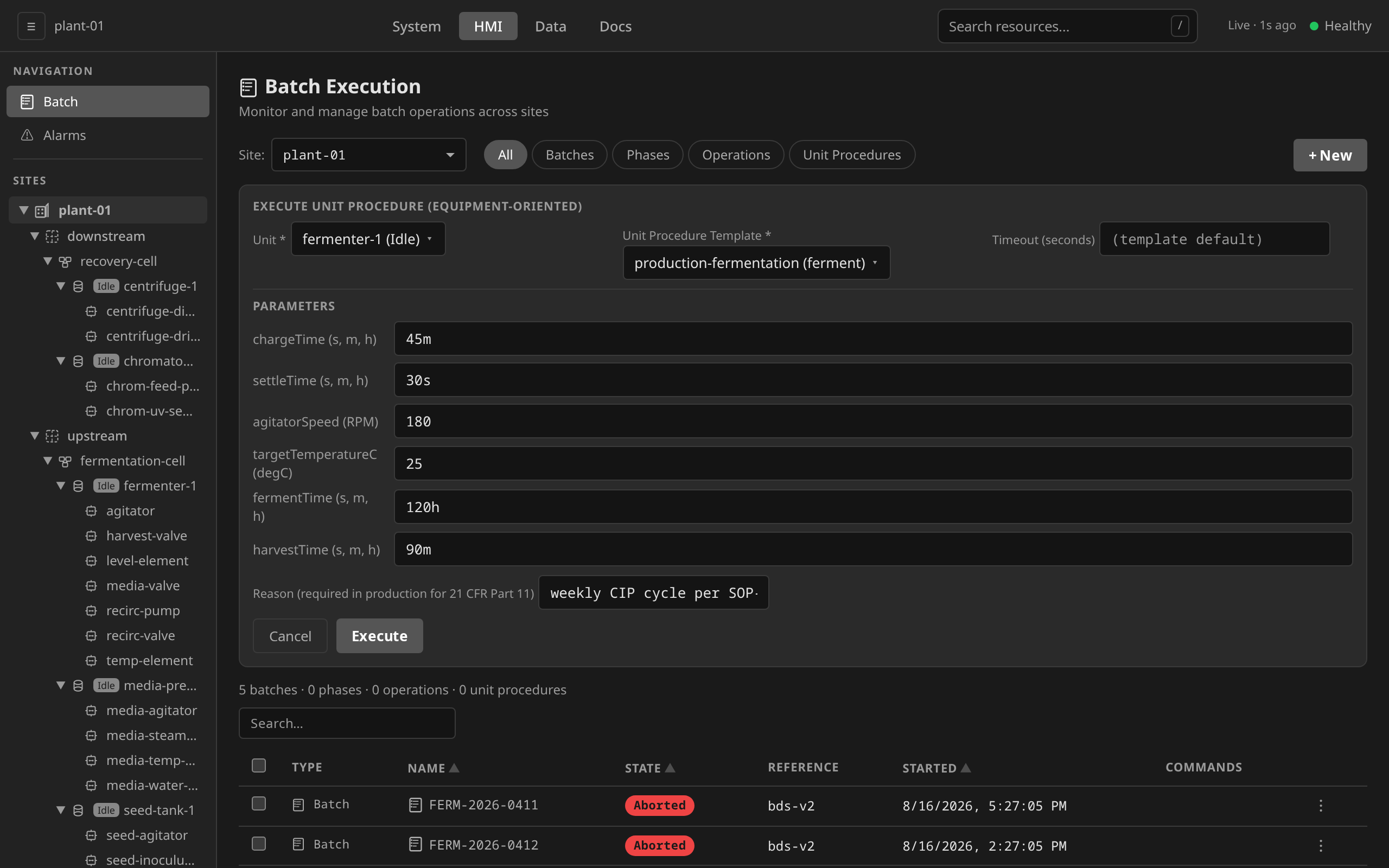
| UnitProcedure | Multi-operation equipment campaign (e.g. full SIP-CIP-leak-test sequence) | operate-lead |
required |
Procedure-level ad-hoc execution is not supported. A Procedure spans
multiple units and is, by ISA-88 definition, what a Batch executes. Running a
Procedure outside a Batch produces a "batch without a batch record", which
breaks 21 CFR Part 11. Use dcs create batch for that.
Eligibility: the category field¶
OperationTemplate and UnitProcedureTemplate carry a spec.category field:
equipment— eligible for ad-hoc executionprocess— recipe-bound, reachable only through a Batch (the default)
The default is process, so legacy templates and any newly authored templates
are locked out of ad-hoc execution until an engineer explicitly opts in. Phase
templates are not classified. Every PhaseTemplate is eligible for ad-hoc
execution.
Launching ad-hoc execution¶
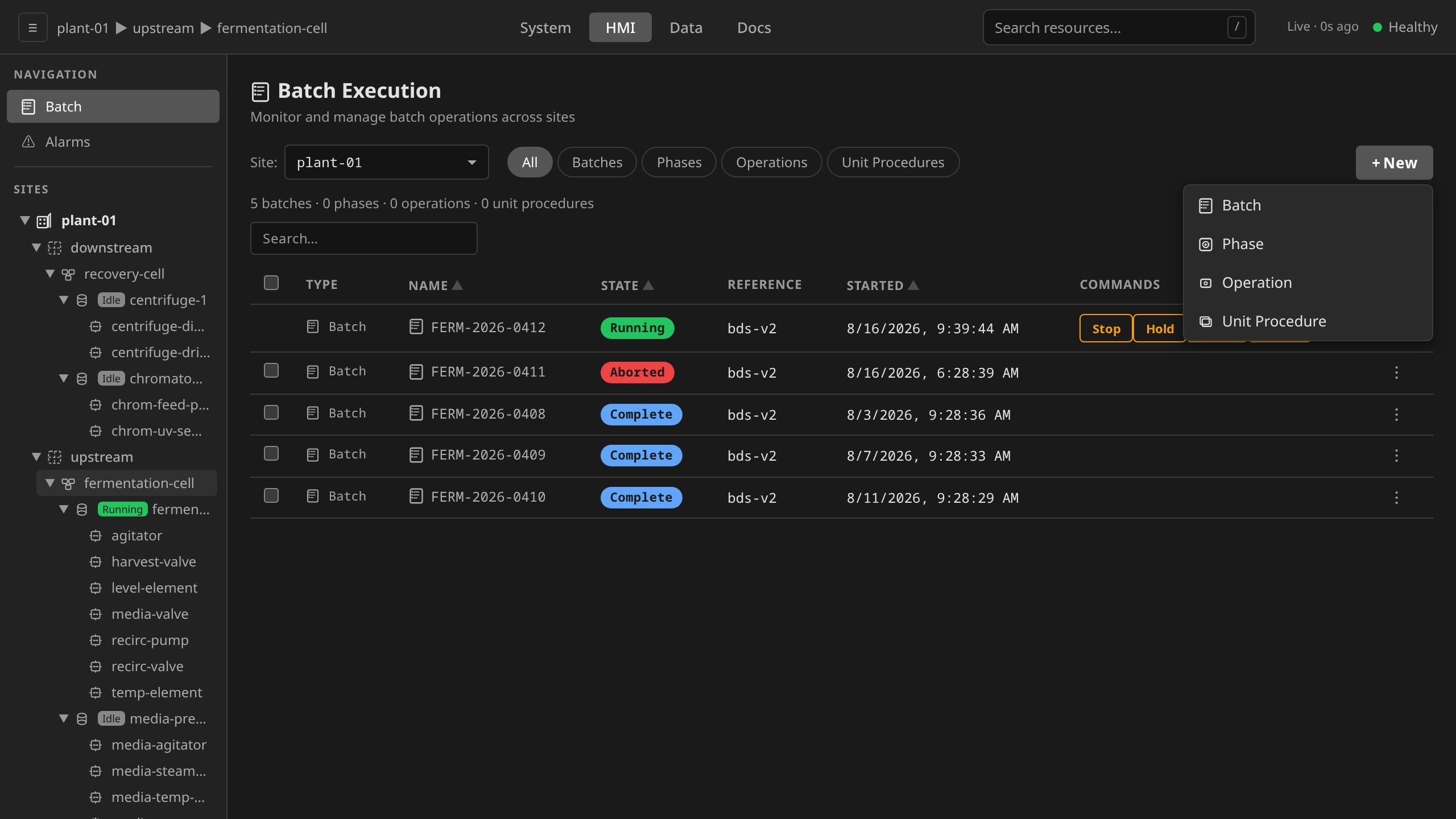
/hmi → Batch in the sidebar (the Batch Execution view) →
+ New. The dropdown menu offers four entries: Batch, Phase,
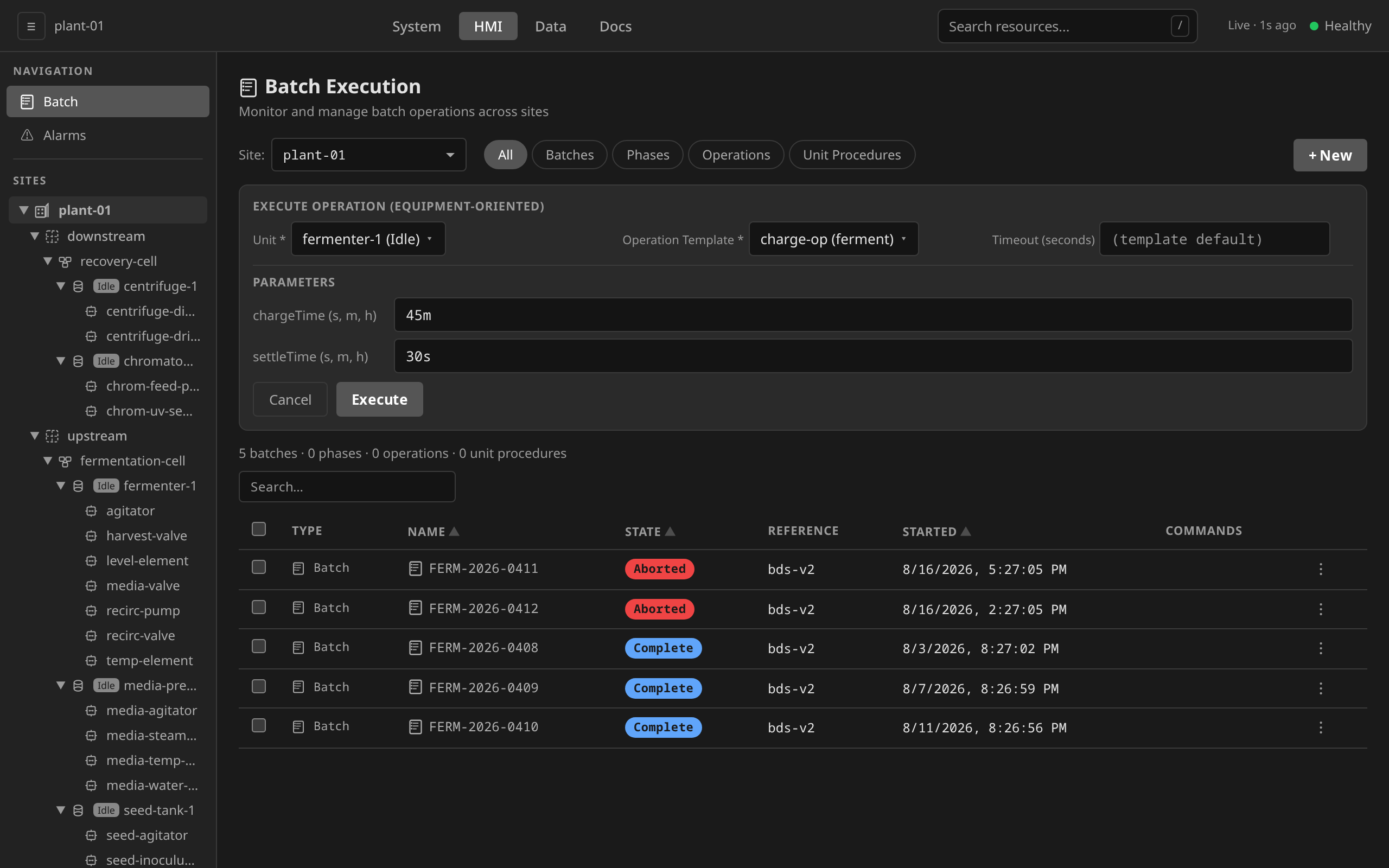
Operation, Unit Procedure. The Operation and Unit Procedure forms only
list templates with category: equipment. The Phase form lists every
PhaseTemplate.
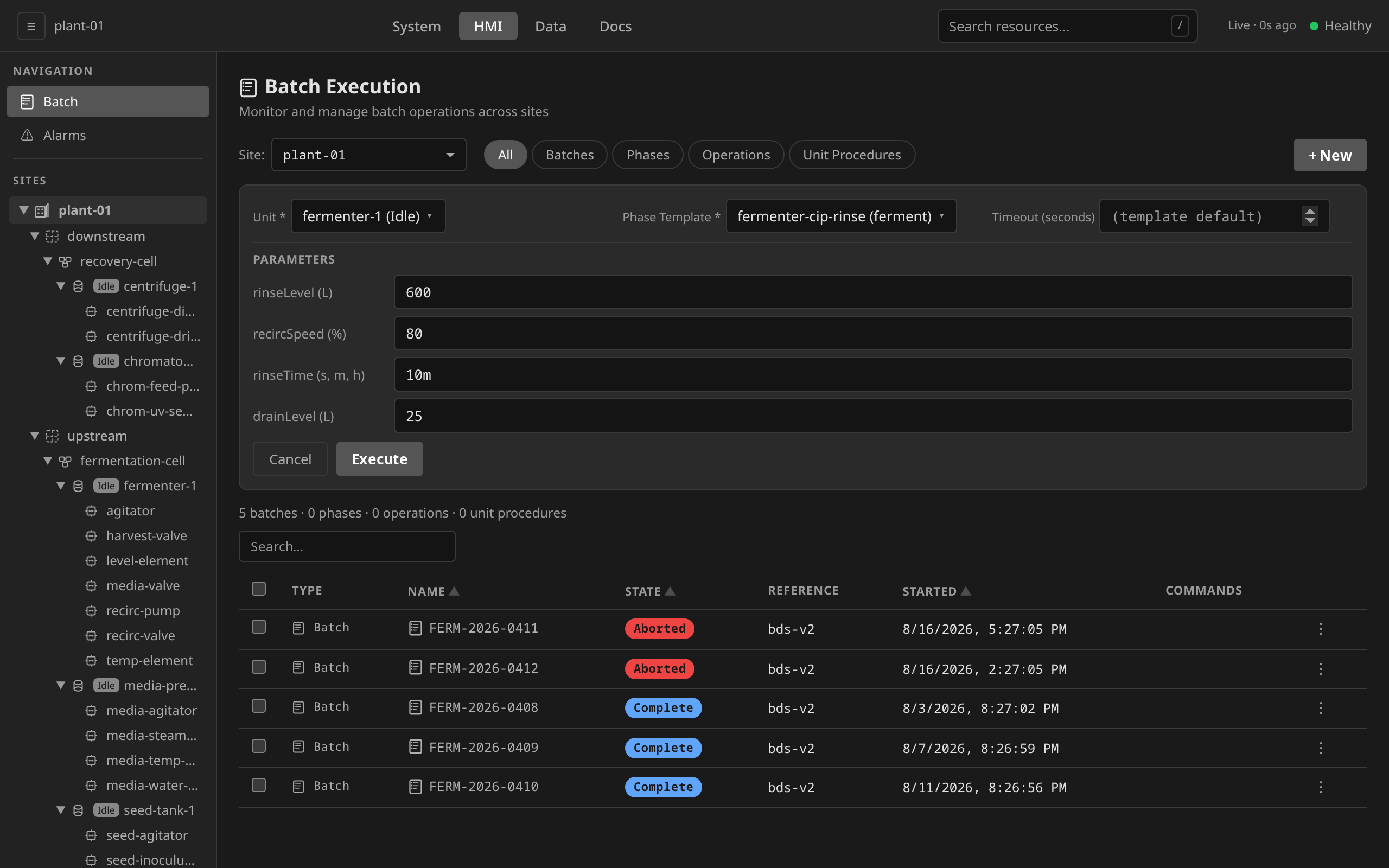
Pick a Unit. The picker shows every unit with its live state, and the
gateway rejects a launch on anything but Idle (409). Pick a template,
override any declared parameters, then Execute. Override rows are
generated from the template's parameter interface, and there is no way
to add one it doesn't declare. Ad-hoc executions appear in the same list as Batches,
tagged with the matching Type chip. Filter by Phases, Operations or
Unit Procedures to narrow the view.
The Operation and Unit Procedure forms are the same shape: an equipment-only template picker, and (for Unit Procedure) the Reason field that production mode requires for the 21 CFR Part 11 signature.
# Ad-hoc Phase (operator role)
dcs execute phase \
  --unit reactor-1 \
  --template purge-with-N2 \
  --param duration_seconds=120 \
  -s houston-plant

# Ad-hoc Operation (lead-operator role; OperationTemplate must be category=equipment)
dcs execute operation \
  --unit reactor-1 \
  --template cip-cycle \
  --param caustic_temp_c=80 \
  -s houston-plant

# Ad-hoc UnitProcedure (lead-operator + production e-signature)
dcs execute unitprocedure \
  --unit reactor-1 \
  --template full-cleaning-cycle \
  --reason "weekly CIP per SOP-CL-014" \
  -s houston-plant
# Ad-hoc Phase
curl -X POST /api/v1/sites/houston-plant/units/reactor-1/execute-phase \
  -H "Content-Type: application/json" \
  -d '{"phaseTemplateRef":"purge-with-N2","parameterValues":[{"name":"duration_seconds","value":"120"}]}'

# Ad-hoc Operation
curl -X POST /api/v1/sites/houston-plant/units/reactor-1/execute-operation \
  -H "Content-Type: application/json" \
  -d '{"operationTemplateRef":"cip-cycle"}'

# Ad-hoc UnitProcedure (production mode requires reason + fresh OIDC token)
curl -X POST /api/v1/sites/houston-plant/units/reactor-1/execute-unitprocedure \
  -H "Content-Type: application/json" \
  -d '{"unitProcedureTemplateRef":"full-cleaning-cycle","reason":"weekly CIP per SOP-CL-014"}'
What gets created¶
The gateway instantiates the procedural tree as parentless resources
(no OwnerReferences to a Batch). Children carry the parent's name in the
usual OperationRef / UnitProcedureRef spec fields, plus these labels:
| Label | Purpose |
|---|---|
dcs.io/adhoc=true |
Marks this as ad-hoc; powers the ?adhoc=true list filter |
dcs.io/unit=<unit> |
The target Unit |
dcs.io/phase-template / dcs.io/operation-template / dcs.io/unitprocedure-template |
Source template name |
Reconcilers do not require a Batch owner. The same SFC chart-walking and unit state-mirroring run, just without a Batch context.
Commanding a running ad-hoc execution¶
A batch is commanded through its Batch resource, which forwards the command
down the procedural tree it created (ISA-88 Clause 7.3.2). An ad-hoc run has no
Batch, so its root is commanded by name: the Phase, Operation or
UnitProcedure that the launch created at the top.
This matters most when a run stops on its own. Any chart error (a guard that cannot be evaluated, a step budget overrun, a failed step action) self-holds the element, and a held run needs an operator decision to leave that state:
| Command | Effect |
|---|---|
| Restart | Resume the chart from where it held (see the caveat below) |
| Stop | Run the stopping chart to a controlled Stopped |
| Abort | Go to safe state immediately, ending at Aborted |
Only the root accepts commands. The children of an ad-hoc Operation or
UnitProcedure are refused with 400 Bad Request naming the root to command
instead. Commanding a child would diverge it from the parent that is
sequencing it, which is the same failure the Batch rule exists to prevent.
Deleting a held run is not a recovery: it destroys the execution record and
reaches no ISA-88 terminal state.
A restarting chart re-commands one step's posture
Restart replays the element's restartingChart, which is a single
program for a phase that may have several steps. If the chart drives the
equipment posture of one step, restarting into a different step can leave
the run unable to satisfy its own transition condition. Where that applies,
Stop or Abort and relaunch.
/hmi → Batch in the sidebar → the run's row in the unified
execution list. The Commands cell carries the commands valid for the
current ISA-88 state, the same way a batch row does. Opening the run shows
the same set in a Commands section on its detail.
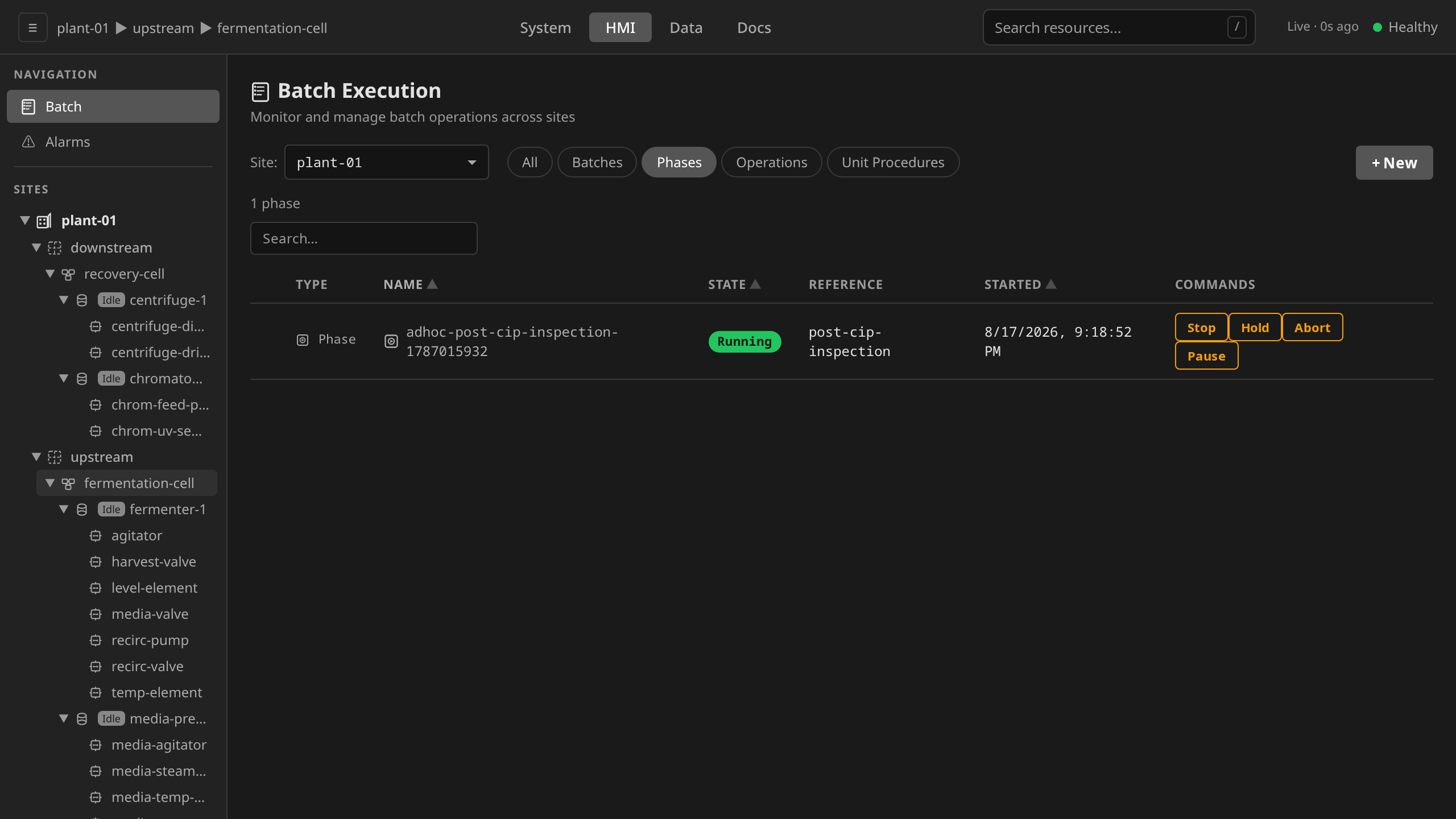
Rows for the children of an ad-hoc Operation or Unit Procedure appear in the same list and carry an empty command cell by design. Command the root.
Irreversible commands (Stop, Abort) go through the reason ceremony that 21 CFR Part 11 §11.10(e) requires, exactly as they do for a batch.
# Restart a self-held ad-hoc phase
dcs command Phase adhoc-purge-with-n2-1754870400 Restart -s houston-plant

# Abort it instead (irreversible commands require --reason)
dcs command Phase adhoc-purge-with-n2-1754870400 Abort \
  --reason "N2 header pressure lost; ending the purge" \
  -s houston-plant

# Same for an ad-hoc Operation or UnitProcedure root
dcs command Operation adhoc-op-cip-cycle-1754870400 Stop \
  --reason "line needed for production" -s houston-plant
dcs get phases lists the live phases with their states. An ad-hoc root
is the one with an empty OPERATION column. That column is the parent
ref, so anything with a value there is a child and must be commanded
through its owner.
curl -X POST /api/v1/sites/houston-plant/command \
  -H "Content-Type: application/json" \
  -d '{"kind":"Phase","name":"adhoc-purge-with-n2-1754870400","command":"Restart"}'
Valid kinds are Batch, Phase, Operation and UnitProcedure, the last
three only when the named resource is an ad-hoc root. Unit and Procedure
are never accepted. A name that does not exist returns 404 Not Found. The
WebSocket command frame applies the identical rule (see
SCADA Integration).
Audit trail¶
Every ad-hoc execution emits an AuditRecord with a category label so the
audit-trail UI can filter:
dcs.io/audit-category=adhoc-phasedcs.io/audit-category=adhoc-operationdcs.io/audit-category=adhoc-unitprocedure
UnitProcedure ad-hoc in production mode carries an electronicSignature block
with meaning: ad-hoc-execution, the signer's identity, the digest of the
canonical UP spec, and the keystore key ID, meeting 21 CFR Part 11 §11.200.
The ceremony runs below, in production mode with real authentication, where the signed-in session is the signing credential:
meaning: ad-hoc-execution, signed by the authenticated supervisor.Parameters are override-only¶
You pick an existing template and override its declared parameters at
launch. The CLI/API will silently drop entries whose names are not in the
template's Parameters interface. The template defines the schema. Ad-hoc
execution is not a vehicle for new parameters. To add a new parameter, edit
the template under change control.
Cleanup on partial failure¶
UnitProcedure instantiation creates child Operations and grandchild Phases. If any child Create fails partway through (missing PhaseTemplate, CM-role mismatch, etc.) the gateway deletes already-created children before returning the error. A failed launch therefore does not leak orphan resources.
Why Procedure-level is excluded¶
A full Procedure is, by definition, the executable form of a recipe. Running
one ad-hoc has the same operational footprint as a batch but produces no
Batch resource and therefore no BatchRecord. That is the wrong default for
a 21 CFR Part 11 system. The regulator expects every product-affecting run to
be tied to a batch record. If you find yourself wanting a one-off Procedure,
the right answer is a one-off recipe approved through change control and run
as a Batch.